Hello, my name is Dean. I broke my neck and diving accident 40 years ago and have limited use of my arms but I can type with a stick on the computer but can’t work a smart phone. I just bought hubitat C8 pro so I can set up routines.
I currently have the list below all controlled by Amazon Alexa.
My 2 questions:
Are there any shortcuts to adding these all to habitat or do you have to add each one individually?
my WLED lights turn on at random since connecting Hubitat to the router ( no device was yet added) does anyone know why this is happening?
Any help would be greatly appreciated. Look forward to more conversations in the future.
My WiFi device List:
Master bedroom
Ceiling lights 1 Kasa dimmer switch
Accent lights 1 Kasa dimmer switch
Fan Kasa dimmer switch
WLED tray ceiling
WLED mattress
WLED vanity
Govee strip
Bathroom light Kasa switch
Tp link smart plug - cable box
Fairynest lights
Steph’s bedside light Kasa dimmer switch
My bedside light Kasa dimmer switch
Hallway
Three Way hallway light switch
Three Way foyer light switch
Ecobee thermostat
Living room
Schlage smart lock
Ceiling lights Kasa switch
SYLVANIA app: light 1,2,3,4
Kitchen ceiling light Kasa switch
Archway light will Kasa dimmer switch (currently Gosund)
WLED smart wall
WLED NICHES
WLED SECOND WALL
WLED TOP SHELF
WLED MIDDLE SHELF
WLED BOTTOM SHELF
WLED BAR
SMART PLUG FOR “smart tv” (cable box?) what name did I name ? (So it’s not the same as “cable” in bedroom.
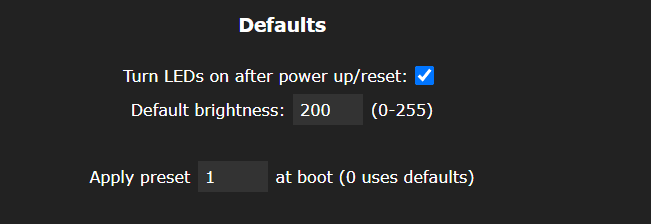
If it wasn't happening before, it's not likely the cause but there is a setting on what WLED devices should do after a power up/reset. If this checkbox under the Defaults section of the LED Settings is checked, you lights will turn on.
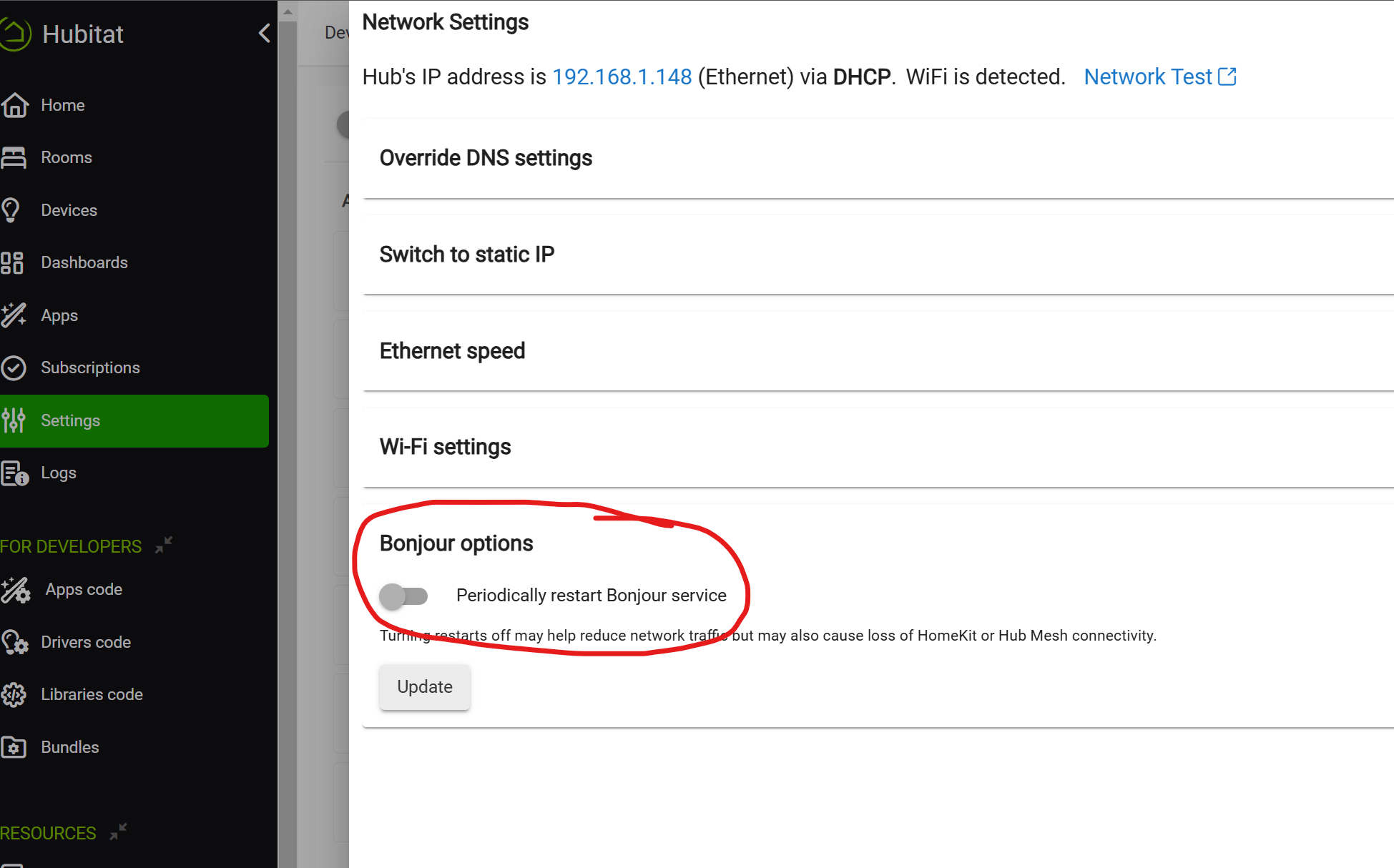
Try disabling the following setting, to see if it helps with your WLED lights. I seem to recall that the extra mDNS traffic caused by this setting causing issues for some users WLED lights...
This should mostly add all your Kasa devices in one go. One tip I have for that app is DO NOT give it your Kasa login credentials. It should be able to discover all your devices on the LAN and IMO will work better without the cloud connection.
For your Schlage lock, is it Wifi or Zigbee? Or do you know the model number?
Thats good because you should be able to pair it to Hubitat. Zigbee you can only pair to one hub though, so you will have to reset the lock and pair it to Hubitat. Then to get it back on Alexa you will have to share it using the Hubitat skill / Amazon App on HE. Might be good to wait on that one.
I would try the Kasa devices first, it should be pretty easy and you don't have to mess with any of the existing integrations to get them working on Hubitat.
The WLED devices you should also be able to do without removing from Alexa, but searching around they look a little more complicated, maybe someone else who has them can point you in the right direction.