I concur. In my experience, the Z-Wave Updater device driver I got from Inovelli updates the firmware faster, and more reliably than the Hubitat ZWave firmware updater. I have a dimmer for my guest room that still will not update. If I update using the driver, all my devices would update, they may be slow if they are further away, but they work. If I use the Hubitat app, like I did for this dimmer, the update stalls, and the dimmer fails. After waiting upwards of an hour for any indication it is moving along, I perform a reset (not a factory reset, just pull the power, and re-apply) then the dimmer comes back to life. This dimmer is 15feet away from the bridge, but it is two hops away. I had the same issue with my Gym dimmer, which is 1 hop away. The only way to get the Gym dimmer to take the update was to reset it, then use my Z-Stick to update it. It seems that once we try to update the device using the updater app, something breaks in the dimmer, and even the updater driver won't work. But if I use the driver initially, then the update works fine. I don't know if this is an Inovelli quirk, or a Hubitat quirk. But this is what I see. I am more than willing to downgrade and upgrade the device a few times if we need a test device for this.
I'll add one more detail to this. Typically a correctly functioning dimmer lists several items on its device page next to the controls near the top under "Current States." A few key properties would be lastEvent, lastActivity, and pushed. Here is a correctly functioning device:
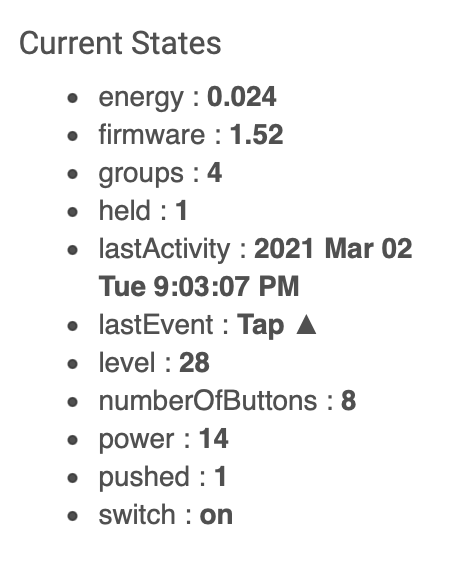
A device exhibiting this failure after firmware update lacks the lastEvent and pushed properties. The lastActivity timestamp never changes unless you specifically click refresh on the device page. Even then, lastEvent never appears within the list and nor does pushed. Turning to the events list (click Event in the tabs at the top of a device page) the event stream looks stuck after the (supposedly) successful firmware update. No amount of hub reboots, air gap resets, etc restores functionality. The only thing that fixes it is the procedure outlined in my previous post.
Well, it’s not that difficult. Create a virtual dimmer, swap that in for all your automations until there is nothing in the “in use by” section at the bottom of the device’s page. Then, excluding and resetting the device doesn’t destroy your automations. Then do your update, factory reset, whatever, then include and swap out all “in use by” items for the virtual dimmer, replacing with the updated dimmer.
I’ve done this several times, originally suggested by Ashok Aiyar (@aaiyar). Works fine.
Well, you don’t have to do that. Don’t delete the old device. Factory reset the dimmer, pair the new device then in the devices list, change the newly paired device’s network ID (prefix it with an AA) and save the device, then go to the old one, and change the network ID to the ID of the Device that was just pairs (without the AA prefix). Save the device. And go back and delete the new device. The old device entry now points to the newly paired dimmer and the new device entry is now safe to delete, and all rules will work without recreating them.
(Fixed a lot of iPhone based typos and autocorrect errors)
Can you post the command class list for the old dimmer as well as the command class list for a newly included working dimmer? @bcopeland is probably correct about a CC change in this firmware. We added additional button presses to the central scene command class, but I can't remember anything else that may have done it. I thought it was only if you add or remove a command class, but who knows.
For me, before upgrade (Red Series) was v1.48
0x5E,0x26,0x70,0x85,0x59,0x55,0x86,0x72,0x5A,0x73,0x32,0x98,0x9F,0x5B,0x6C,0x75,0x22,0x7A
After upgrade now v1.52
0x5E,0x26,0x70,0x85,0x59,0x55,0x86,0x72,0x5A,0x73,0x32,0x98,0x9F,0x5B,0x6C,0x75,0x22,0x7A
Looks the same to me. Can't recall if v1.48 was before or after the change for central scene additional button presses.
I’ll run the same update on mine.. They are probably horribly out of date by now
I just tried the update again, using the hubitat firmware updater app, and this problem dimmer is at 59% complete after 37 minutes. It's moving painfully slow, but it is proceeding with no logging beyond the initialization of the update. This dimmer is 2 hops away, and it never would update with this tool. Maybe things have stabilized, and it has more to do with z-wave congestion that anything for the failure. If it completes, I will see if it exhibits the same behavior that @r.p.ulivella reported.
Didn't work. I think the app is tied to the user's web page, and if the browser drops connection, the app fails, because it made it further than ever but died after the browser lost connection. Is that the case? Does the app break if the browser connection breaks? Retrying, and will be sure browser stays on app window.
In case it's useful in looking into the issues w/Scenes, mine failed again this AM.
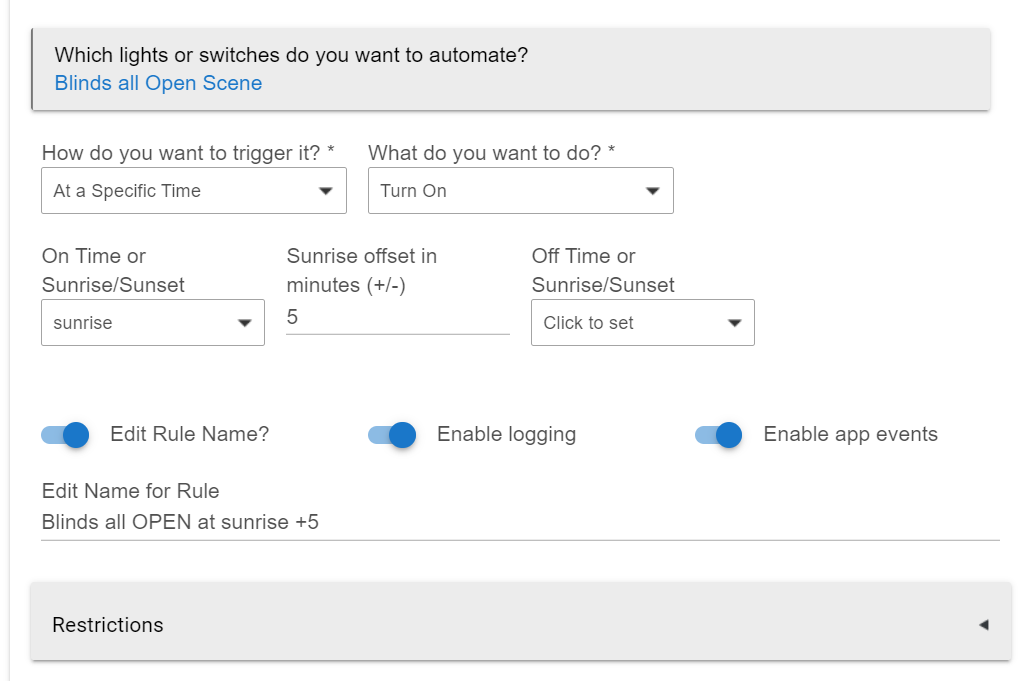
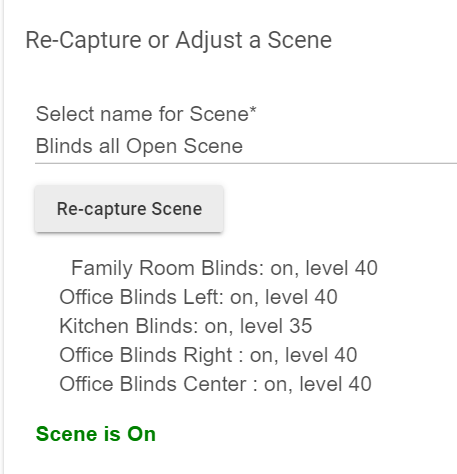
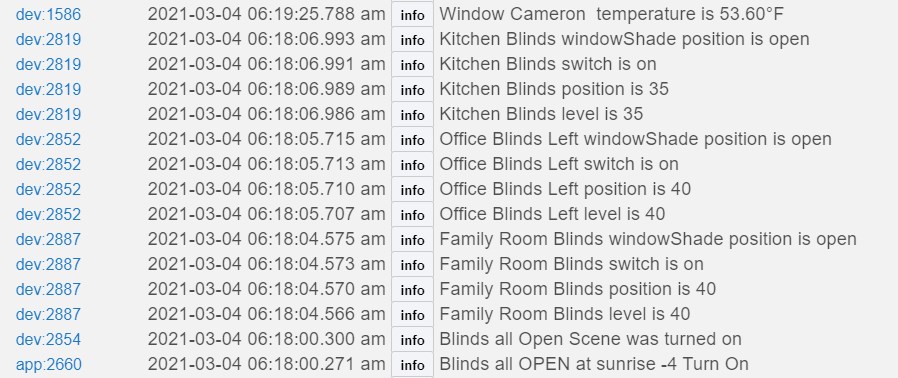
Two of five iBlinds (Office Blinds Center and Office Blinds Right) in the scene activated by SA were not sent the scene open settings when the scene was activated by SA.
SA:
Scene:
Office Blinds Right and Office Blinds Center did not get sent any scene info.
For 1.52 did you remove it from the network and then re-add it to get that CC listing?
I did. That after upgrade is one I had to factory reset, and then re-add... but now that you mention it, I used the network I’d swap. I can delete and re add it without the swap. That particular one isn’t in any rules... just a pain to fix my sharptools tiles and Alexa. So resetting it again to get the new command class, I see
- inClusters: 0x5E,0x6C,0x55,0x98,0x9F,0x22
- secureInClusters: 0x26,0x70,0x85,0x59,0x86,0x32,0x72,0x5A,0x5B,0x73,0x75,0x7A
Correction, after joining it w/o security, I have this: * inClusters: 0x5E,0x26,0x70,0x85,0x59,0x55,0x86,0x72,0x5A,0x73,0x98,0x32,0x9F,0x5B,0x6C,0x75,0x22,0x7A
So, the only difference is the 0x32 and 0x98 are swapped — hopefully the sequence isn’t a consideration.
I wonder if the scenes app call the on() or setLevel() etc... functions of the member devices, are does it try make the z-wave calls directly?
If calling the child devices’ functions, it should be simple to add a log to the child devices that the function was called before making the z-wave call... that should confirm the calls are being made to the devices.
Yeah, I don't know how the calls are made, obviously, above my pay grade, but I believe that HE staff are looking at this pretty closely based on previous comments from staff, and presumably they have even greater superpowers they can apply to this investigation than what we mere mortals have. 
Yes, the apps make conventional device command calls, except for Zigbee Group Messaging, which is completely different and special (Group only). The calls are being made, and the problems are in the radio stacks.
Thanks. It was because of the zigbee group logic that I was curious.
So for example in my case this AM, SA made the calls, but they got "lost" in the radio stacks so never got to the two blinds.
Is a fix for this expected in 2.2.6?
Although I have a correctly updating events list and now I see “live” feedback from those few devices that would respond with action but no log entries/events, the broken scenes issue remains. I still get either forgotten devices or devices being sent the incorrect value. Today I noticed something else. After a scene failed with a forgotten command I tried activating a different scene. Low and behold that device responded but with the wrong value — it responded with the value that should have been seen in the previous scene that was the forgotten one! This was an RGBgenie Micro Dimmer using the Hubitat built-in driver. I had the exact same failure pattern a few hours later with another ZWave device. This one was an Inovelli LZW31-SN running v1.48. So my scenes problems persist.
It is as mysterious as ever and extremely frustrating. I don’t know what else to try and I don’t even know what tools I can use to investigate further.
I cannot live with what is a broken automation system. Since migrating to C-7 there have been nothing but problems. I’ll say it again as I have throughout his thread — I had none of these ZWave device problems before. Could I have a bad C-7?
We need to dig into your hub to try to understand what's going on. See my pm to you...