Only if he's using a custom driver that doesn't follow the platform standard and every built-in driver. setLevel(x), for x > 0 should always turn on the device implicitly. To the best of my knowledge this applies to all Z-Wave devices, all Lutron devices, etc. Only a non-conforming custom driver would not turn on the device from setLevel().
okay. That's what I figured but thought I would throw that out there. I don't recall the specifics, but I recall there was another system where setLevel(>0) would not turn the light on until an on() event was submitted.
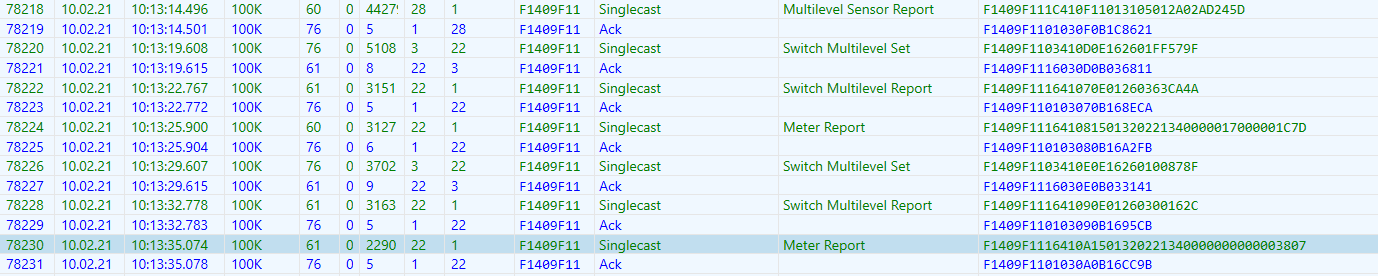
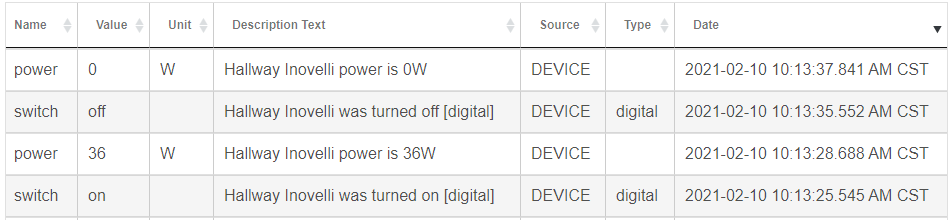
I see something absolutely bizarre with the last two devices that had trouble tonight. Both are Inovelli Red Series LZW31-SN ZWave dimmers and both were migrated from the C-3. RSSI looks solid and device page control is perfectly smooth (and faster than ever). However the only recent events for those devices are "lastActivity" and the date/timestamps show Feb 2 with "lastActivity" as the name and an event every second. There is nothing showing that it was sent a dimmer command when the sleep scenes were triggered tonight.

Clicking the ON button on the device page or sending the dimmer to a level works perfectly. But the event is not logged in the device events page nor does the device page update until I click refresh. This is not the case with other dimmers of the same type on the network. I also see other dimmers of a different type that show the same exact symptom and those too were migrated from the C-3 hub (on which they were working perfectly within scenes).
Which driver does this device use?
How does an event get posted in the events log? Is there something that a developer needs to do to record the event?
Yes..
sendEvent(Map properties)
I'm confused why events wouldn't be in the log then. Admittedly, I don't know z-wave, and I do not fully understand how parse() is supposed to be implemented.
From the Inovelli driver, looking at code for on(), the on command calls wave.basicV1.basicSet(0xFF) and then performs a wave.switchMultilevelV1.switchMultilevelGet() .
The z-wave message result of which is passed to the parse() function which creates the list of events and returns them.
Are you suggesting that rather than return the list of events, the driver should be explicitly calling sendEvent() for each of the created events in the parse method? If that is the case, I can try out the change, and if this works, suggest a fix.
Those of us that use Inovelli devices tend to want all the advanced features of the driver that the stock driver does not fully support.
Custom drivers from Inovelli (unmodified and directly imported from the GitHub URL) in the case of the LZW31-SN dimmers in my home. The rest are built-in Hubitat drivers (RGBGenie Micro Dimmer, some Generic Z-Wave Smart Dimmers, and the Yeelights integration).
I completely agree with this though I have switched drivers on a few of my devices to get to the bottom of what actually is happening.
Tonight — surprise surprise — the few scenes that were called worked correctly on the first try. I have increased the log levels on a few problem devices to investigate but I see no errors and nothing strange as of yet.
@gopher.ny @bravenel more testing today…
I had a small scene fail this morning. Two devices were “forgotten.” Both use the same built-in RGBGenie Micro ZWave dimmer driver. Similarly to past experience there is no mention of an attempt to dim the device by the scene or otherwise in the Event Stream or Logs. On the third re-run attempt of the scene the devices finally took action. Between scene re-runs I directly (using the device pages) turned these dimmers on and off, set levels, etc with zero issue and lightning fast response.
Now what is additionally unique is that these two dimmers are the closest (physically) to the Hub with an easy 3’ clear line-of-sight signal path. According to the ZWave details page the route for these two devices is Hub to Dimmer without any other hops (and they are two of many such short routes I see on that ZWave details page).
Scene-1.2 does not log anything, so this is not surprising. All we know for certain is the device events. Next release will contain logging for Scene-1.2, so this can be better understood. How many devices are in this Scene?
Totally understood — I am looking in the events stream (the list shown in the “Events” tab on each device page). There is no record of activity there either when scenes forget a device. When operating normally would a scene’s actions be recorded here?
Excellent!
This scene includes 6 devices. I had another scene fail later today (only one forgotten device) with only 3 devices and that scene is a composite — one WiFi device and two ZWave (the forgotten device uses the built in Generic Smart ZWave Dimmer driver).
What we do know is that Scene is sending commands to those devices -- in quick succession.
Unexpectedly joining the party here...
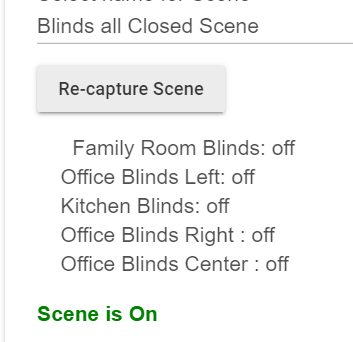
Had a scene I've been using w/out issue for weeks go south on me tonight. Scene sets five blinds to closed position. Three were set properly, though there were significant delays (>1m) from the first blind reacting until the last of the three that closed completing.
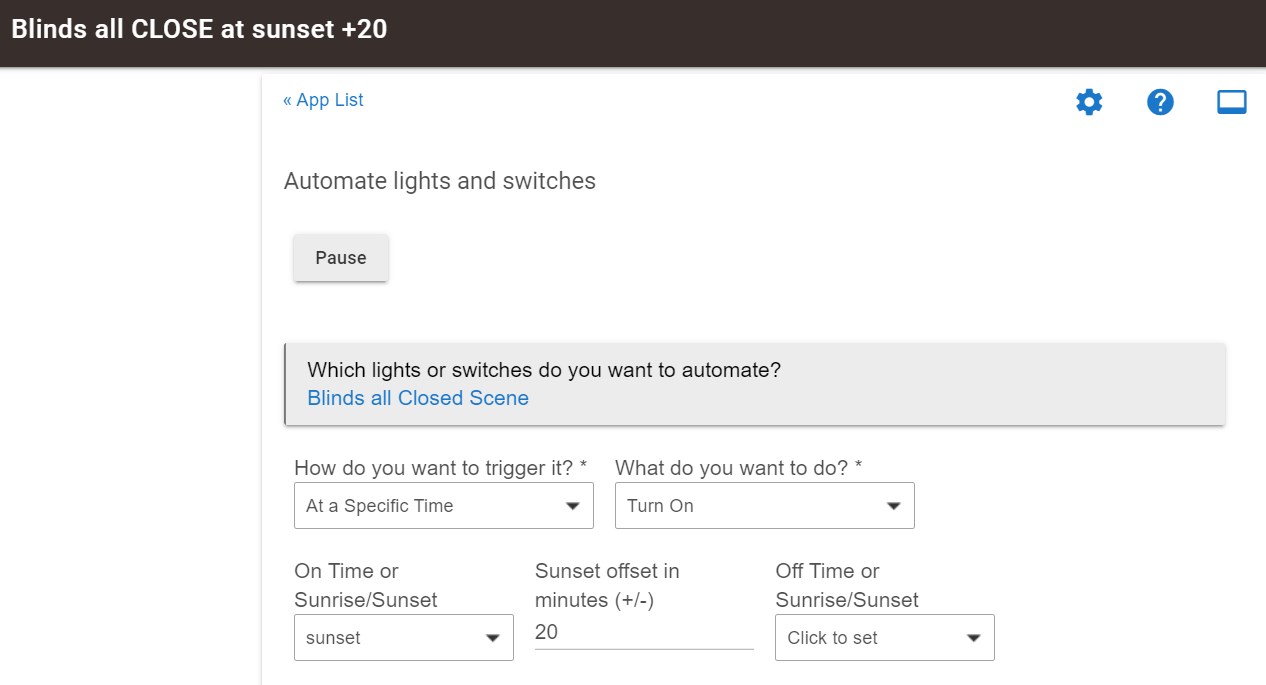
From the logs it's appears that the other two of the blinds that didn't close didn't see any command from SA activating the close scene.
SA:

Blinds scene:

Blinds
Kitchen blinds got the message right away:

Family Room blinds almost a minute later:

Office Left blinds a few seconds later:

Office Center and Right show nothing going on at that time (5:56 - 5:58). I manually closed them using tiles at 5:59:
Center:

Right:

Hopefully the new scene logging coming will help sort this out.
What kind of device are these shades?
iBlinds. @bcopeland has one or two.
So, this is most likely a Z-Wave issue of some sort. The app sends these commands in quick succession. We don't know exactly what is going on, although radio overrun is a likely culprit.
Thanks. The scene has worked without issue for weeks now, so definitely an exception for me. They typically close one after the other, in an orderly manner. FWIW, no changes to devices or automations.
@ericm I have found a connection between the built-in ZWave Firmware Updater App and my issues. I now have been able to confirm with three devices (two are LZW31-SN) that performing an OTA update using that built-in app stopped the return of events (log entries, responses, routine power/energy, and even button presses!) from reaching Hubitat. I'm not sure where along the way the messages are lost but nonetheless that's what I see.
Now to fix this I have to factory default the device, reboot the Hub, include it, then manually recreate all its various rule, scene, etc. entries throughout my system. After doing all of this everything seems to work (for that device) the way it did back on my C-3 hub and before 2.2.5. The last step is to force remove the now disconnected old device and then remove the ghost from the ZWave network using the PC Commander tool.
Pfew that's a lot. This works for me for the purposes of getting a few key devices back to normal with regards to responding to scenes and in triggering rules on button presses. But long term and throughout my network this is an unacceptable fix.
@bravenel & co any idea as to what is going on here and what can be done for a better fix? I have high suspicions of the reliability of the built-in ZWave Firmware Updater App and certainly will not use it again until there's an update that reliably fixes this. But what can be done instead of the full factory default, include, rebuild rules/scenes/groups/etc from scratch, force remove, remove ghost, repeat process I outlined? Surely there's a way to automatically fix this behind the scenes and get ZWave devices to send messages back to the Hub? It's almost as though when the firmware updater completes its work it "left something undone" or "left a tool in the machine" that blocks messages from being sent or is directing them to the wrong address. Is anything like that possible???
If the update changed command classes the device would have to be re-included as the Node Information Frame (NIF) would be different.. This has been common on many zooz models, but this is the first I have heard of an inovelli device requiring this..
But I can assure you with all the built-in safety-guards in the protocol, that the update software by itself can’t cause what you are describing..