Zooz ZEN76 on/off constantly switching

I have multiple ZEN76 switches controlling fans. Hubitat does not reliably know whether they are on or off. When it is wrong, on/off commands will be reversed. When sending an on command, the switch will turn off, Hubitat will indicate on, then often reset the indication to off. The switch will then work properly for a short time but the process restarts. Anytime I want z-wave control over the device it is broken. All my devices work this way, today I bought a new switch and installed it in place of a failing one. Behavior is the same.

It seems very much like a Hubitat problem, but I cannot verify anything in logs and have no device to tell me independently what is happening on z-wave itself. It is hard to believe something so fundamental does not work, but in internet searches this kind of behavior has been reported for these switches for years. No advice in older threads has done anything to change behavior.

Is the Zen76 firmware updated? I had an issue where all of my switches (zen 22/26/72/76) would do a quick on/off at random times. Zooz asked me to update and it worked. The downside is that I have dozens of Zooz devices and it took forever to update them all.

I purchased a new device and installed it today. It may not have current firmware but chances are about as high as it can be. Hubitat tells me the FW version but I cannot tell if that is current, it is 3.5.

The last bullet item in 3.6 might fix your concern.
https://www.support.getzooz.com/kb/article/1158-zooz-ota-firmware-files/

Firmware: 3.60 (released 08/2025 as OTA)

  • Added new parameters: 19 – Scene Control Multi-Tap, 20 – LED Indicator Multi-Color. You can view all available settings here.
  • Improved the delay from the mechanical switch in 3/4-way installations.
  • Optimized Z-Wave reporting behavior: when Basic Set and Binary Set commands are sent from the Z-Wave controller (Lifeline), the device will no longer send redundant report or notification commands back to the controller.

I confirmed I am on 3.5 and there is a 3.6. I did believe I was seeing redundant commands although I do not know enough about the logs to be certain. Anyway, I updated to 3.6 and the behavior instantly changed. It appears the problem may be fixed.

2 Likes

Sadly, problem is not fixed with 3.6 although the initial behavior works. After a minute a message is received from the device that breaks the state.

I don't know if this is causing your issue or not, but the Z76 is not supposed to be used with fans.

See Product Highlights on right side of this page.

2 Likes

Thanks, I believe that is the correct answer. I have an identical fan but I've used a ZEN71 there and it works fine. Only when I use a ZEN76 on this fan does there appear to be a problem.

1 Like

..."The ZEN76 is optimized for 3-way wiring flexibility rather than heavy-duty switching. To achieve this, it uses a smaller 8A relay and specialized current-sensing components that are more sensitive to motor-induced electrical noise. "...

It is very much NOT a Hubitat problem. When you send a ON command it is explicitly telling the device to turn on, it is not a toggle. So if the device is already on it should do nothing at all and just respond back that it is on. The states shown in Hubitat for z-wave devices (with a properly coded driver) is only derived from specific messages from the device about the device state. There is no guessing or assumptions made.

I agree that using the device improperly on a fan is probably causing the device itself to malfunction.

Right, and that's why it "seems very much like a Hubitat problem", because it behaves exactly like a toggle. Not at all what you'd expect, that's why it seemed important to mention.

I would not assume that given the behavior presented. Hopefully you can see how you're making my argument.

Nor do there need to be for a bug to exist. Not sure what the point of being so defensive about a description of how a problem manifests.

Nevertheless, it is clear that the switch is being used outside its recommended application and that the recommended switch fixes the problem. The behavior it has is peculiar and unexplained, for example how everything can be reported and work correctly, then spontaneously break after a minute of inactivity, with the load off AND a log entry showing the failure. Why it fails in the manner it does is interesting but the solution is clear.

Your logic escapes me! The it is the switch that you are improperly using, not Hubitat.

A user does not see one part, he sees the system. The user interacts with Hubitat, Hubitat presents a "toggle-type" user interface, that "toggle" appears to get out of phase. The user sees this as a system failure for Hubitat, not merely an "it" that you wish to be something else.

A core cause here appears to be and "improperly" used switch, but that is not confirmed. That doesn't mean there are not other problems.

dev:219 2026-03-21 07:04:16.307 AM info master fan was turned on
dev:219 2026-03-21 07:03:14.156 AM info master fan was turned off
dev:219 2026-03-21 07:03:13.431 AM info master fan was turned on
dev:219 2026-03-21 07:03:12.930 AM info master fan was turned on
dev:219 2026-03-21 07:03:12.418 AM info master fan was turned off
dev:219 2026-03-21 07:03:11.917 AM info master fan was turned off
dev:219 2026-03-21 07:03:00.586 AM info master fan was turned on

Here is a snapshot of a log that includes a failure episode. Sorry, the forum allows me to embed an image and then rejects the post. I have this as an image if I could do anything with it.
At the bottom is an event that starts the episode and represents a clear failure of the system. The fan is OFF but Hubitat thinks it is ON. Why that happened is not clear in the log.

The user then submits a "toggle" of the device through a dashboard. Hubitat thinks the device has turned OFF but it was already OFF and turned ON instead. The second clear failure of the system, appearing as a toggling failure.

Then precisely the opposite occurs, another "toggle" through the dashboard results in Hubitat again getting it wrong. Hubitat says it is turned ON but it turns OFF instead. Third failure of the system, again a toggling phase error.

Then, 700ms later Hubitat corrects the bad device state and the episode ends. Why? Don't know, probably a message from the device.

60 seconds later, while the device is off and the fan is entirely motionless, the last event shows another failure episode starting. This brief log documents 4 clear failures of the system. Who's to blame? Don't know, but it all APPEARS to be Hubitat toggling out of phase. It is reasonable to think that the problem here is firmware inside the switch, but I cannot see enough to know that.

What I do know is that the system is fragile and that is at least partly Hubitat's fault. What we see here is poor design and a lack of concern for root cause and system improvement, along with some hubris and contempt, honestly.

Some people here have helped and I appreciate it. Zooz has dismissed my problem as "user error". I am confident that MY problem will be solved with device swap, but the design weaknesses here remain. There really isn't any explanation for how an idle, open switch with no dynamic load causes the first and last events to occur. I think that should interest Zooz and Hubitat, it apparently does not. We know a device is used out of spec, but NOT when the failure actually occurs. An unpowered device presents no load.

I will also note that I am a 20+ year veteran embedded systems programmer who has written literally every aspect of the kinds of software that exist here. Programmers know that the most important things are good descriptions and having problems that are reproducible. This problem is trivially reproducible, Zooz has already told me they aren't interested.

What you’re missing here is that Hubitat is an innocent participant which is sending to the switch what you’re telling it to send and responding to the events that the switch is sending it.

Because you are asking the switch to operate outside of its design parameters, what it does with the commands it receives and how it reacts and responds is undefined.

You need to stop blaming everyone else and use the correct switch for the job.

Both Zooz and Hubitat should not be expected to support this out-of-spec usage.

I’m sure that the ZEN76 works well for its intended purpose and that the appropriate fan (or higher capacity) switch will do the job for you.

I am neither missing it nor does it have to do with the point I'm making. The product here is home automation, Hubitat is not an "innocent participant" in home automation.

That is false. Worse, it shows you aren't thinking about the problem at all. At the time of the failure, the switch is not operating outside anything, it is OFF without a load.

Funny considering that I IMMEDIATELY recognized this very problem, yet here you are blaming me.

Again, this simply represents your willful misunderstanding of the issue.

I'm sure it will also, no thanks to you.

At this point, I think you should pin this post so everyone can see just how hostile you are to perceived slights. This is a real problem with the product, yet you and one other poster are more interested in smearing me than learning anything. Wish I'd seen this before making a commitment.

I’m sorry you’re feeling that way. I am in no way “smearing” you and I didn’t intend to be (and don’t think I have been) hostile.

I hope that you solve your problem. Enjoy your weekend.

In case you missed it from Zooz:

Yes, I did miss that. It was there but buried on the page where I bought it. Sad thing is I don't even use the S2 feature, the 71 is totally fine with me.

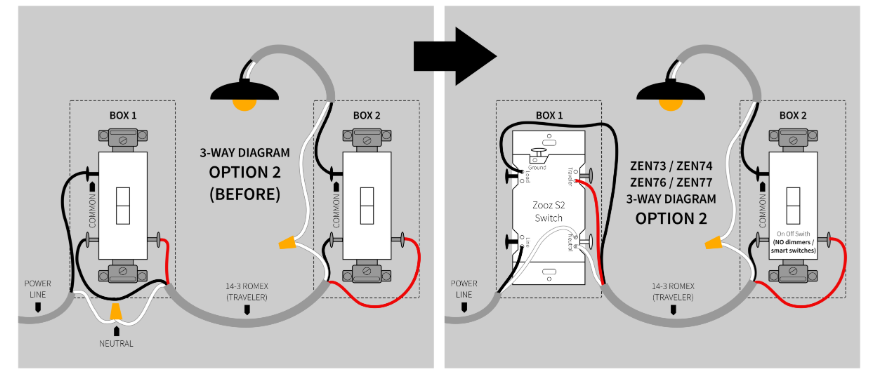
Well I didn't read all the minutia above but I did have an issue with ZEN76/Zen71.

Their wiring for three way is different. It's because Zen76 has some sort of patented current sense scheme whereas Zen71 doesn't. The problem is if you wire a zen76 as a zen71 it will do erratic things upon paddle switch of the non zwave 3 way switch changing.

Not sure whether this is a factor here but I'd double check if its a possibility.

ZEN71:

ZEN76:

I swapped the switch out already so I can't check, but I think it's interesting. The thing is that the ZEN76 failed for me BEFORE it ever switched the load on. Worse, the firmware update altered this behavior. It seems that the switch is doing something with the load regardless of switch setting, I think it's a really good hint.