I've had a Zooz ZAC36 installed for a couple of years now. Recently, its started showing a state of Wet and (via Habitat HomeKit Integration) HomeKit is telling me I have a leak. I just switched to the direct HomeKit Integration this week (was using HOOBs and MakerAPI before but my HOOBS box died.)
I have never used (or even attached) the leak sensor on the valve (I have plenty of those throughout the house.) The Habitat C-8pro is up to date. I have flashed the Zooz to the latest firmware (1,24) and excluded/included it. I also switched to the Titan Valve driver.
Until now, I've never modified any of the units settings. In addition to showing Wet, it is also telling me I have 0% battery (which is true as I have the ac supply battery backed up.)
Despite saying things are Wet, the valve hasn't closed.
I am guessing I have a setting wrong, but I've tweaked everything that looks obvious to me.
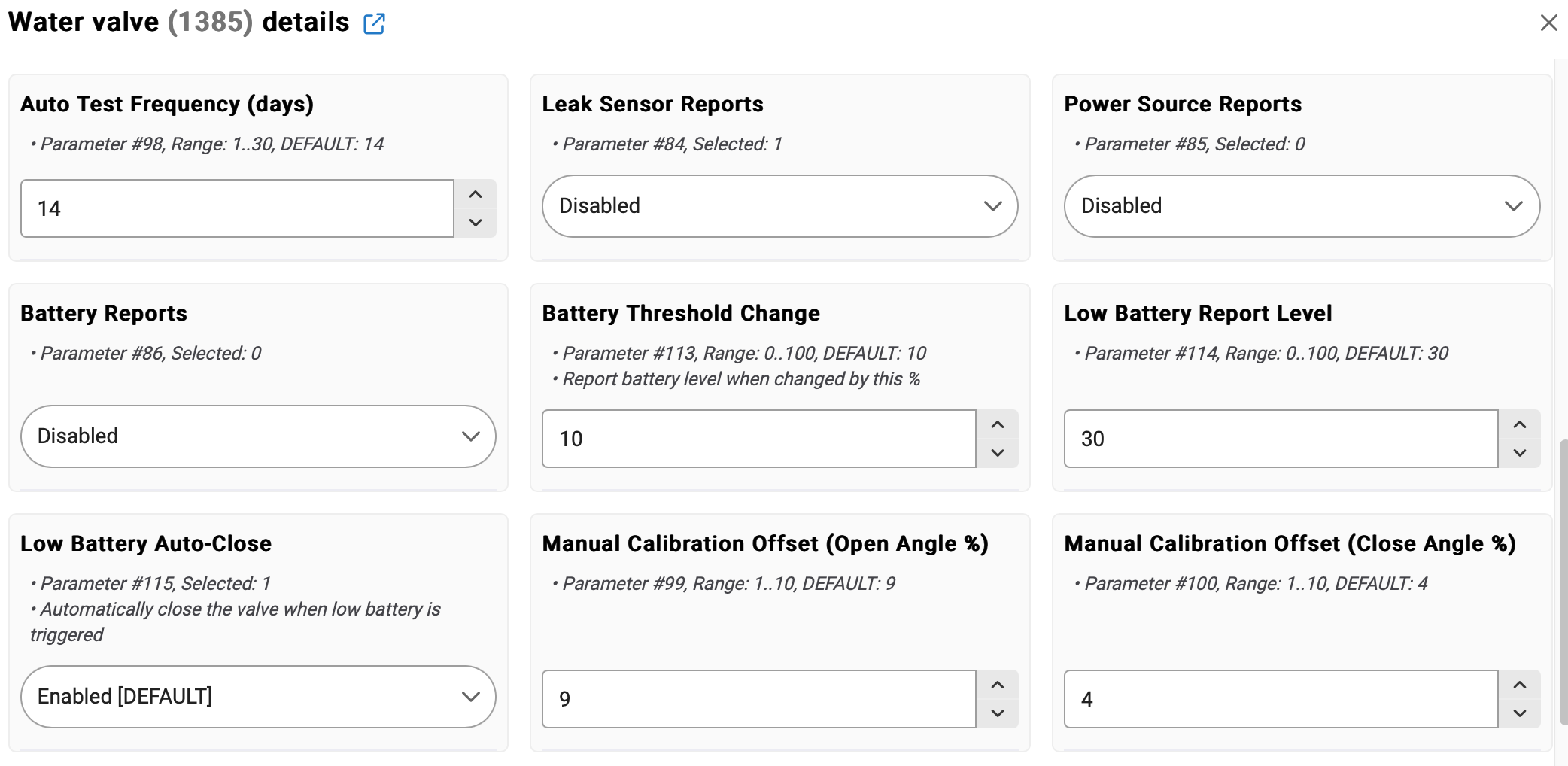
Here are some of the pertinent screens for the config of the device:
If so, that's a known bug that's still unresolved...
I have 2 Titans... One is paired mesh (and has no battery backup) and the other is LR (and does have a battery backup).
On JS, the mesh one shows a High Temp and Wet alert any time it's Refreshed (and whenever it does its normal check-in)
Oddly enough, the LR+battery one is fine on JS -- I dunno if the LR or the battery (or both?) make that one impervious to this JS bug.
Both use Jeff's custom driver, but I've tried stock driver too on both Titans -- same behavior.
On (legacy) ZIP, both Titans are fine, so this issue (and a similar JS-only reporting issue with my Z17s) is why I'm on back ZIP these days.
Jeff has also confirmed this JS wet/high-temp bug on his Titan too.
ETA - both of my Titans are latest hardware model, and the mesh one is paired mesh-S2 (via SmartStart). Both Titans (and my 2 Z17s) were perfectly fine on JS for a quite a long while - then a JS update sometime early last fall introduced these reporting bugs.
Outside of an occasional foray back to JS to see if these bugs are still present, I've been back on ZIP since then.
I guess I am on Z-Wave JS. Would I move to ZIP by selecting Legacy Z-Wave?
I'm running a mix of Z-Wave (not secured) and Zigbee devices. The only driver I've changed is the Zooz driver and I just changed that a few days ago trying to solve the WET issue.
Indeed - from the Settings -> Z-Wave Details page, just select the "Switch to legacy" button at the top. I think the hub will then reboot (It's been a while since I've switched), and all your z-wave things should come back online just fine.
The one blessing in all of this is that switching between Legacy and JS has never caused any major z-wave issues for me -- those switches have always been straight-forward (knock on wood).
Tagging @bcopeland for awareness... Bryan - here's another case of that Zooz Titan false wet/high-temp issue on JS that Jeff and I have previously reported - thanks!
I hope you have more luck with @bcopeland that I did with my ZSE41s' false state reports on wakeup with the system driver, fixable in my case, after many months, by using @jtp10181 's driver.
Interesting. I'm on ZWJS, Jeff's driver, and my ZAC36 (legacy mode: my hw version is pre-LR support) on fw v1.24 . Something else to do that agitates it?
Maybe it's just something with the v2 (LR-capable) Titan hardware models. I'm on f/w 2.10 for mine.
My Titans were fine on JS for quite a while (I started using it as soon as it was released), and then something changed with Hubitat's JS implementation sometime around late last summer / early fall... That's when this Titan reporting issue started for me, as well as an odd-ball reporting issue with my 2 Zen17s.
I've been back on ZIP since then (where everything's working fine).
I have three of these valves and none of them are showing wet. Here are their details:
C-8 Pro running ZIP (didn't have this issue on ZWJS either)
Valve 1: ZAC36 v2 paired as mesh firmware version 2.00
Valve 2: ZAC36 v2 paired as LR firmware version 2.00
Valve 3: ZAC36 v1 paired as mesh firmware version 1.13
Thanks to this thread, I am updating the last one to 1.24 but am leaving the others at 2.00
Frimware 2.10 (I had updated it as a troubleshooting step from 2.00 exhibiting the same issue)
Additional Info: I had noticed that the states were weird and that's what got me messing with it. I went to the device, and ran a configure and refresh cycle, and all of the sudden I got a high temp alarm. I also noticed that at some point all of my values seemed to still be set to Celsius conversions as opposed to Fahrenheit. (Freezing was 0 instead of 32, even though the driver was set to F).
Unfortunately i didn't pay much mind to the states before i ran that cycle so I'm unsure of what all i kicked off when i did that. Needless to say, now it's stuck in a state of "wet" for the probe status and "high" for the temperature and it doesn't seem to ever clear, even after the firmware update.
I didn't mention earlier, but I got mine before the battery option was available. I don't have a battery installed. No battery options show on the system driver, which was a change. Doubt it makes a difference though.
I don't have my leak probe plugged in, but I have leak sensing enabled in Preferences.
I see no setting on the system driver to set a high temperature alert threshold, which likely isn't possible to be used by Hubitat anyway.
So, my setup, experiencing no problem (that was the kiss of death):
C8Pro
ZWJS
Retracted Z-Wave radio update
Valve hardware version 3
Valve firmware 1.24
No battery backup installed (from the git go)