So everything was working great, then a update about 2 updates ago came out and my zigbee became unreliable. It starts just perfectly after a reboot then after a few hours, occasionally a day it jut doesn't respond until I reboot then it's good for a bit. The only thing I have added (some before this problem some after) are Tuya Soil sensors an a couple of MHCozy 2 point relays. but it's frustrating when I have to reboot. Any have an Idea how I should address this issue?
Using the Diagnostic Tool (port 8081), roll back to the platform version where you had no issues.
If you no longer have issues, that would narrow it down to something in the platform update that is impacting your zigbee network.
If your zigbee mesh is still unstable, remove the devices you've added recently - the MHCOZY relays and the Tuya soil sensors.
2 Likes
If you can identify/resolve the issue using @aaiyar great advice, how about the following?
What type of home WiFi system are you using?
What 2.4GHz Channel is your WiFi system using?
What is the 2.4 GHz channel width?
The recommendation is to use 2.4GHz WiFi Channels 1, 6, and/or 11 with a 20MHz Channel Width. If your WiFi system is automatically changing its 2/4GHz WiFi channel, that could explain the sudden onset of interference issues.
What Zigbee channel is your Hubitat hub using? The recommendation is to use Zigbee channels 15, 20, or 25. Do not use channel 26 as it is restricted to lower power.
The goal is to reduce the chance of RF conflicts between 2.4GHz WiFi and 2.4GHz Zigbee networks. The following charts explains why the above recommendations make sense, to prevent overlap between these two networks that share the 2.4GHz frequency range.
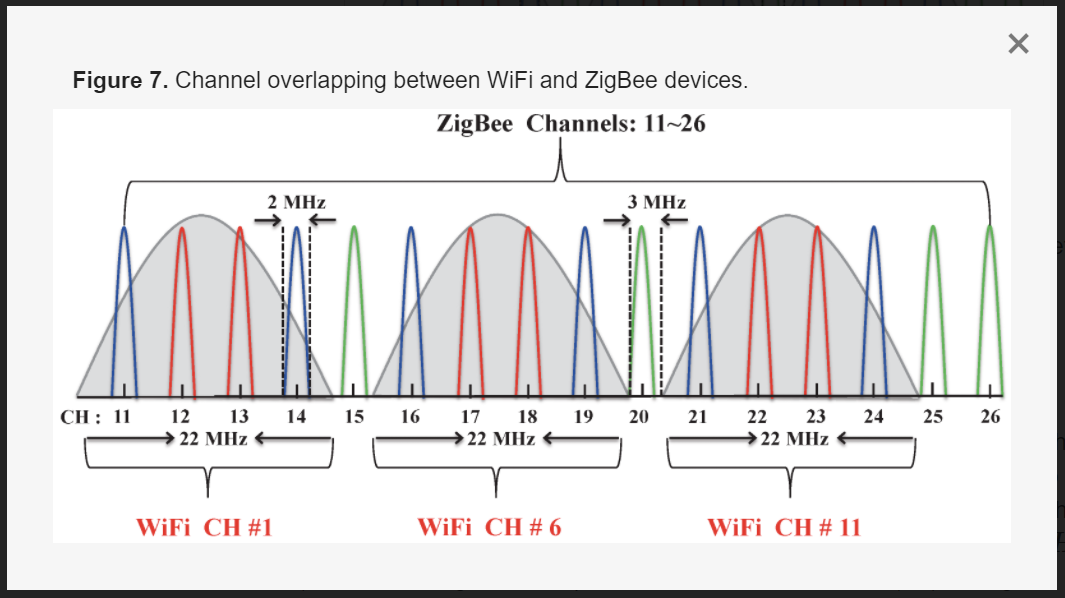
Also, how many Zigbee "End Devices" (typically battery powered devices) do you have connected to the Hub? How many Zigbee "Repeater Devices" (typically mains powered devices.) The hub needs multiple repeater devices spread throughout your house to properly handle a bunch of non-repeating devices.
4 Likes
 Thanks for quick responses! I rolled back to 2.3.7.145 and things that were not connecting after last reboot suddenly are now. I by no means think it's fixed but a nice thing. I will give it a couple of days because it can vary like this mornings reboot only lasted for a couple hours but yesterdays lasted most of the day. I am on channel 20 on my zigbee, I am pretty sure my WiFi are on fixed channels but I will verify. But I try to only change on thing at a time because I am always happy when I fix something but give a deep sigh when I changed 72 things so I have no idea what the fix was I have about 25-30 zigbee devices about 1/3 of them would be mains powered but not sure if they are repeaters or not.
2 Likes
Mains powered usually means they're also a repeater. Maybe some exceptions with contact sensors or motion sensors.
The most well known exception to this are Sengled Zigbee bulbs. Sengled bulbs are NOT repeaters by design.
2 Likes
I seam to be having some small issues which maybe is just growing but here a a question? 1st aaiyay know of any issues with the Tuya water valve shutoff's mine worked fine but now are the first to show connection issues.2nd What is "enable debug logging" I unchecked the ones I had checked when all of this started happening, because technical I don't know what is used for. I also had to unplug my c-7 and after it booted back up I got some sort of warning that my system was overloaded and but after a regular reboot it went away and has not come back
This topic was automatically closed 365 days after the last reply. New replies are no longer allowed.

