I saw that this was included in the update. I decided to give it a try and I am glad I did. I had a couple of devices showing up in the graph as "unknown." I was able to figure out which ones they were by process of elimination and get them showing up by name in the graph again. If this had not existed, I would not have known that these two devices, one a Bosch motion detector and the other an Iris smart button, were not working properly.
Thanks to the developers for incorporating this very useful tool.
Update: The "Discovered Devices" line, together with the Zigbee Devices viewed as a chart (actually, copied to document, formatted and printed as a table for easier reading) helped me to figure out that two more devices were not responding. They were two Iris V2 buttons and although the battery readings were rather high (90% in the case of the one I looked at most recently), both batteries were in need of replacement. After doing so, both buttons then showed up on the graph and all my devices are now accounted for.
Again, a big THANK YOU to the developers for incorporating this useful tool. The only odd thing I noticed is that it is showing one of my ERIA 4 button dimmer switches as a repeater (blue) with an orange (neighbor) connection to the hub. That is odd as it is a battery operated device which normally would mean that it is not a repeater.
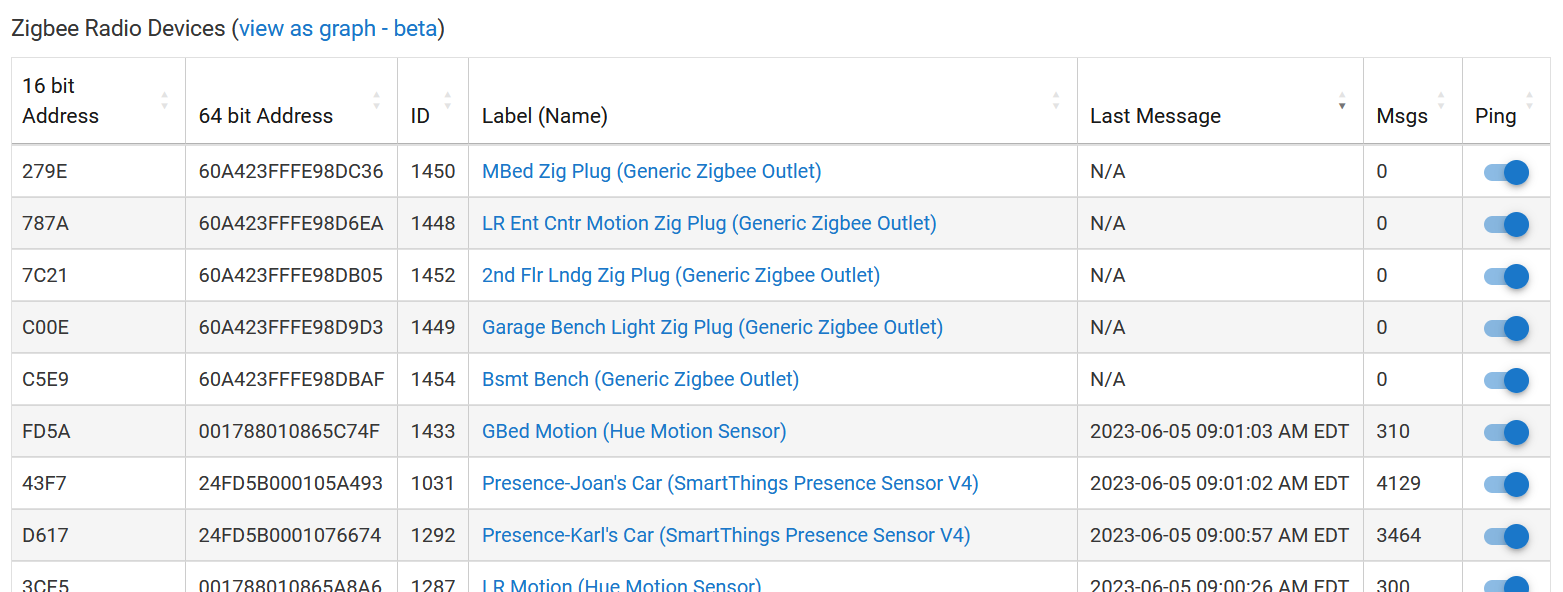
I've found the last messages column helpful too. It's sortable. The N/A might also show a non-responsive device. My N/A's in the table below are zigbee plugs I unplugged as part of an experiment. I've also had a battery device appear once as N/A when it stopped reporting for a while. Also you can look at the date/time in a sort to see which haven't reported lately, and could check them out. I'm not sure what the ping every 3 hour option does. Maybe it assigns N/A if it doesn't hear back?
I wouldn't be happy about a battery device active as a repeater but what you'll notice in time is that zigbee is using the same sort of system as arpanet / TCP/IP. The idea being that if a node disappears (being nuked/a flat battery) then the protocol will route around it and you in most cases won't notice a thing.
I have a spammy mmwave motion/lux sensor that likes being a repeater but it's powered so I'd be more worried about that, because its using a lot of processing power doing lux sensing and on top of that it's routing as well.
If your battery unit drains its battery it'll die and be routed around, the sensor will not drop off the network unless the activity crashes it, and before that happens, if 7 devices are routed through it, it'll kill network speed and cause other issues, which is why this app/feature so useful..
Best I can suggest is watch what's happening and make a little list of the common routing devices, that way you can pay them special attention (and not yank them to use that power point to install new devices - one of my heater tuya em sockets is my nets favourite router...).
I'm using it. On an old firmware that I know is stable because I have to have the hub stable at the moment. I've other issues to worry about. I just hope the app version gets the updates the firmware version does, but we'll see. It's fine as it is, tbh.