If you go down the two Hubitat Hub Zigbee Networks route, a few things to consider.
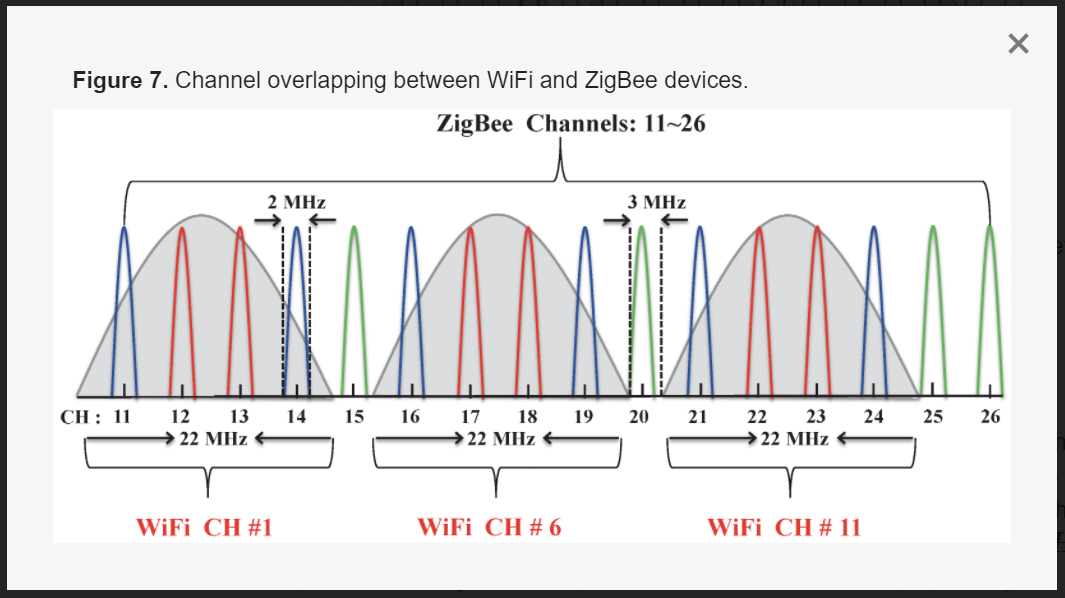
- Make sure each hub's Zigbee radio is using a different channel. I recommend only using Zigbee channels 15, 20, and 25, as those are least susceptible to 2.4GHz WiFi interference. My personal choice is channel 20, as it has worked the best with all of my Zigbee devices. Note: Zigbee Channel 26 does not operate at full power, due to FCC restrictions. This is why I do not recommend it. Also, some older Zigbee devices will not successfully join a network that uses higher number channels.
- Make sure ALL of your WiFi Routers, Wireless Access Points, Range Extenders, etc... are only using 2.4GHz channels 1, 6, and/or 11. Also make sure that the 2.4GHz radios are only allowed to use 20MHz channel width. This will ensure your WiFi 2.4GHz does not interfere with your Zigbee networks.
- You mentioned that you have Sengled Zigbee bulbs. Please be sure to leave enough device that support Zigbee Repeater functionality paired to the same hub at the Sengled bulbs. The Sengled bulbs are not Zigbee repeaters, and thus will need to rely on other devices to create a solid Zigbee mesh network. Strategically divide up the Zigbee repeating devices between the two networks so both have a strong mesh, each on their own Zigbee channel.
- If any of your Zigbee devices support power/energy monitoring, I suggest completely disabling that functionality for now. Too many devices constantly reporting minor changes in power usage can quickly create chaos on a mesh network. In order to get things to be stable, please disable this feature on any switches, dimmers, or outlets.
- If you have any Peanut Zigbee outlets in your mesh, I would recommend removing them for now, to see if things calm down. Peanut outlets have been know to cause Zigbee networks to constantly rebuild routes between devices, causing performance issues. Cree Zigbee bulbs, and older Sylvania Zigbee bulbs, are also known 'problem devices' that can wreak havoc on a Zigbee mesh network.