C8 pro
2.4.4.135, but had issues with 2.4.4.151 so reverted back
Mostly zigbee devices (~45), 1-2 Zwave
~20 outlets
~15 switches
3 dimmer switches
1 set of blinds
I’m having major issues and am trying to resist the temptation to detonate my whole system and start over.
I have suddenly lost a lot of control over my devices. The thing that boggles my mind is that on/off events aren’t even populating the “Events” tab for my devices. See below for an example. I had sent off and on commands but they weren’t recorded. Devices are reporting statuses that are incorrect.
My Hubitat is USB powered. It was very close to my modem and Phillips Hue hub so I moved it several feet away. After a reboot+power cycle I have gotten it working for short periods of time, but I’m very stuck and can’t find anyone else who has had this problem.
I’ve tried rebuilding database, resetting radios, extended power down time, rebuilding zigbee networks—nothing is working right now, and none of it explains why events aren’t being sent to the device despite showing “command sent.”
There are a few dimmers in my office near the Hubitat that do seem to be miraculously working while everything else is bricked.
Please help! I’m desperate!
I'm confused by your screenshot. Is this a Homekit Bridge issue or a Zigbee issue?
What happens if you use the device page to send the on and off commands? Have you turned on debug logs for the devices and looked at logs for what is happening?
You can also watch the live Zigbee logs in Zigbee settings. Send commands to the device and watch to see what shows up there.
Not a HomeKit issue; it is isolated to Hubitat. It’s only showing incoming HomeKit commands for some reason, but it doesn’t work within Hubitat itself. It won’t register on/off events from within Hubitat in that state log table.
I found one device that had a high message count (3000ish in 18 hours) so I’ve taken that offline. Still no luck.
I can’t add any new zigbee devices either, so I’m worried if I factory reset I won’t be able to connect them again.
If you can get things back up and running, at least for a little while, make sure you try disabling any power/energy monitoring features on your outlets, switches, etc.
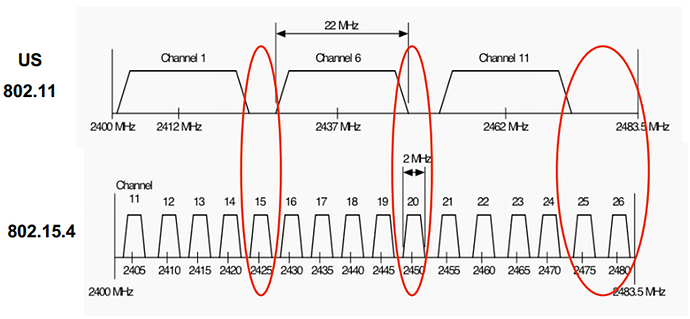
Also, make sure your 2.4GHz WiFi is using only channel 1, 6, or 11 with 20MHz channel width. Make sure you use Zigbee channel 15, 20, or 25.
4 Likes
@steph.whalen.mit
Agree with @ogiewon. Those settings will likely fix most of your issues. When you do make the change, shut down the hub for a minute and power back up. Most devices should reconnect within 24 hours. You may have a stragler or two. If that happens,simply put the device into pairing mode and re pair to hubitat (do not delete from hubitat) and it will go back to it's slot. I recommend 25 for the zigbee channel. From personal experience I've had several issues with 15 and 20. 25 has always been solid.. Do you have any other zigbee coordinators? (Like a Hue bridge?)
2 Likes
Thanks both! I will give this a shot tomorrow. I do have a hue bridge; any tips there?
Hue bridge on 20, hubitat on 25, wifi on 6 and below. If you have more than 1 wifi AP, start at 1 for the 1st ap, then 2 etc.... Keep zigbee power at 8 to start and if need be increase to 12. Don't go above that or it will just signal bleed.
1 Like
This is not advisable if using 2.4GHz WiFi. 2.4GHz WiFi should optimally use channel 1, 6, or 11 with 20MHz channel width. This way the AP channels don't overlap and cause interference with each other.
So start with 1 of those channels on the 1st AP, then use another for the 2nd, and the last for the 3rd, etc. If you have more than 3 access points, you can go back to one of the used channels, as long as the next AP is out of range of the other AP on that same channel.
In my case, I have 2 access points and an extender. The 1st is on the 1st floor and is on channel 11. the 2nd is on the 2nd floor and is on channel 1. The last is an extender, also on the 1st floor, on channel 6. I have zero issues with this AP setup. My Hubitat Zigbee channel is 15. The hub is centrally located on the 1st floor. My Hue bridge, located in my basement rack, is on channel 25. Again, zero issues with this setup. I only have about 20 Zigbee devices, but they all work with out issue, as do my Hue devices.
1 Like
I’ve been completely unable to get the Zigbee radio to do anything for days now; I’ve submitted a warranty request in case that radio is fried. I’m not sure what the odds are that this is some database issue that would follow me to a new elevation hub, or that it truly is a hardware issue that could be resolved by new hardware.


