Goal: place switches in a common group then send a zigbee "multicast" (group broadcast) to that group to change LED bar colors using Inovelli's private cluster "set zigbee attribute" method.
So, develop a driver then apply to a virtual device so the color bars can be controlled easily from rule manager at the switch group level. This greatly reduces traffic and would enable simultaneous LED bar updates across the entire group.
However, it looks like group orchestration methods in the hubitat zigbee object are limited only to common cluster functions like on/off etc. Is there a more generic library that I could import that might implement more generic group based orchestration?
That one is hardcoded for common capabilities in switch/dimmer zigbee clusters sadly. The capabilities it uses are also in the zigbee object. I wish there was a method there that would let me specify other zigbee clusters. Then I could use the Inovelli private cluster ID and leverage it's set zigbee attribute method. It looks like I'm going to be using he-raw probably with jvm33's sendAdvancedZigbeeCommands library available here: Hubitat-Zigbee/zigbeeTools.sendZigbeeAdvancedCommands.groovy at main · jvmahon/Hubitat-Zigbee · GitHub
Update on this. I've successfully enabled color bar control for all Inovelli zigbee devices via the zigbee broadcast dni and the write attribute capability of the inovelli cluster.
I'm using the raw "he wattr" method to accomplish this currently. Next up I need to get a zigbee sniffer up and running and have a look at adding a group id into either the above method or use some other method that would work. It has been proven that Inovelli zigbee switches respond to group messages with the write attribute method specified.
The driver code is going on github soon and I'll post the link here when its up.
Starting to zero in on the low level "he grp cmd" to accomplish this. Essential syntax is this:
"he grp cmd 0x${groupAddress} 0x01 0x${cluster} 0x${command} { ${hexData} }"
So assuming cluster = 0xFC31, command = 0x02 (write attributes), and hexData is the payload which would be for example: {0x005F (set LED on color) 0x20 (Uint8), 00 (Red color)}.
However the switches need the manufacturer code to process this and I'm not sure that "he grp cmd" exposes this. Maybe something you would know @kkossev ?
Thanks! Might be a good idea to tack away from this technique....
"he grp cmd" is returned by the zigbee object methods that begin with "group" btw and also referenced by Mike Maxwell here. I've successfully used it to send on/off commands to the on/off cluster in an existing group.
I sure wish the hubitat folks would release documentation around these low level commands....
edit: looks like your library is useful for working with the groups cluster itself and the final version of my driver will for sure need this. Right now, I'm actually only trying to send a message to an existing group using a group broadcast.
@mike.maxwell working with "he grp cmd" to send an inovelli private cluster command to a group but the switches will need manufacturer ID in order to process it. Syntax of the command as I understand it is this:
Does this command accept a manufacturer code? Maybe along the lines of
"he grp cmd 0x${groupAddress} 0x01 0x${cluster} 0x${command} { ${hexData} } {mfg code}"?
Thanks. Haven't found a combo that works yet. Probably byte reversal related. Working to get a zigbee sniffer up and running which should give me the answers.
Here's a copy of a simple driver that I built to control the Inovelli LED bars via zigbee broadcast. Hopefully it will spark more ideas/thoughts. It works and can change the LED color bar for every switch in your house simultaneously, but there is no error checking/input validation.
// (working Hubitat Driver Code)
import hubitat.device.HubMultiAction
import hubitat.device.Protocol

metadata {
    definition (name: "Inovelli LED bar colorizer", namespace: "sleuth255", author: "Sleuth255") {
        capability "Actuator"
        command "setColorCode", [[name:"set Color Code",type:"STRING", description:"2 digit Hex Color Code Value "],
                                [name:"Device Network Id",type:"STRING", description:"4 digit DNI or FFFF for all devices "]]
        command "runCommand", [[name:"Run custom command"]]
    }
}

preferences {
    // Define any preferences for your driver, such as for the custom attribute values
}

// ... other driver methods like installed(), updated(), etc.

void setColorCode(colorCode, deviceAddr) {

    def cmds = []
    cmds += "he wattr 0x${deviceAddr} 0x01 0xFC31 0x005F 0x20 {${colorCode}} {122F}, delay 200"  //set on color
    cmds += "he wattr 0x${deviceAddr} 0x01 0xFC31 0x0060 0x20 {${colorCode}} {122F}, delay 200"  //set off color
    log.debug "setAttribute $cmds"
    sendHubCommand(new HubMultiAction(cmds, Protocol.ZIGBEE))
    log.debug "command sent"
    sendEvent(name: "colorCode", value: "${colorCode}")    // new LED color
    sendEvent(name: "deviceAddr", value: "${deviceAddr}") // device that was changed
}
void runCommand() {
    // for testing custom commands.  enter your custom string below
    def cmds = []
    cmds += "he grp cmd 0x217 0x01 0xFC31 0x02 {5F00 20 00} {122F}, delay 200"
    sendHubCommand(new HubMultiAction(cmds, Protocol.ZIGBEE))
    log.debug "command sent: $cmds"
}
// ... other driver methods like parse(), etc.
void parse(String msg) {
    log.debug "Got reply"
}
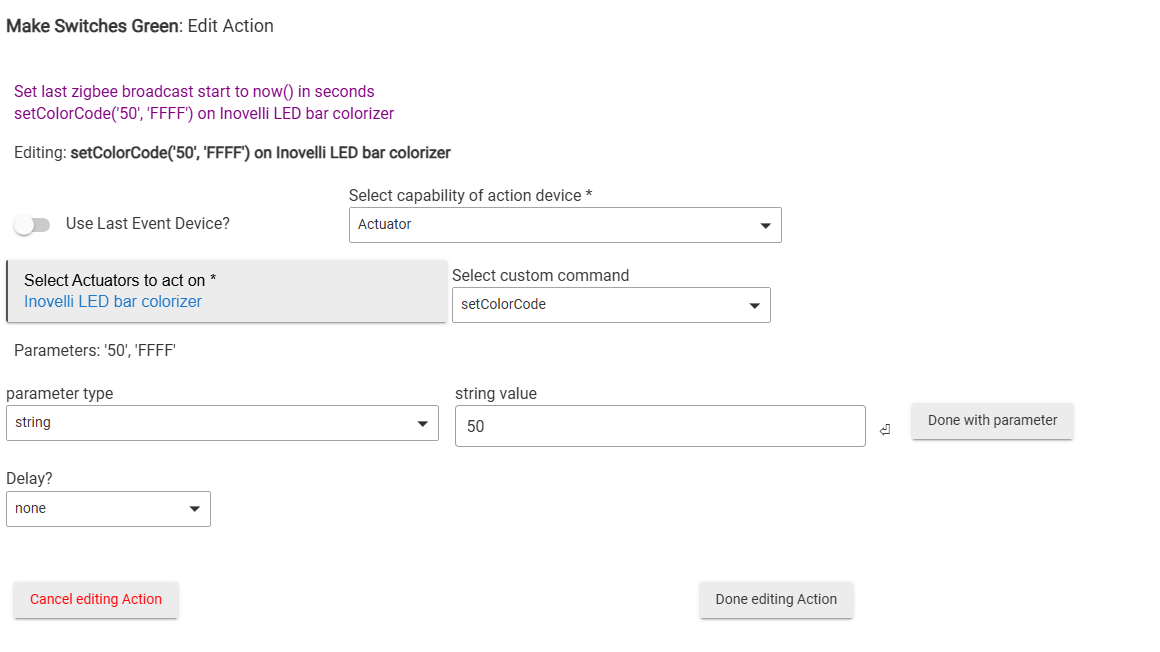
Here's an example of a rule machine rule that uses the virtual device created from this driver to turn the LED bar green for every switch in the house:
This is great! I have routines set to change the led colors from default to red when our alarm is enabled. I had to do it using LED Affect All because trying to bulk change the configuration color of the LEDs was problematic and inconsistent. For whatever reason switches didn't respond well to that command vs the effect command. That also meant a more complex routine for other led effects because I'd have to have logic that determined what the default effect was based on the alarm state.
This driver is working really well in broadcasting that configuration change so that it can work independently of the other led effects I have.
I could maybe see this being valuable to managing other configuration settings that need to be changed in bulk. Such as default level or led intensity?
Yup, it can change any attribute in the Inovelli cluster. This driver is hardcoded to change the color for both the on and off LED colorbar settings. Be warned though: broadcast messages can tie up a large zigbee mesh for ~5-10 seconds due to all devices re-transmitting the packet even if they are not directly affected by it. This is why I ultimately want this to work via group broadcast. In a group broadcast, devices not in the group ignore the message.
I built this driver for the same reason btw: turn all switches red when the alarm is enabled and armed, green when the alarm is enabled but not armed, and their default color when the alarm is disabled.
Ah, good to know that broadcasts tie up the network like that. The process it is replacing took about as long because of the number of switches I have.
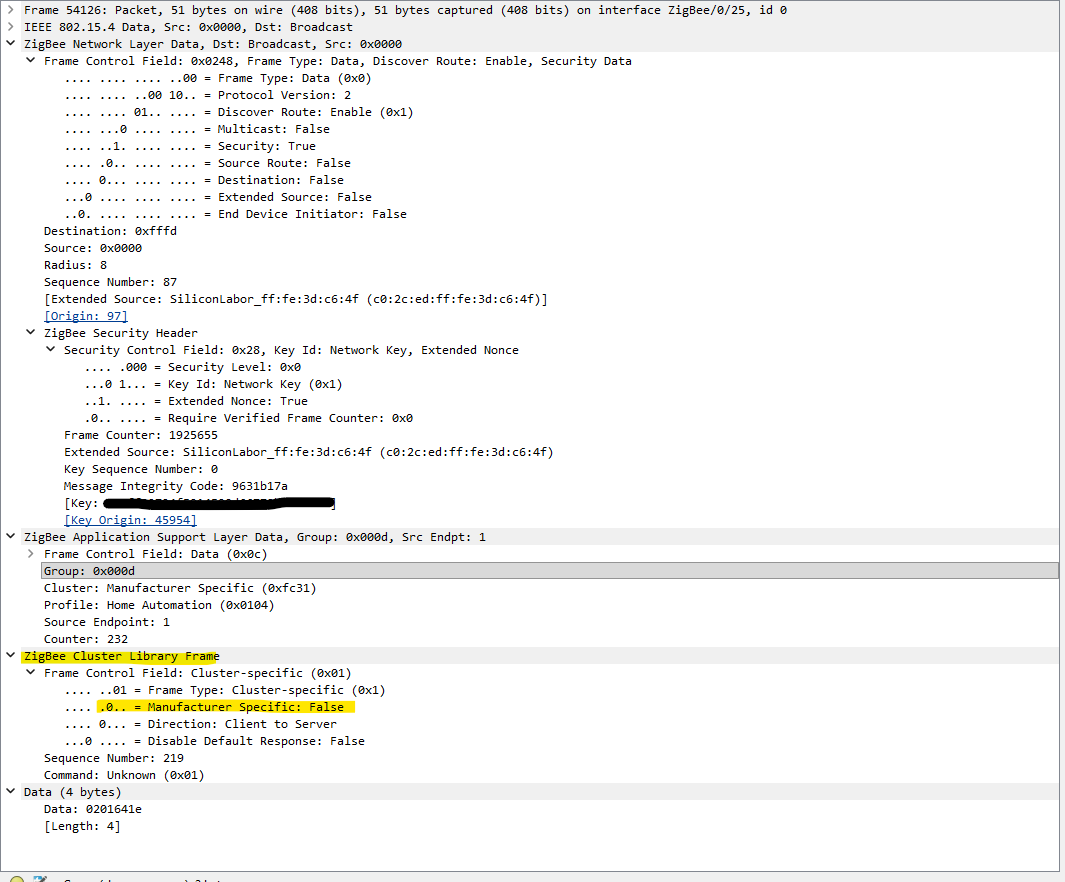
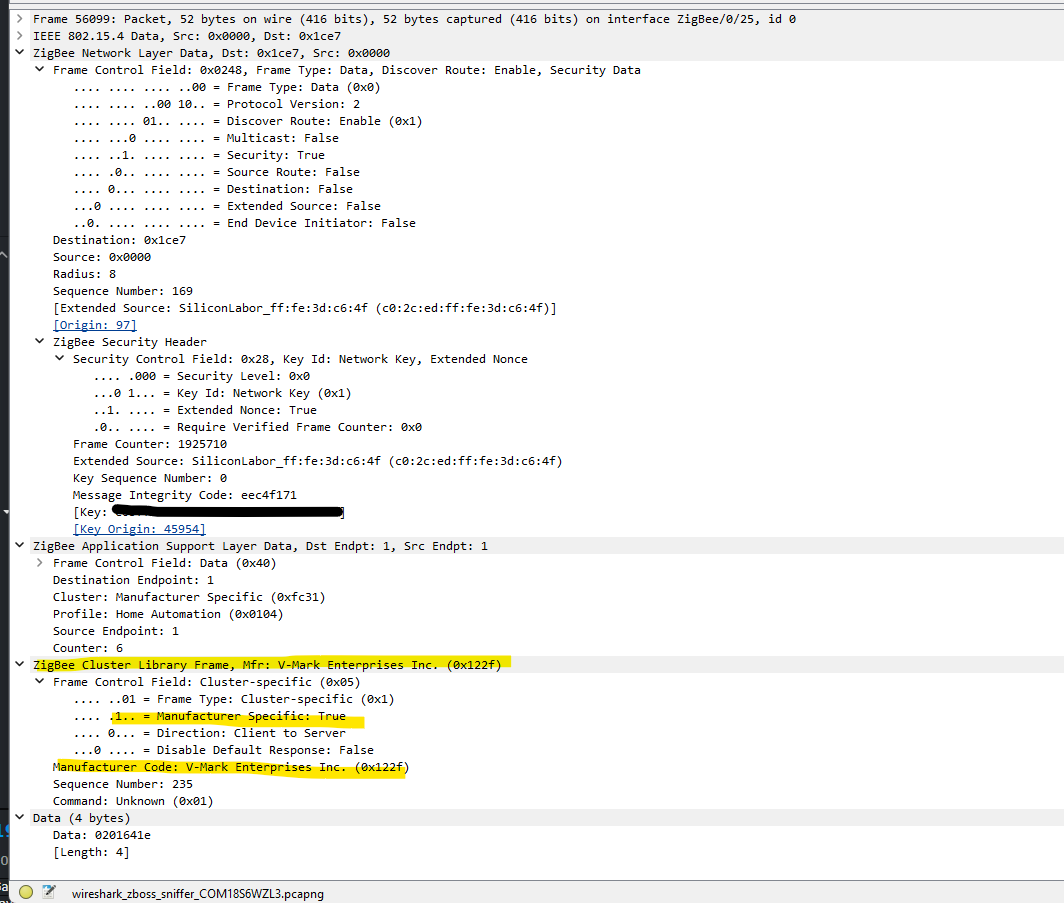
@mike.maxwell I am trying to get a group command to work, but it seems I cannot find a way to pass the manufacturer specific info. Because of this the switch is not processing the command. This is the group command:
@mike.maxwell I sure hope this can be worked out. There are lots of applications for group control over manufacturer specific cluster attributes. IMO this will ultimately only add more diversity to the Hubitat ecosystem's zigbee support capabilities.