I don't have much wiring experience; I'm stumped. I tried installing a ZEN73 switch today. I'm trying to use it to control my porch light. The light switch junction box has three switches: the porch light is a single pole switch; the other two are three way switches. I believe I found the Line, Load, and Ground wires and connected them just fine. I think I found neutral wires to connect to. When I hook everything up and turned on the breaker, all three switches worked fine. I was even able to pair the ZEN73 with my hubitat. I cut the power again to close everything up (tightening screws and attaching face plate). When I turned to breaker back on, the porch light turned on and stayed on. I couldn't turn it off with the switch or hubitat. Unfortunately I don't have any pictures.... it was getting late and I had to put the old switch back so we had a working light (you all know how it goes  ).
).
Any help would be appreciated.
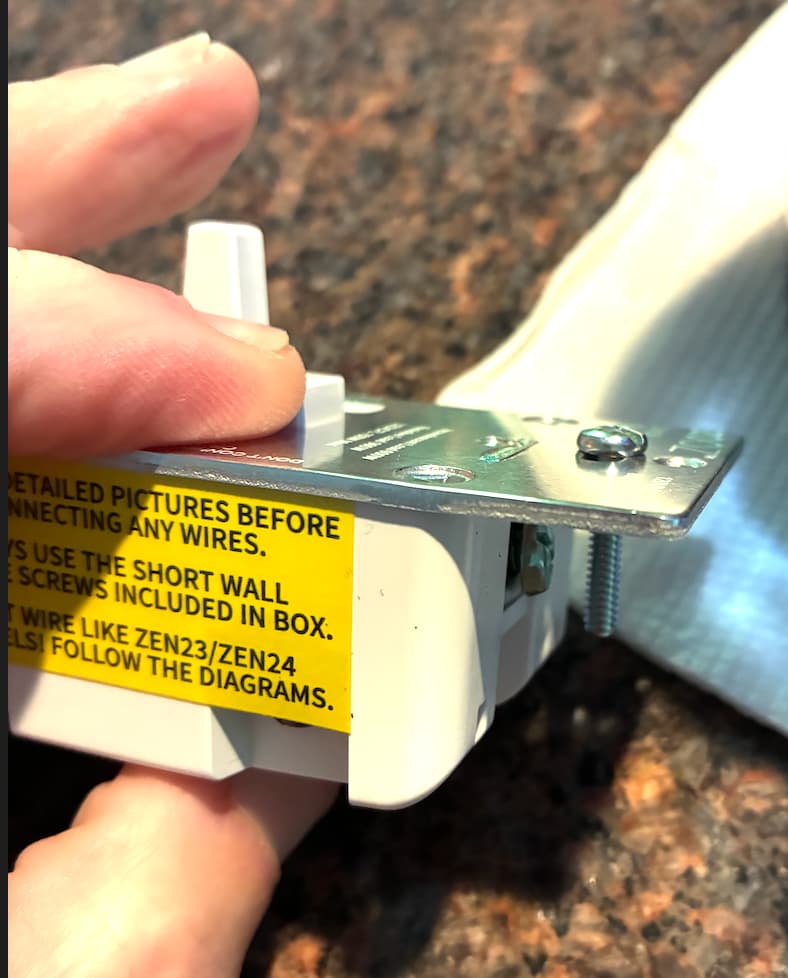
Did you use the face plate screws that came with the ZEN73? I know on earlier models if the face screws were to long they would interfere with the movement of the toggle.
2 Likes
No, I didn’t use those. I’ll try them this weekend. Thanks for the suggestion.
Ah, a fellow ZEN73 person!
Not sure if it's the long faceplate screw. It only seems to interfere with the grounding lug.
I dug one out of my box of things. It is a late model LR version.
hmmmm. Verify?
(other switches are 3-way)
Is this switch new, out of the box? LR?
Yup... a lot of my lights can't use dimmers, so I'm working with the ZEN73s.
To go down your questions, @velvetfoot :
It's a brand new, just delivered ZEN73 800LR.
It does look a lot like your picture. Are you (and @JBrown ) saying the issue could be that screw above the ground wire connection is possibly contacting the ground wire and causing a problem, so that screw should be switched?
When I said "I think I found neutral wires"... as I said, I'm kind of a noob with wiring. I thought every switch would just have it's own neutral wire so I was surprised to see multiple neutrals in one wire nut. After doing more research, I see that multiple switches on the same circuit (which these should be because they go to the same breaker) can share a neutral. So, the ZEN73's neutral connection should be good.
With incredibly rare exception, no dumb switch/dimmer uses a neutral.
So if your switch box had neutrals in it, they would have just been bundled together under a nut in the box (but not attached to any switches).
Not every white wire is a neutral, and that's particularly true in switch boxes.
If you have an existing neutral bundle, you always pigtail the smart switch into it -- you don't ever take one of those neutral wires out of the bundle to connect to the smart switch.
You mentioned 3 switches in that box... Are all 3 switches confirmed for certain to be on the same circuit? If "yes", then all neutrals in that box must remain bundled together.
If "no", then you need to be careful to keep the respective neutrals on their respective circuit -- neutrals cannot be shared between circuits.
Finally, depending on the number of neutrals involved, getting all of them properly & well secured under the nut can be challenging... Especially if it's a mix of stranded and solid, it's very easy for a wire to squeezed out from under the (undersized) nut without noticing. Using Wago lever-nuts instead of wire nuts is an easy way to help mitigate that possibility.
Did you check your line conductor with a meter to confirm the line? And except for the neutral bundle, you did not mess with the two 3 ways in the box?
No. I'm saying it's something else, lol.
Oh, and does that ZEN73 have a smart bulb mode? Make sure it is not in it.
1 Like
Ooh, good call. Also confirm that Local Protection didn't somehow get turned on (since that would prevent direct control from the toggle).
I think you'd have to go out of your way to do that, re: toggling the toggle, on an out of the box device, although...
Not that it makes a diff, but is it paired LR or mesh?
What driver you using? Again, not that it makes a diff,
https://www.support.getzooz.com/kb/article/639-zen73-on-off-toggle-switch-700-advanced-settings/
Thanks for all of the suggestions. I'll try to install it again this weekend and see. It's still in Hubitat, and it shows Smart Bulb Mode: Physical Control enabled and I think the driver is the current (autodetected during pairing) Zooz Zen73 S2 Switch - I did tell it to not turn on S2 during the pairing. I don't see a setting for Local Protection.
What gets me is I would think if it was wired wrong it wouldn't work at all; but it worked for a few minutes and then locked on. Even a factory reset wouldn't do anything.
Did you try just power cycling it? That will sometimes fix them if they are locked up.
If you reconnect it now and it is still dead to all physical commends, and stuck on, then it is most likely a wiring problem and you fried it.
1 Like
Cool, then Physical Control is what I meant by Local Protection -- I couldn't remember which term Zooz uses for that concept.
Factory reset as in flipping the toggle or whatever it tells you to do and getting some blinking lights?
Now don't take my word as gospel, but there should be no resistance between Ground and Neutral when NOT energized, ie, the breaker is open. You may not even have a neutral in there. And check very carefully what connected to those terminals, ie, load, line, neutral, traveller, etc. it's small print, dark (use flashlight), etc. I seem to dimly recall hooking one up wrong and getting similar results.