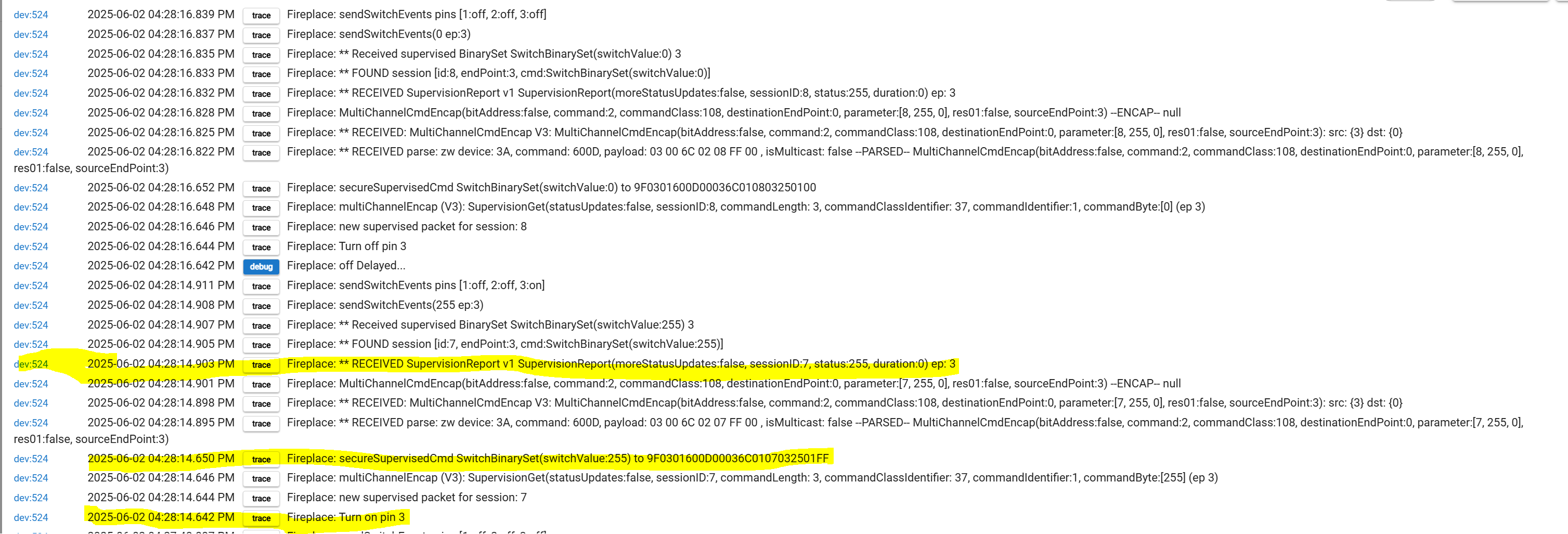
I'm struggling to understand how Z-wave supervision should be handled by community drivers.
I've read the guide here from 2022:
And read more recent discussions here:https://community.hubitat.com/t/2-3-9-x-z-wave-s2-supervision-encapsulation-c-7-and-up/138319
opened 06:36PM - 15 Feb 23 UTC
closed 12:29PM - 09 May 25 UTC
Documentation 📚
A lot of issues in user's networks come down to too much parallel communication.… While we have a few guidelines on how to configure devices optimally to prevent this, often it is not possible due to how the devices are implemented. Especially when S2 and Supervision are involved, things can easily go sideways.
### Z-Wave Communication Basics
To better understand the issue, let's take a look at how Z-Wave communication works at a high level.
**Basic communication flow:**
```mermaid
sequenceDiagram
participant Z as Z-Wave JS
participant C as Controller
participant N as End Node
Z->>C: Send this command to Node
activate Z
C->>Z: I've started sending the command
activate C
note over C: Tries to reach N
C->>N: Here's a command
N->>C: ACK
C->>Z: Node got the command
deactivate Z
deactivate C
note over Z,C: ready for the next command
```
This process is typically very fast (~10ms), but can take several seconds when the controller has trouble reaching the node.
The important part to remember here is that this entire flow needs to be completed before another command can be sent.
**Basic communication flow with status updates:**
Even if the node got the command, this does not mean it could understand it or even executed it. However, applications usually want to know if a command was executed, e.g. if a light was turned on or a door was unlocked. To guarantee that, Z-Wave JS waits for the node to report its new status. If that doesn't happen within a few seconds, it queries the current status. For simplicity, the controller and protocol-level ACKs are omitted from the following flow:
```mermaid
sequenceDiagram
participant Z as Z-Wave JS
participant N as End Node
Z->>N: Send SET command
note over N: processes command
opt If node does not report status
Z->>N: Send GET command
end
N->>Z: REPORT status
```
That status update does not require a response outside of the protocol-level ACK, which is sent automatically by the controller.
When the node does not automatically send status reports (or does not understand the command), this can lead to a couple of seconds of uncertainty until the status has been queried.
**Supervised commands:**
By using **Supervision CC**, the node is required to respond whether it understood and executed the command:
```mermaid
sequenceDiagram
participant Z as Z-Wave JS
participant N as End Node
Z->>N: Send SET command, with Supervision
note over N: processes command
N->>Z: Supervision REPORT, including command status
```
This eliminates the uncertainty and it reduces the number of commands to 2 (instead of 2 or 3). Since Z-Wave has very limited bandwidth shared by up to 232 nodes, so reducing the number of commands needed for each action is beneficial.
**Encrypted commands:**
When encryption is involved, things become a little more complicated. The older standard **Security S0** is notorious for adding up to 2 commands overhead for each exchanged command, because it requests a nonce from the target:
```mermaid
sequenceDiagram
participant Z as Z-Wave JS
participant N as End Node
Z->>N: GET Nonce
N->>Z: Nonce
note over Z: encrypts command
Z->>N: encrypted command
note over N: tries to decrypt command
```
Like before, it is unclear if the target node understood the command unless it sends an update, so this exchange may be followed up with a GET and a REPORT, each time exchanging new nonces before.
**Security S2** does this better by establishing a shared encryption state which does not need any nonce exchange unless there are communication failures involved and one party gets out of sync.
```mermaid
sequenceDiagram
participant Z as Z-Wave JS
participant N as End Node
note over Z,N: establish shared state
Z->>N: encrypted command
note over N: decrypt command
N->>Z: encrypted response
note over Z: decrypt response
```
In case of a decryption failure, the target responds with a **nonce report**, which will cause the sender to re-transmit its command including a its nonce to re-sync the shared state:
```mermaid
sequenceDiagram
participant Z as Z-Wave JS
participant N as End Node
note over Z,N: encryption out of sync
Z->>N: encrypted command
note over N: fails to decrypt
N->>Z: nonce report
Z->>N: re-transmit encrypted command, with nonce
note over N: decrypt command
note over Z,N: shared encryption state in sync
```
So in order to handle cases where the target cannot decrypt the command, the sender would have to wait for a potential nonce report, so it can re-transmit the command:
```mermaid
sequenceDiagram
participant Z as Z-Wave JS
participant N as End Node
Z->>N: encrypted command
note over Z: wait for nonce
alt node could decrypt
note over N: decrypt command
note over Z: timeout
else node failed to decrypt
note over N: fails to decrypt
N->>Z: nonce report
Z->>N: re-transmit encrypted command, with nonce
note over N: decrypt command
end
note over Z,N: ...next commands...
```
While this does work, it introduces unnecessary delays. The nonce report can easily take 0.5 to 1s to be delivered, so the sender should wait at least this long, even if the command was processed within 10ms. This is fine though if few messages need to be delivered (e.g. 2-3 reports from a node to the controller), but very noticeable when trying to control many devices (e.g. when a user wants to turn on 10+ devices).
**Supervision to the rescue?**
Again, **Supervision CC** can help with this. It requires the target to respond, so it increases the throughput for successful transmissions:
```mermaid
sequenceDiagram
participant Z as Z-Wave JS
participant N as End Node
Z->>N: encrypted command, with Supervision
note over N: processes command
N->>Z: encrypted Supervision REPORT
note over Z,N: ...next commands...
```
Also since 2022, the Command-Retry feature was added so it can potentially conflict with supervised events getting re-sent.
Some context:
What I'm doing is when the SupervisedReport is successful, I pass the session cmd as a zwaveSupervisedEvent()
              logTrace "** RECEIVED SupervisionReport v1 ${cmd} ep: ${ep}"

              session = null
              if(sessions["${device.id}"][cmd.sessionID]) {
                  session = sessions["${device.id}"][cmd.sessionID]
                   logTrace "** FOUND session ${session}"
              }

              if(session && cmd.status == 255) {
                  // If succesfull, pass session command to zwaveSupervisedEvent
              	zwaveSupervisedEvent(session.cmd, ep)
              } else {
                  // Pass to driver SupervisionReport cmd for error handling

                  // Unclear if we should attempt re-delivery or let driver do this
                  // Potentially conflicts with 'command retry feature' in Hubitat
                  zwaveSupervisedEvent(cmd, ep)
              }
          }

          // Handle Supervised events
That is then handled in the driver for a custom action:
          	logDebug "fingerprint  mfr:\"${hubitat.helper.HexUtils.integerToHexString(cmd.manufacturerId, 2)}\", "+
          		"prod:\"${hubitat.helper.HexUtils.integerToHexString(cmd.productTypeId, 2)}\", "+
          		"deviceId:\"${hubitat.helper.HexUtils.integerToHexString(cmd.productId, 2)}\", "+
          		"inClusters:\"${device.getDataValue("inClusters")}\""+
          		(device.getDataValue("secureInClusters") ? ", secureInClusters:\"${device.getDataValue("secureInClusters")}\"" : "")
          }

          /*******************************************************************
           ***** Supervised Z-Wave Events
          ********************************************************************/
          void zwaveSupervisedEvent(hubitat.zwave.commands.switchbinaryv1.SwitchBinarySet cmd, ep = 0) {
              logTrace "** Received supervised BinarySet ${cmd} ${ep}"
              sendSwitchEvents(cmd.switchValue, '', ep)
          }
I'm not really dealing with "re-sending a packet" if it fails... @bcopeland is this something that has changed since 2022? Is this done automatically now?
The only part that has changed is that ZWaveJS handles all the supervision and other encapsulations automatically. So if you use ZWaveJS it's not needed at all. But if the drivers are used with hubs that aren't on ZWaveJS then supervision is recommended, but not required except on received packets.
If you aren't re-sending then there is no point in using outbound supervision.
It's the only way I get the driver to work
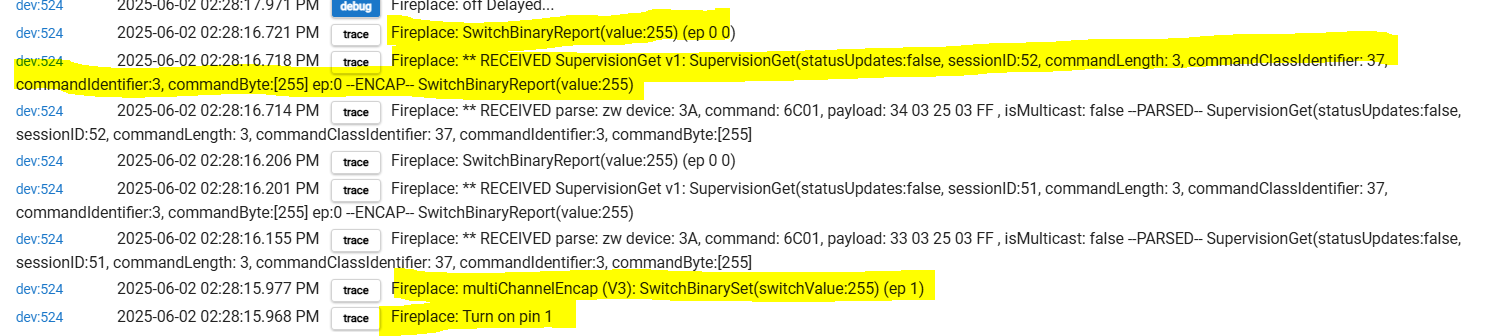
I get a SupervisionGet with the SwitchBinaryReport at value:255
Notice the endpoint is 0 but that's not what I sent, should be endpoint 1.
String switchBinarySetCmdTest(Integer value, Integer ep=0) {
    if(state.supervise) {
        // works
        return secureSupervisedCmd(zwave.switchBinaryV1.switchBinarySet(switchValue: value), ep)
    }
    return secureCmd(zwave.switchBinaryV1.switchBinarySet(switchValue: value), ep)
}
The secureCmd() seems to trigger a SupervisionGet() and I get endpoint 0....
String secureCmd(String cmd) {
	return zwaveSecureEncap(cmd)
}
String secureCmd(hubitat.zwave.Command cmd, ep=0) {
    sCmd = zwaveSecureEncap(multiChannelEncap(cmd, ep))
    return sCmd
}
jbondc:
SupervisionGet
The SupervisionGet is the device sending the hub a supervised transmission, this will happen regardless if you are using outbound supervision or not.
Are you saying that if you use outbound supervision then the response is on the correct endpoint (1)? Could be a firmware bug on the device itself in that case.
I think I see some of my code in there
When I use a supervised command for relay 3 / endpoint 3:
I get a SupervisionReport for that command so I know it was succesful.
When I don't use supervision, just multiChannelEncap for endpoint 3. The device is sending SupervisionGet but for endpoint 0.
I am using your code here from the Zen16
/*
 *  Copyright 2025 Jonathan Bond
 *  Copyright 2023-2025 Jeff Page (code from the Zen16 Relay)
 *
 *  Licensed under the Apache License, Version 2.0 (the "License");
 *  you may not use this file except in compliance with the License.
 *  You may obtain a copy of the License at
 *
 *      http://www.apache.org/licenses/LICENSE-2.0
 *
 *  Unless required by applicable law or agreed to in writing, software
 *  distributed under the License is distributed on an "AS IS" BASIS,
 *  WITHOUT WARRANTIES OR CONDITIONS OF ANY KIND, either express or implied.
 *  See the License for the specific language governing permissions and
 *  limitations under the License.
 *
*/

library (
 author: "Jonathan Bond",
show original
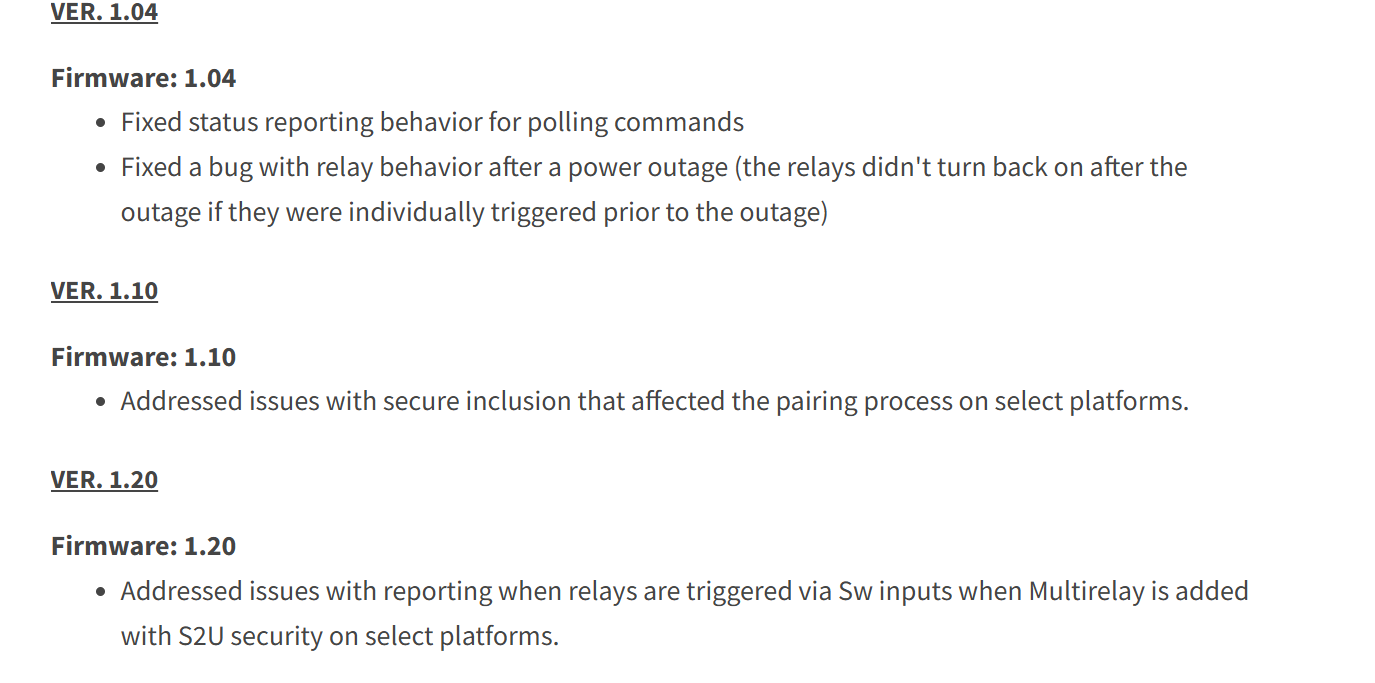
The relay is: Firmware Version 1.04
I guess I can try 1.20
I think maybe you need to set a multichannel lifeline association, group 1, set to node 1:0
You could try switching to my driver and running configure to set the lifeline if you want.
I could test it on my driver but I am fairly certain you will see two differences:
Without outbound supervision, the report response should be MC encapsulated with the correct endpoint, as well as supervisionGet encapsulated. It would have to have the endpoint in there or my driver would never work.
With outbound supervision I think you will see an additional binaryswitch report coming in (with MC and supervisionGet) along with the supervision response.
My driver does not do outbound supervision so the second bullet is an educated guess.
Thanks! I will look into this. My plan with associations is to expose them in the data section for each driver similar to what I think you did for Config Vals.
Then use an 'Association' app to change associations between devices.
You would not normally expose group 1 though, that is the lifeline association.
Inovelli already has an app they made. You just need to have the correct functions in the driver for it to work with it. It does not implement multichannel associations though. At one time they said I could fork it and add that feature myself if I wanted.

 , or at least based off my code.