A few years ago, I purchased several Z-Wave roller shades from ZebraBlinds, based on some of the reading in this forum.
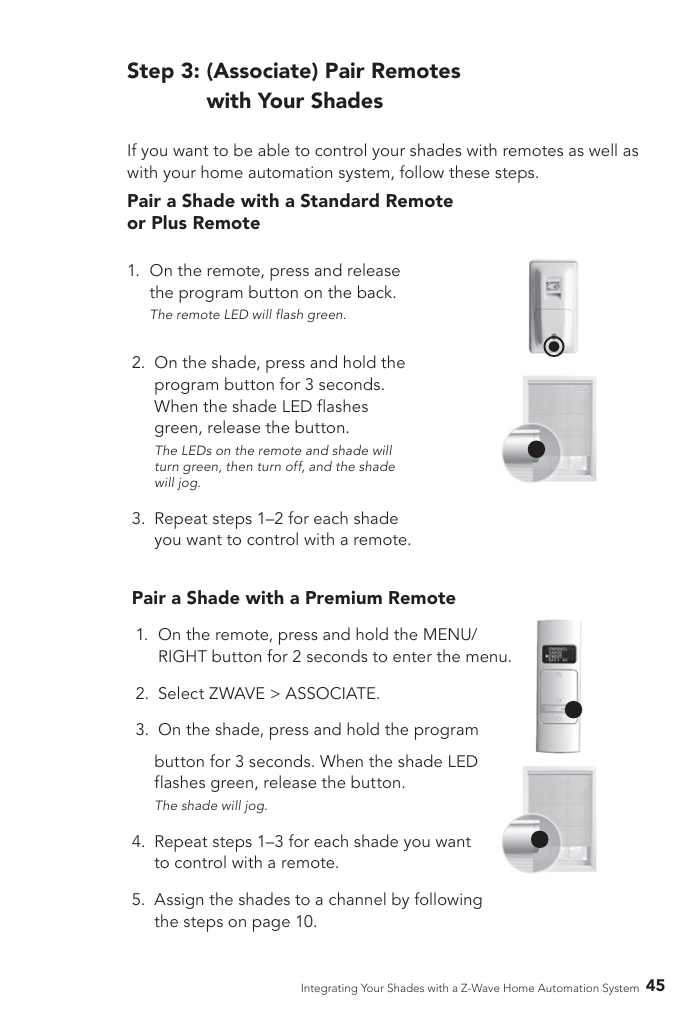
My question is simple: Has anyone ever successfully paired a remote as a secondary controller (Hubitat being the primary)?
Overall, my experience is great. However, I've had to adjust the upper and lower limits a few times as they tend to drift a bit. To my knowledge, this MUST be done via a physical remote. What ensues is a nightmare of resets, exclusions, inclusions, repairs, ghost nodes, forced removal, reworking every Rule Based action, updating Hub Mesh, etc., etc. What should take 10 minutes, ends up taking several hours.
Am I missing something or have other users experienced the same thing?
I realize that my question may be poorly worded. This action is what I am referring to:
Were you ever able to do this?
I have Bali roller shades. I just have 6 installed this week so they are z-wave + Bluetooth and have 3 from 2021/2022 that are just z-wave only. When I purchased the original 3 I never bought a remote so I couldn't "hard set" the upper and lower limits. When I purchased these 6 new shades I purchased the premium remote that has 12 channels.
The installer configured the new shades to the remote so I did the following steps.
- Rest remote
- Reset the 6 new roller shades.
- Reset 1 of the older roller shades.
- Connected the 6 new roller shades to Hubitat.
- Connected the 1 older roller shade to Hubitat.
- Connected the premium remote to Hubitat.
- Associated (connected) all 9 shades to the premium remote.
I was then able to set the upper and lower limits on the old roller shades.
https://support.springswf.net/support/solutions/articles/30000028547-motorized-shade-owner-s-manual is the newest owners manual.
According to https://www.springswindowfashions.com/brands/ Zebra is not a brand of Springs Window fashion, so I don't know if their remote will work,
Thank you for updating this. After posting on some other forums and messing around for several hours, I did finally give in and go through the whole fiasco described above.
One of my shades has drifted (again) and I am ready to try again. Thanks to another, unrelated problem I created for myself, my understanding of Z-Wave secondary controllers is a bit better - albeit still at the amateur level.
I will utilize the info you have provided and update this thread on my success/failure.
After several years, several hours on several occasions, I’ve finally figured this out – with the assistance of users like @kvtobola and others.
All steps must be completed in this order;
- Make sure the shade and remote are BOTH paired to the Z-Wave hub.
*NOTE: If you have Rules/Automations associated with your remote (i.e. your remote controls all of your shades via a hub-based rule), I found it to be helpful to pause those rules.
-
Bring the remote into close proximity with the shade (for me, performance was inconsistent beyond a few feet)
-
Place the shade at the limit you wish to adjust (Upper limit or lower limit)
-
Press and release the Program Button on the back of the remote
a. The remote lights will flash green
-
Press and hold the Program Button on the shade for ~3
a. The shade Program Button light will flash green until the remote connects (<2 seconds)
-
Once the remote connects to the shade, the remote lights will stop flashing green and the shade Program Button light will begin flashing green rapidly
*IMPORTANT: The upper and lower limits are only adjustable via the remote while the Program Button light on the shade is flashing green rapidly. You must complete the next step within ~30 seconds
-
Press and hold both the up and down buttons on the remote at the same time for ~3 seconds
a. The remote light will turn amber and the shade will jog
-
Use the up and down buttons on the remote to adjust the shade to the new limit
-
Once the shade is at the new desired limit, press and hold both the up and down buttons on the remote at the same time for ~3 seconds
a. The remote lights will turn off and the shade will jog.
-
Press and release the Program Button on the shade
a. The shade program button light will flash green once and the shade will move to the opposite limit
That’s it. You are done with that shade. With this knowledge, I can now adjust the limits on my shades in minutes rather than hours.