Z-wave Completely Unresponsive

Hi All. I have been working with Hubitat for about a month. I Started with Wink years ago and migrated to SmartThings when I bought a new house. I was convinced to move to Hubitat, and the transition has been 0 fun.

About 3 times a day all z-wave controlled devices stop responding. I have no control from the device page, the app, or from automation. The must frustrating part is I have feedback on all the z-wave devices. I turn on the light, I see the light turned on from a physical on, same if I turn it off.

All other automation work during this, as well as zigbee devices, the only issue is with the Z-wave devices.

I have migrated all rules to a second hub, so this hub only is responsible for talking to the devices.

During testing, I found that I cannot ping any of the devices when I have this issue. If I attempt a z-wave repair, all nodes fail.

I have let the Hub site for hours, and it does not recover. The only solution I have is to power the device down, remove the power and plug it back in. Sometimes I have to do this 2 or 3 times until the device starts talking to the z-wave devices again.

The majority of my devices are Inovelli light switches, versus motion sensors, about 60+ devices in total.

I have no errors in the logs, and the z-wave issue seems to be at random. It could be after no automation ran for awhile, it could be after activating a scene, or it could be me turning on a light via the app, I then go to turn the light off and I have no response, and then I can't control anything.

C7 Hub.
Newest Firmware.
Hub sits in the center of the house.
I have purchased multiple repeaters.

Any suggestions would be appreciated.
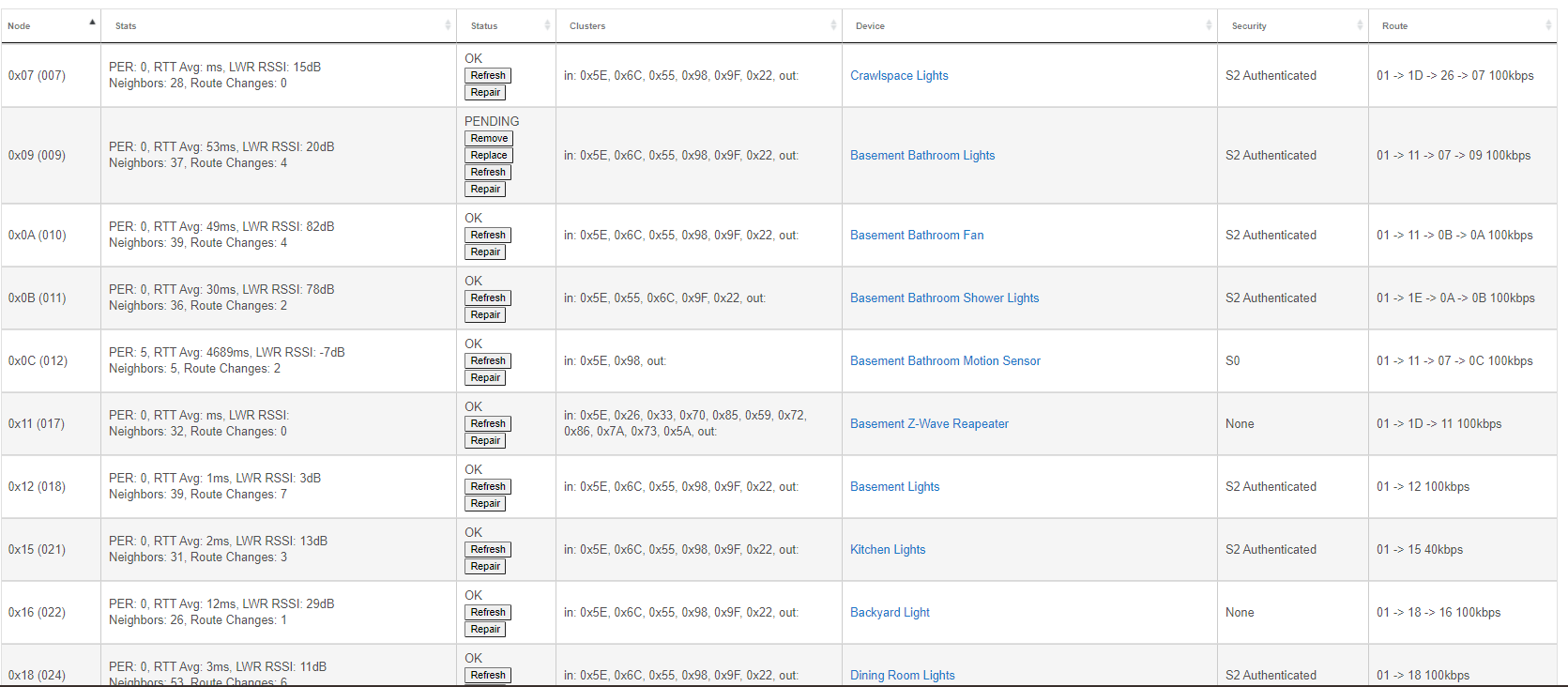
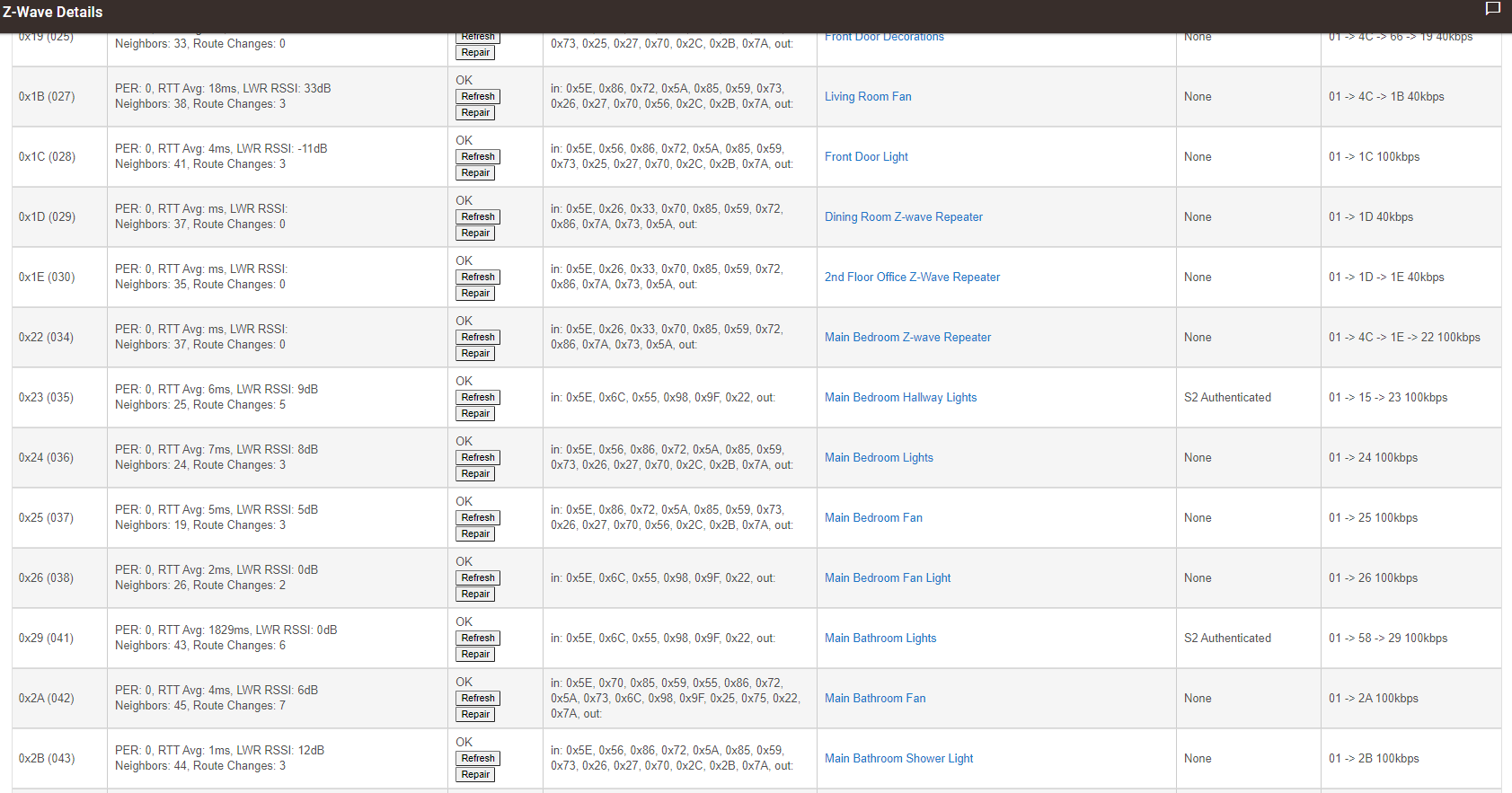
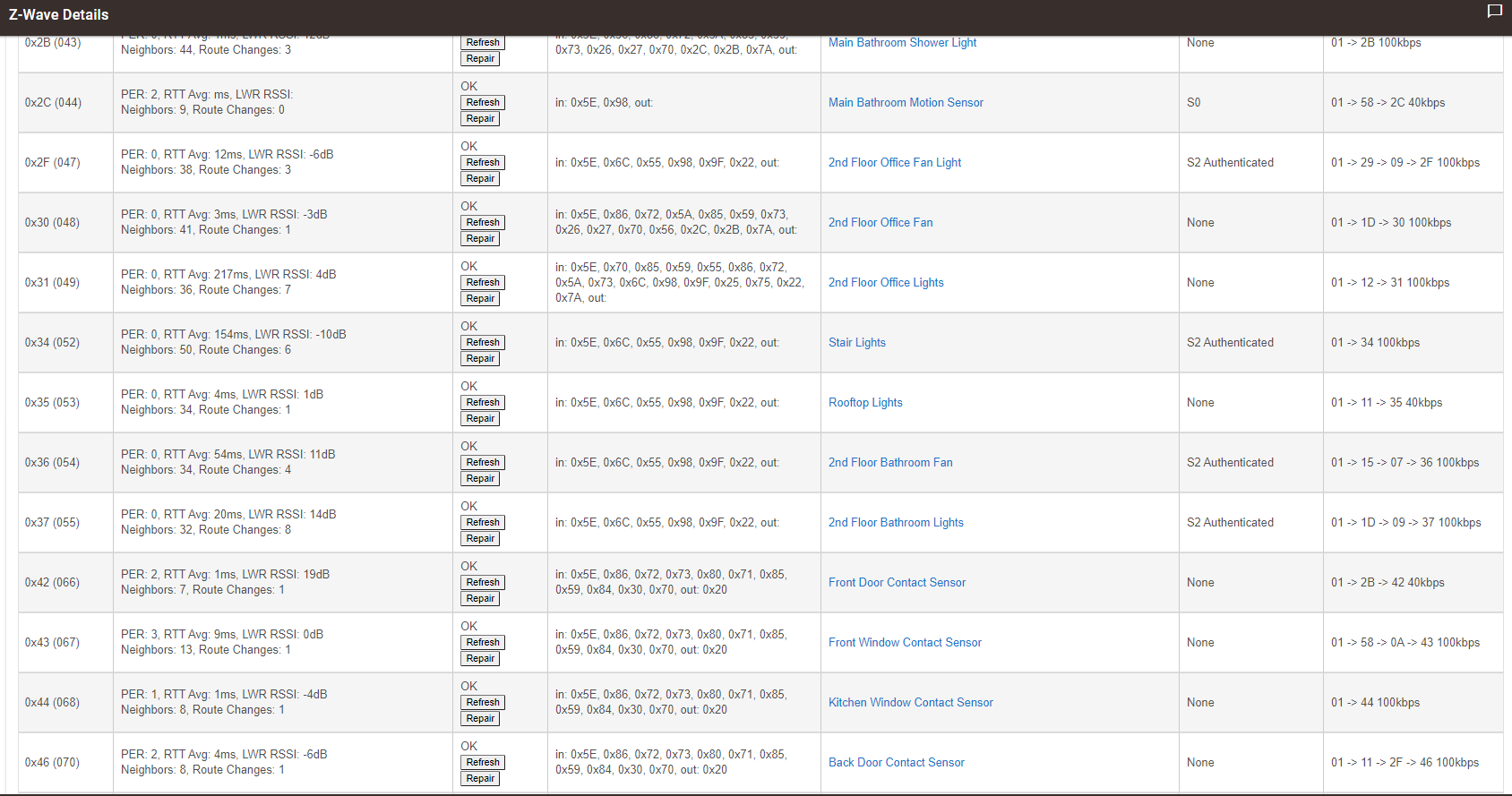
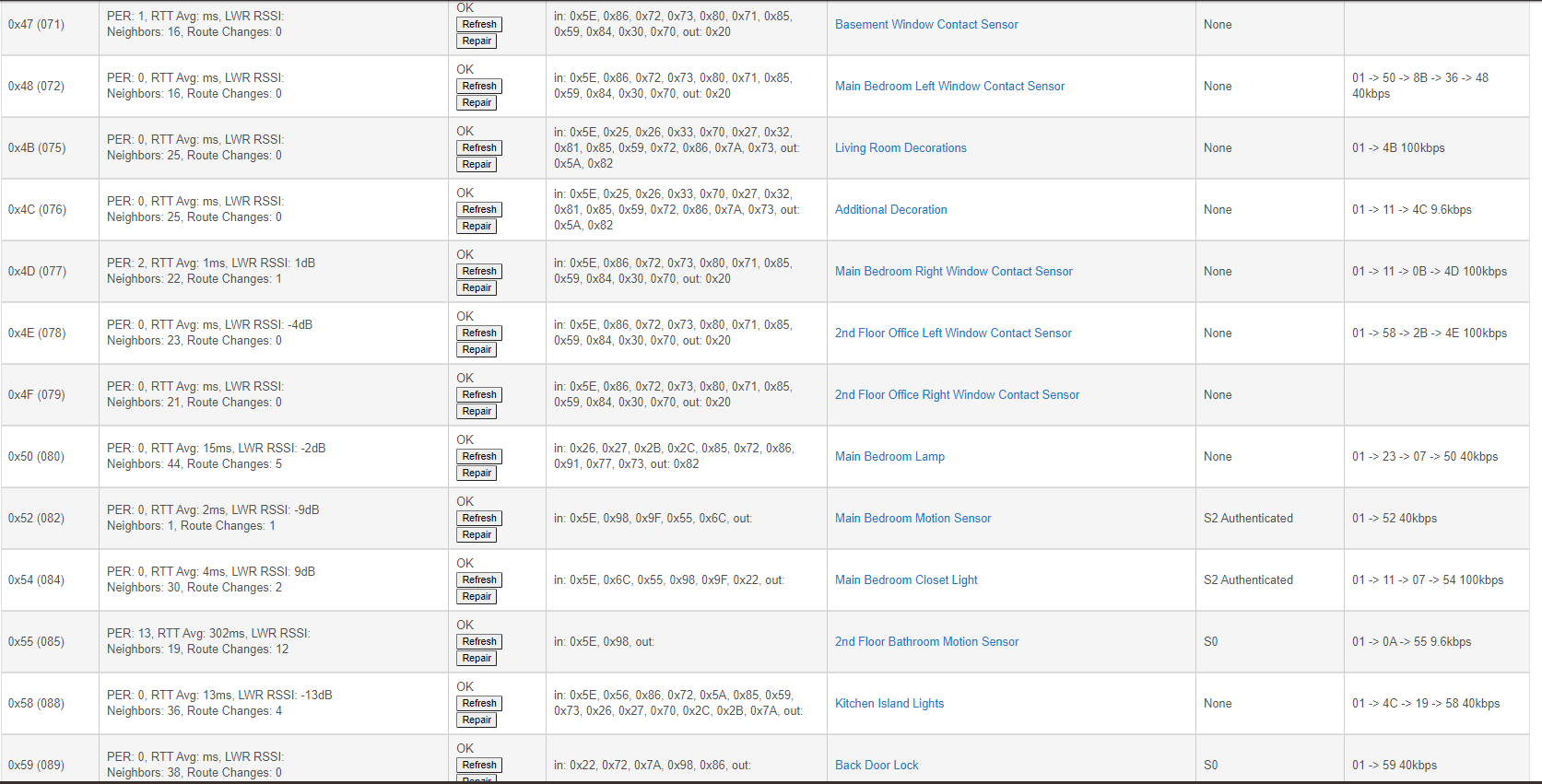
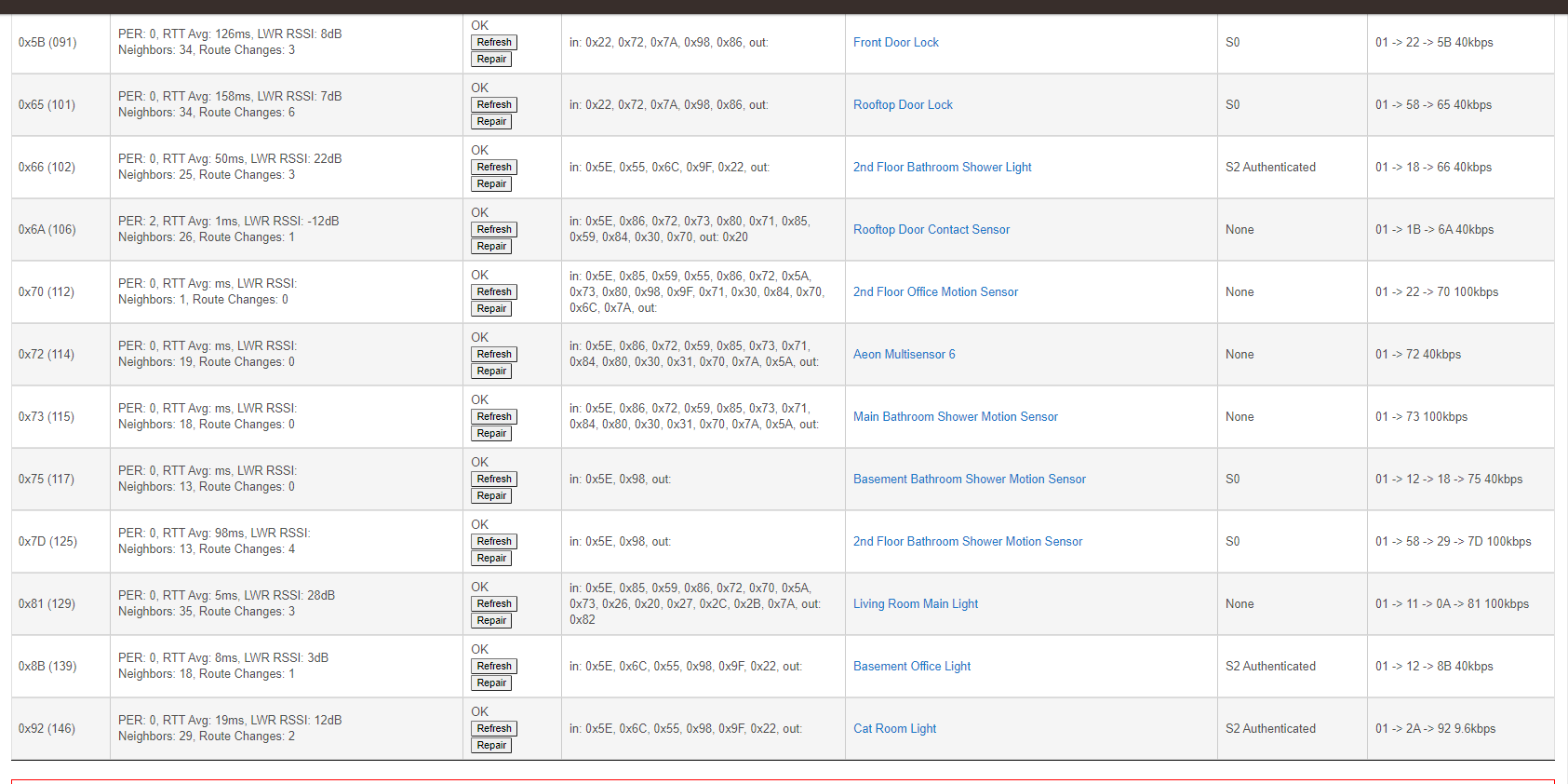
Do you have any ghost nodes (nodes without any in out clusters) on the Z-Wave Details page?

Could we see a screenshot of the Z-Wave Details page?

Have you tried rebooting the Z-Wave radio? (Shutdown to red light, power off hub at wall (not at mini USB, which is fragile and can break solder joints to PC board), power up after 30 seconds, allow to boot)

2 Likes

No Ghost nodes.

Currently the reboot method is how I solve the issue. It happen last night right before heading to bed. This time I let it sit while we slept, It looks like most has recovered on it's own, I have also tried rebooting the radio only with no luck.

Some of the other instances of this have been linked to a failing or sleepy contact sensor...

I will admit I am stumped, unless you have a bad device. It would be helpful at this point if you had a Z-Wave packet sniffer. You have so many devices that it’s going to be hard to isolate a bad one without a packet sniffer (Z-Wave USB stick with Silicon Labs (free) PC Controller software, a part of Simplicity Studio (a misnomer if there ever was one)).

Unrelated to the unresponsive network, why do you have the motion sensors paired securely? It would seem that the locks are the only thing that need secure pairing. The S0 pairings generate 3x traffic, but I don’t believe that is causing this particular problem.

Hi all, thanks for helping. I just heard back from Support.

They said the newest updated sent out today should fix my issue, apparently a few hubs are suffering from a z-wave issue. They also suggest taking a backup of my device and restoring directly from that backup. This would fix any database issues that I could be suffering from.

I too was thinking it was a faulty device.

I just did the update, and I will let my system settle, but so far so good. I won't really know if this solved the issue for a few hours.

Fingers Crossed.

Interesting. I am not sure if this is my case as I never have issues with receiving from a contact sensor or a motion device. I typical have 100% accuracy with feedback, I just lose all control, and can't ping nodes.

I pretty much have the same issue. Mostly powered devices and would work perfectly for most of the day then suddenly the Z-Wave becomes totally unresponsive but everything else would work perfectly fine. I have downloaded the latest update like yourself but the release notes don't really mention anything about Z-Wave fixes in the latest update.

That's priceless, I was thinking the same thing when I had to update to the latest PC controller and had to install Simplicity Studio

Are there decent instructions anywhere for using Simplicity Studio to remove ghost nodes? Like you say, it's anything but simple.

Try this one: Dropbox - Hubitat UZB Stick How-To.pdf - Simplify your life

1 Like

Thank you!!!! That was perfect. I sincerely appreciate it.

1 Like

Spoke a little to soon. Still issue, but the system now recovers faster... sometimes.

No zigbee issues, and all other functions with no issues.

Pretty frustrating. I can turn on a light watching z wave logs and works fine. I then turn off the light and the light doesn’t work, log shoots showing no info and I then have no control over anything z wave.

How long have you had your Hub? I have had mine since January and haven’t had a full 24 hours without an issue.

If it were me, I'd be looking at the devices you included with Security especially the ones using S0. Motion sensors with S0 hmm definitely thinking zwave packet loss that's why restarting fixes your problem. May sound a little crazy but have you tried powering off all your z-wave devices?

How could S0 be causing the issue? Also, how would I add them as none S0? No security options pop-up as they add.

I have powered everything down including battery powered devices.

Keeping it simple S0 is old and slow & sends like three times more packets then S2 and no security. I don't know what make of devices you have paired with S0 but if there's no option to pair them unsecured then you could always pair them with a Z stick. They wouldn't happen to be Zooz 4 in 1 sensors you have paired with S0? seen people having problems with those.

1 Like

They are the 4 - 1. I have a stick but not sure how to pair to the stick and then transfer over. Have only used the stick to clean up nodes.

The other S0 are door locks.

You include the Zstick with HE making it a secondary controller. Let me see if I can find a good write up on here. If

if you haven't installed Simplicity studio get that installed

Here is @danabw’s writeup:

Ghost Removal -Who you gonna call?

2 Likes