I’ve been building an App and a set of device drivers that let Hubitat talk directly to the YoLink Local Hub, with no cloud dependency. Events come in over MQTT from your local hub; periodic “reconcile” calls use YoLink’s local HTTP API. It’s fast, private, and keeps working even if the internet is down.
I officially have the drivers in Hubitat Package Manager. YAY.
Optional periodic reconcile (local HTTP getState) to ensure nothing was missed
Customizable date/time format (shown in events), and F/°C selection
Clean device pages (hide internal “driver”/format attributes from Current States)
Supported (initial) devices
THSensor (Temp / Humidity)
Leak Sensor / Leak Sensor 3
Door Sensor
Power Failure Alarm
MQTT Listener “device” (handles the message bus)
Update: Supported devices
Motion Sensor (Indoor / Outdoor) - 2025 1221
More YoLink devices can be added over time, if I get my hands on them.
Why local?
Latency: MQTT events arrive in milliseconds on your LAN
Resilience: Works even if your internet is down
Privacy: Your automations stay on your network
How it works (high level)
Parent App
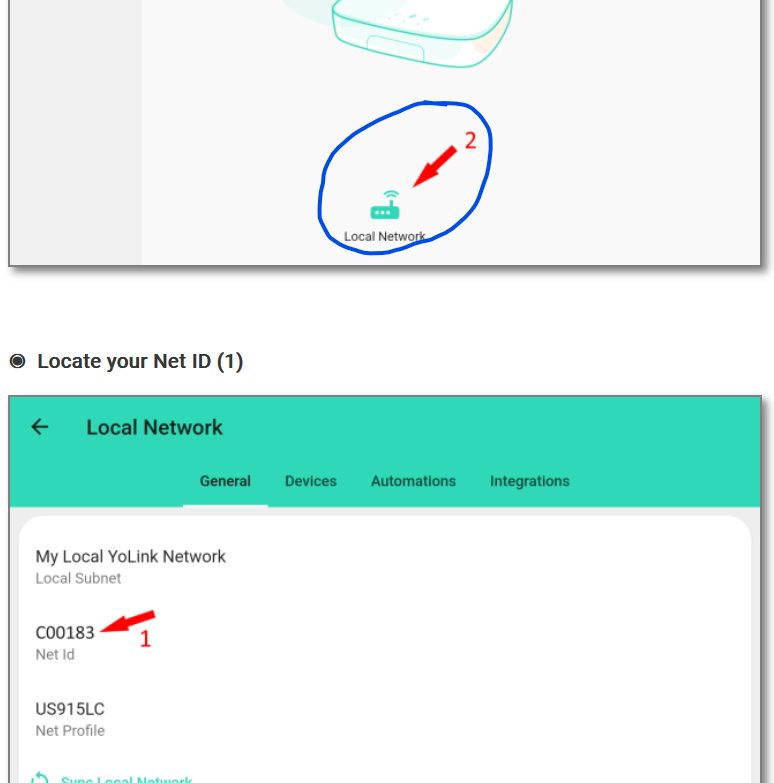
You enter the Local Hub’s IP, Subnet (Net ID), Client ID, and Client Secret.
The app fetches a local access token, discovers devices, and lets you select which devices to expose to Hubitat.
It creates one MQTT Listener device that connects to the hub’s broker (port 18080) and routes messages by deviceId.
Drivers
Each device driver receives MQTT reports directly from the parent app.
Drivers also support a local HTTP getState call (used for “reconcile”).
Drivers format timestamps according to your preference set in the parent app.
Polling strategy
Primary: MQTT push for near real-time updates.
Secondary (optional): a “Periodic reconcile” that pings devices via HTTP to refresh state on a schedule (Off / Hourly / 6h / 12h / Daily).
Requirements
YoLink Local Hub with Local API enabled
Static/reserved IP for your YoLink hub on your router
Your Client ID and Client Secret from the YoLink app (Integrations → Local API)
Hubitat Elevation running current firmware
This integration is only for the Local Hub. It does not use or require YoLink Cloud.
Installation (quick start)
Install the App & Drivers
In Hubitat, go to Apps Code → paste the parent app code from the repo, Save.
Go to Drivers Code → install the drivers you need, Save.
Create the App instance
Apps → Add User App → select YoLink™ Device Local Service.
Enter credentials
Local Hub IP (reserved), Subnet (Net ID), Client ID, Client Secret.
Other settings
Choose Temperature Scale and Date/Time format.
Pick a Periodic reconcile cadence (recommended: Hourly or 6 hours).
Select devices
Choose which YoLink devices you want created in Hubitat.
The app will also create an MQTT Listener device automatically.
Done
Open a created device and watch events come in.
Optional: enable debug logging in the app/drivers while testing.
Troubleshooting
MQTT connected?
Open the MQTT Listener device; check MQTT: connected and logs.
No child device for a message?
The app silently ignores MQTT for devices you didn’t select.
(No scary errors—only a debug line if app debugging is on.)
Nothing updating?
Verify Local Hub IP & that the hub is reachable on your LAN.
Re-enter credentials; confirm the token request succeeds.
Make sure “Periodic reconcile” isn’t set to Off while testing.
Timestamps / units look off?
Adjust Date/Time format and Temperature Scale in the parent app; drivers pick it up automatically.
Notes & Limitations
Uses the deviceId as the child DNI to route MQTT reliably. If you’re migrating from older builds, the app will recreate devices using the new DNI.
Some YoLink models share the same “type” name—drivers handle common payload shapes, but edge models may need small tweaks. Report anything odd.
Local API is plain HTTP on the LAN; ensure you trust your local network.
Credits
Big thanks to Steven Barcus for foundational work on the cloud side.
Built with a lot of late nights and a lot (and I mean a lot) of AI assistance.
License / Disclaimer
This project is not affiliated with YoLink/YoSmart, Inc.
Provided “AS IS” without warranties. Please review the license in the repo before redistribution or commercial use.
If you try it, I’d love your feedback, logs, and device models so we can keep tightening things up.
I would call these devices as BETA devices as only I have tested them on my setup. These were created with the help of perplexity.ai and more recently ChatGPT5 (Works better for coding)
Any guidance on adding additional drivers for additional sensors - Specifically, I would want to add a MotionSensor, for mailbox activity alerts. Just do a PR, or send a log of current cloud based attributes (not sure if that helps with what's actually described in the local MQTT topics)..
Or just add a new driver file and hack at it a bit, and send you my results - I'm guessing this will be somewhat similar to the DoorSensor, but I don't have a local YoLink hub yet (that was going to be a Christmas present...)
The cloud and local run different. I was originally trying to hack the cloud version to work with the local but that did not work corectly so the had to be created from scratch. The parrent app would also need to be updated to work with the motion sensor. If i had the money i would buy one of everything. As that would make life easier to make drives. Infact that is what Steven did, although yolink provided them to him and they have shutdown that part of their program, now we have to buy them all.
I might buy a few other devices like a motion, shock, and such once i know what people are looking for.
Really nice job on this integration, so easy to set up, and works so fast! Amazing to be able to control these devices locally within Hubitat and WebCoRE. Yolink, if you're reading this, send this person some devices please, for the benefit of the community and yourselves, (sending devices to random YouTubers is just for publicity, @albertjmulder makes them viable for everyone).
Now that I know local is possible I'm interested. Thanks for knocking this out.
I don't understand why the local hub is $200. Very little info out there on this hub and you actually have to dig for it on the yolink website. I hope it's not a short lived effort.
Ya they are nkt great at promoting the local hub and not sure why other than they could not keep up with demand. And it took them 3 years after me asking for it and being told it wil be out soon. 3 years is not soon, but atleast its out.
Now that you got me interested in the yolink line with local capability I'm checking their products.
I'd be interested in these:
*indoor motion sensor RT
*outdoor motion
*x3 indoor temp with screen
*x3 outdoor temp with screen
*smart sprinkler timer
*smart indoor hygrometer
*leak sensor 2 if not already supported
So little info on the local hub. When enabling the local api do you still have the ability to use the cloud? Is it a both king of thing? When it comes to products like the sprinkler valve it's probably not high demand for local out of the gate and probably a lot of overhead to get it working well local. Curious if there is a dual approach possible while developing local control or when new yolink products come online.
Did I also see that this hub is matter capable?
If you felt like adding support for additional sensors I might be willing to drop ship you some product.
So yes with the local hub it can also be used via the cloud even with them paired to the local. It makes it nice and was great for when i was doing testing.
Motion and sprinkler i dont have so i could not make drivers.
All temps should be supported as i have 3 different ones and they all work including the indoor with display also the hydro runs off the same driver. And the leaksmart should also work as i have version 3 but should work for version 2 also.
Willing to support drivers just hard without them.
I have updated the repo location to its own repor. Updated the original Post with new location, if you have it already installed, just update the App grovvy code to get the updated links for the help file pics.
Hello Albert,
I recently got the yolink local hub 1606, and trie installing the app/drivers.. but could not get past the error 200, when setting it up..
Looking at the app code and some hubitat documentation for https post...
I had to make these 2 changes
comment out headers: headers (line 691)
change line 684 from
def body = "grant_type=client_credentials&client_id=${state.Client_ID}&client_secret=${state.Client_Secret}"
to
def body = [grant_type: "client_credentials", client_id: "${state.Client_ID}", client_secret: "${state.Client_Secret}" ]
after doing this it started working.. and I was able to move along and get to the device selection page etc.
PSA: Yolink has the local hub in stock on their website. They have a small number left according to support. If you have been waiting to get one go get it now.
Are you sure you have the "Local Hub" not the normal hub? If you do have the Local Hub, then you will want to reach out to Yolink and find out what the issue is, as that is part of the local hub, with out that showing you can not add you devices to the local hub and use this app/drivers