Reading over the “manual” (YMF40 Manual) it doesn’t appear that setup is exactly straight forward. Somewhat to be expected as they provide several ways of interacting with the lock (fingerprint, PIN, and physical key), as well as override and battery fail options. Unfortunately that setup has to be done according to the manufacturer’s defined method, once done we can interact though.
3 Likes
It occurs to me that if you haven't been able to store a name with the fingerprint, then "unknown" is probably the name assigned by default; if true, then we don't need to do the getCodes() because the value already has the name we're looking for.
2 Likes
Thebearmay I removed the device from the hubitat and synchronized it with my hub tuya, through the smartlife app I was able to identify all the fingerprint ones and rename them. Until a solution comes out for this, I'm thinking about installing homebridge and integrating hubitat with smartlife in the home IOS app. Tnks for support
The issue you're running into is that the standard Lock Codes capability only provides for setting or retrieving the code, not renaming. The set method is defined as:
setCode(codeposition, pincode, name)

codeposition required (NUMBER) - Code position number
pincode required (STRING) - Numeric PIN code
name optional (STRING) - Name for this lock code
So to rename an entry an app would need to furnish both the position and PIN (which with a fingerprint lock may or may not be appropriate). Standards say that fingerprints are normally stored as lossless JPG or PNG images which could, in theory, be stored inside in the PIN slot if it were big enough, but currently there is no way for HE to capture that image and store it there. Given that I can't find a fingerprint lock standard, the PIN slot could also be used to store a pointer or path to the image, or the manufacturer could be using some other memory location altogether. If you want to play a little, we could use a small app do a getCodes() and see what is returned in your instance; it may or may not be useful.
Alternatively, the slot names could be managed outside of lock itself (inside the app). Slight expansion of scope, but not too terribly difficult.
Another thought, now that you've renamed the slots, do the settings inside the lock hold if you rejoin the lock to HE?
3 Likes
BTW, if you want to play with it, the prototype for the lock history app is at:
https://raw.githubusercontent.com/thebearmay/hubitat/main/apps/lockHistory.groovy
2 Likes
thebearmay when I tried add this drive, I receive this notice: No signature of method: Script1.definition() is applicable for argument types: (java.util.LinkedHashMap) values: [[name:Lock History, namespace:thebearmay, author:Jean P. May, Jr., ...]]
Try importing now, there was a condition that only occurs when the program is newly added....
2 Likes
Error again: No signature of method: Script1.definition() is applicable for argument types: (java.util.LinkedHashMap) values: [[name:Lock History, namespace:thebearmay, author:Jean P. May, Jr., ...]]
1 Like
Do the logs show anything?
2 Likes
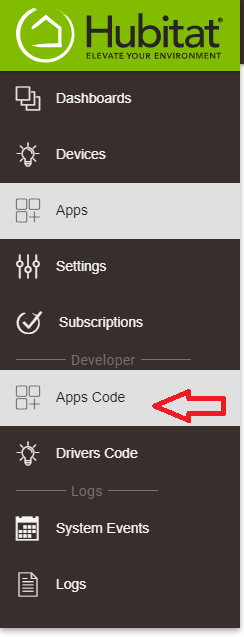
I was unable to save the code, when I try to save this error appears at the top of the page
Try hitting the import button at the top and pasting in:
https://raw.githubusercontent.com/thebearmay/hubitat/main/apps/lockHistory.groovy
for the URL.
Also make sure you are adding a new App, not Driver.
4 Likes
sorry for that, I tried add to new drive!  Its correct now!
Everyone does it at least once, so of us more than others... 
3 Likes
2021-04-30 16:05:28.322 [CodeName] unknown codeNumber: 1
2021-04-30 16:07:45.678 [Lock Event]
2021-04-30 16:07:51.302 [Unlock Event]
2021-04-30 16:07:51.303 [CodeName] unknown codeNumber: 1
1 Like
What does the Current States part of the Device Driver show for the attribute lockCodes
Current States
- battery : 45
- lastCodeName : unknown codeNumber: 1
- lock : unlocked
- maxCodes : 1
1 Like
Does it change if you hit Configure on the device driver? May also want to try hitting the Get Codes button.
It doesn't change, the only thing that works is unlock and lock, the other parameters I click and nothing happens!
Hmmm... how many codes/fingerprints do you have in the lock at the moment, and what do you get if you use one other than the first one?
1 Like
| 2021-04-30 16:07:51.303 | [CodeName] unknown codeNumber: 1 |
|---|---|
| 2021-04-30 16:43:20.394 | [CodeName] unknown codeNumber: 2 |
| 2021-04-30 16:43:35.966 | [CodeName] unknown codeNumber: 3 |
Current States
- battery : 45
- lastCodeName : unknown codeNumber: 3
- lock : locked
- maxCodes : 1
1 Like