Doing an audit to solve more of my issues - I have one item that is having a problem in my reports, and I think it should be reviewed and fixed.
My virtual device ‘Thermostat Controller’ - a built in virtual device provided by HE puts a funky string as the Parent App. Highlighted in Orange below, with the full device highlighted in blue shows that there is some wayward HTML stuck in the Parent App field.
My feedback is this is a problem as I create scripts to track my bridging to other platforms.
There isn't anything to fix on the hub side here: the "Parent app" name is accurate, as this will display "(Controlled)" in red text, as you'll see in the hub UI. I think there's somewhat of a misconception that these strings at the end of device or app names are some magic "status" field that the app or UI treats specially, but they're not; rather, they're just part of the actual app name, and what you see is exactly how the app must set its own name (label) to get it to appear like this. (You can find some examples in community code, too, like HPM itself; this is not something unique to built-in apps.)
The screenshot you shared above is, of course, outside the hub UI -- so something that must be scraping this data or using some endpoint to retrieve it. It's up to you how you handle that data. The solution might be to modify your script to at least remove the HTML, but you'll also want to look out for things like "Living Room Thermostat Controller (Controlled)" actually being the same app as "Living Room Thermostat Controller (Free)" if that is a concern. Or perhaps you can go by app ID or some other stable identifier, depending on what data you have and what you're doing.
Respectfully - I disagree. I can obviously see what it is. By your logic the ‘Parent App’ name I find in my Apps list should then be ‘Living Room Thermostat Controller (Controlled)’. Edit I can’t even post this string here because apps and tools are affected by the embedded HTML! That string is Living Room Thermostat Controller < sp an style='color:red'>(Controlled)< /sp an> (Stupid discord keeps being affected by the embedded HTML EXACTLY why this sort of thing is BAD!)That means the Parent App name is dynamic. I think we both know it’s just a hack to help the GUI with a cute feature.
However, I just call em as I see em, and I posted this to show what I see, not debate - I let HE ignore or resolve as they see fit.
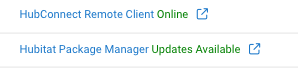
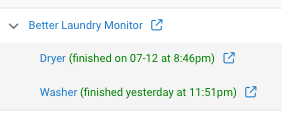
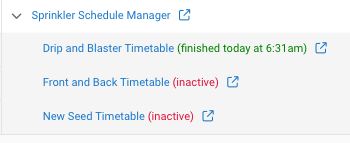
You’re wrong is the most likely answer though. Choosing/refusing to understand that Developers dynamically add content to the Title to provide benefits is an odd tack to take. HPM (as mentioned,) Sprinkler Scheduler, Better Laundry Monitor that I manage all make use of this Feature. Other developers do too.
All of the apps add some sort of status message, success or fail using green or red, is quite common within that technique.