I have Hubitat C8 Pro, current sw. I am trying to integrate Wiz Pole light - this is new and pre-configured through the Wiz app. Also all current.
I did experiment with LAN based Wiz Integration. That was a bust. I did more homework and found out that it was not the route to the Matter implementation I was after. This was all backed out, deleted, everything back to square one. Boot, boot, boot.
Then, I proceeded to add the Wiz Pole similar to what I have done successfully with Govee lights. I pre-configured via Wiz app and then added device in Hubitat with the Matter interface using the 11-digit key. It processed smoothly. The Wiz pole appeared in the Matter list but IT DID NOT HAVE AN IPV6 address. I was unable to access the Wiz Pole by any device options.
I suspected the problem related to the lack of IPV6 being listed for the Wiz-pole. A search lead me to a recommendation to ensure my wifi was broadcasting multicast. The only relevant setting in my Unifi Wifi settings was CONVERT MULTICAST TO UNICAST. This did result in an IPV6 address being listed in Hubitat Matter list. However, there was still no ability to control the Wiz Pole from Hubitat.
I rebooted all involved devices. Now, without a change to Unifi settings, the IPV6 address was missing from Hubitat Matter page. And, of course, no joy operating the Wiz Pole.
UPDATE: I decided to take a run at another Wiz light. This also added smoothly and it did yield an IPV6 address. But, no control from Hubitat. During the Wiz pre-configuration, there was an 'optional caution' that BROADCAST UDP ON LOCAL was apparently not enabled in my Unifi network. I poked around and did not find anything as simple as 'enable UDP'. However, with a limited understanding of UDP I think this could be the shortcoming. But, I am unaware of what Unifi network changes would be required for Wiz and Hubitat to get along???
I feel I am close but, must be missing something. Assistance is greatly appreciated.
DMS
Regardless of whether Hubitat shows an IPv6 address for the device or not, the fact that the pairing completed successfully means that Matter communication itself is working at a basic level.
As a next step, try switching the device to the Hubitat built-in “Device” driver. After that, click the Get Info button and watch the live logs. Do you see the Matter device fingerprint being reported there?
That will help confirm whether Hubitat can still communicate with the device over Matter and whether the issue is at the driver or capability level rather than networking.
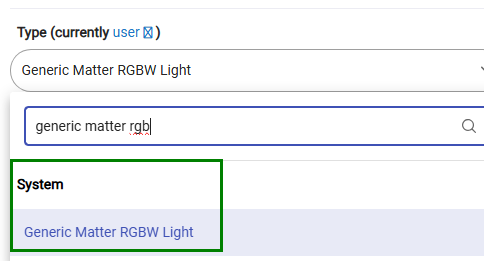
Jackpot! I changed to the driver you suggested and it worked.
I also see that my Govee light uses that driver. I thought the WIZ driver would be better matched but, I guess not.
I will go back out some of the WAN/LAN tweaks that were probably unnecessary. Of course, I will leave the IPV6 enabled on the LAN.
At the moment just having the on/off control in Hubitat is all I desire. However, if there is a more complete feature set exposed somewher, I welcome your input. I have learned a lot configuring these lights with Matter on Hubitat........
Thanks for helping me out of the rat hole I dug for myself.
Happy holiday !!