My TV remote (Sharp Aquos) has an on/off switch which is a toggle. So you click it and if the TV is off then it comes on. And vice versa. Same with the RM3 app that I'm using. Just a toggle. The problem with this is that if I don't know the state of the TV I don't know if I'm actually switching it on or off.
Would there still be specific IR codes for on and for off? Or are they always a toggle like this? If they do exist separately, how would I find them since the IR remote I'm assuming is just sending the same toggle command each time?
I find that Harmony has a good list of available functions.. if a separate on and off command is available, It should be available in there... you don’t have a Harmony remote by any chance?
For some reason, I can’t seem to get the “SendStoredCode” to work. I have set it up as sn actuator, and done everything you did. Sending the full code works, but not the code name.
I had spaces in the code name, which were replaced with underscores, and I have tried using the name with the space and with the underscore, and neither seemed to work.
I've bumped into this issue and found the best solution going forward is to avoid using spaces or underscores in the stored code name.
When an IR/RF code is stored with a blank in its name, the Broadlink app replaces the space with a _ character. However when specifying the name in the sendStoredCode command, the _ character cannot be specified, and the underscores must be represented by a space.
Thanks. I tried manually entering a new code and typing an underscore in the name, that didn’t work. Then I tried again with no spaces or underscores, and that didn’t work either.
I’ll have to revisit this later, and try turning on the logs to see if it shows anything.
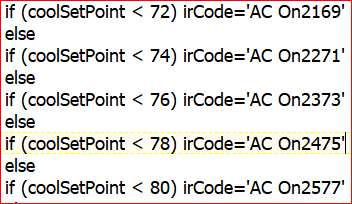
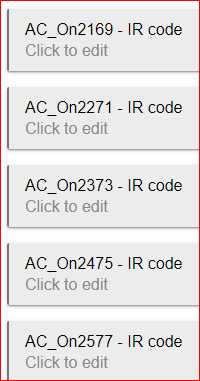
Btw, in the Rule action for your example, it would just be “AC_On2169”, and not “ AC_On2169 - IR Code”, correct? I copied the name directly from the IR/RF page every time I tried this.
The “test Stored code” button worked properly, but I have not gotten the stored code name to work no matter what I do.
Yep. That’s what I copied. I also created one with no spaces or underscores. That didn’t work either.
I have what I need working for now using SendCode instead of SendStoredCode, so I’m going to deal with this later in the week. The only problem with that is that I can’t tell which code does which function in the rule machine interface.
I’m beginning to think these devices hate me. This is controlling the entertain system in my living room, I have a harmony hub in the bedroom that I may replace with another BroadLink device because the Harmony hub doesn’t seem to work properly. I have 4 devices programmed in it, and the cable box has stopped working, and i can’t get it to control just one item, if I turn on one device, it turns them all on.
But I would need a BroadLink device that has a jack for an external remote emitter like the Harmony has, and I don’t think the BroadLink devices have that.
Finally figured out the issue with why the stored codes weren't working.
When I first set up the remote, it created a device called 'Universal Remote A'. Some time passed between my initial setup and starting to program the remote, and at some point, I created another device for the remote, which I had named "Living Room Remote". I was using this one, and it worked in Rule machine to send the full code, but not the stored codes (although it does work to send the stored code from the Device page).
Switching to Universal Remote A in the rules seems to be working now. Now I got to go through all of my rules and switch them over, then delete the second device.
thanks very much. I will get the RM3 RM Pro+ as it supports RF and because it seems to have more IR LEDs so should be better at reaching all around my living room.
It seems that nowadays in terms of finding a the "full size" broadlink RM devices that are still supported for local API is getting harder and harder
I have a Comcast/XFinity box with the voice remote. The XFinity Remote is programmed to my Sony TV; the Power button on the remote will turn on both the TV and cable box.
I programmed that button into my Broadlink (Learn IR Code), but it only turns on the TV; it leaves the cable box off. Is there anything I can do to get the TV and cable box to turn on together? Or is there a way to find a code without using the Learn IR code that powers ONLY the cable box?