I've looked around a bit to see what options I have for placing the local temperature on my Windows desktop from a Hubitat weather device. Multiple options exist for pulling API data. But I want to use my local Hubitat device. Has anyone done this?
My device : THIRDREALITY Temp and Humidity Sensor 3RTHS0224Z Zigbee
Maybe the Adaptive Cards app to make a custom widget, and pull the data from the sensor using Maker API? I've never really thought much about putting stuff on my desktop, but it seems you would need a wiget or something to make it display nicely.
This might also be something you could do with Auto Hot Key and the Gui features it has.
You may need a Powershell script to pull the data from Maker API into whatever you use to display it.
I do this on my the Macs in my house. I use an app called "OneThing" to put a string using emojis that tell the current outside temperature - I have an Ecowitt weather station in my backyard, the current sky weather conditions - scraped from the closest NWS station - and whether I currently have Raspberry Pi PiHole activated. It looks like this on my task bar.
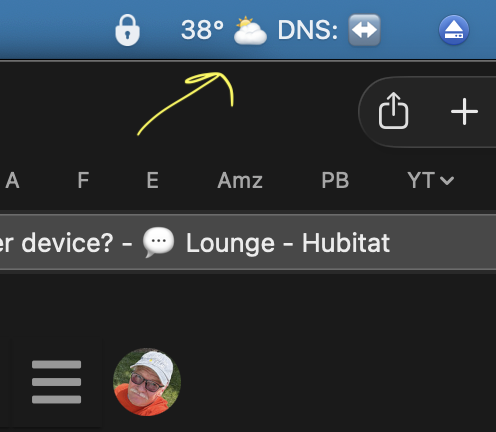
On each Mac is a shell script that runs via cron every two minutes that uses curl to grab the current state of two devices (using the Maker API). The jq utility breaks the xml down into shell variables and then I construct the string and call OneThing. It is a total hack? Yes, in the best old Unix programmer sense of the word.
Anyway, you couldn't follow exactly the same thing for Windows - but the workflow would be similar I would think.
Make device available via MakerAPI
Pull current info
Parse it
Format it as desired
Use some magic utility to display it on your desktop - grok suggests that "rainmeter" might offer similar capability.
Of course MacOS being a variant of Unix makes shell scripts and cron jobs easy and native, but there are workarounds for these also.
Shared in the hope that it might help you to roll your own solution. Mines been up and running for 4 years or so and works great. My wife thinks it something built into her Mac and is none the wiser that it's a bunch of old unix guy ksh|awk|pq|echo stuff.
1 Like
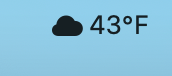
Would you please consider sharing a guide to implement on a Mac? The built in Weather icons are boring.
Sorry, been away. I'll post something in the next day or so.
1 Like
Here's the write up.
How I display current temperature, conditions and PiHole status in on my Mac task bar.

Parts of this Rube Goldberg Machine:

-	The “One Thing” app from the Mac App Store
I have a virtual device that is updated by an Ecowitt weather station and some rules that round the temperature since I don’t find tenths of a degree very interesting. The device is called “Backyard” and it’s device ID is 1112.

I use the Precipitation and Weather Monitor for NWS Data app available here on the Hubitat Package Manager and set it up to get the weather observations from Dulles Airport which is quite close to me. That’s gives current observations such as “Partly Cloudy” etc. And it’s device ID is 2395.

I have a shell script which I’ll share that uses MakerAPI calls to get the current state of those two devices. These are provided in XML format and need to be parsed. There’s a program called jq that will do that for you. Homebrew will allow you to install it easily on your Mac.If you don’t have home-brew first install it. It’s easy to find instructions online. Then in a terminal window type brew install jq.

The shell script.
This script is called in set-menubar.sh and it lives in a directory called scripts in my home directory. I’ll paste it below with the maker access token redacted. You’ll need to put your access token in and edit for your device ids to get the current contents of your devices.

There’s really nothing magic about the “pretty icons” as they are simply unicode icons as you’ll see in the script below.

To make sure that it is never more than two minutes out of date, it runs every two minutes as a cronjob. Again, since MacOS is a variant of Unix all these capabilities are out of the box.

$ crontab -l
1,3,5,7,9,11,13,15,17,19,21,23,25,27,29,31,33,35,37,39,41,43,45,47,49,51,53,55,57,59 * * * * /Users/jay/scripts/set-menubar.sh > /Users/jay/scripts/menuerrs

That’s really about it. As I said it’s a kludge, but one that has run reliably for 4 years or so. And if you don’t use pihole on your network it’s easy enough to just take that part out.

set-menubar.sh follows:

#
# 10/13/22 Jay Wiegmann set the temp and weather and pihole status on the menu bar via "One Thing"
# 09/07/23 Jay Wiegmann Added icon for thunderstorm
# 09/22/24 Made changes for Lori version. Now looks for user to see if
# we should show DNS or not.
# Note that the main habitat IP is 192.168.4.136. If that changes the # script will need to be updated. Yes, it should be a variable. For # # some reason I had trouble with that.
#echo USER is $USER
# include homebrew in path so jq will work
#
PATH=$PATH:/usr/local/bin:/opt/homebrew/sbin:/opt/homebrew/bin
cd /Users/${USER}/scripts

#backyard
curl -s "http://192.168.4.136/apps/api/1078/devices/1112?access_token=BIGREDACTEDNUMBER"> 1112.$$
# DullesWX
curl -s "http://192.168.4.136/apps/api/1078/devices/2395?access_token=BIGREDACTEDNUMBER"> 2395.$$

MYTEMP=`cat 1112.$$| jq -r '.attributes[]| select (.name == "temperature") | .currentValue'`
WX=`cat 2395.$$| jq -r '.attributes[]| select (.name == "Weather") | .currentValue'`

#
DNSSTATUS=`cat dns-status 2>/dev/null`
#
#tail -1 /etc/resolv.conf
HASPI=`tail -1 /etc/resolv.conf| grep -c 126`

#echo HASPI is $HASPI
if [[ ${HASPI} == 0 ]]
then
	DNSSTATUS="↔️"
else
	DNSSTATUS="✅"
fi


#echo $MYTEMP,$WX,$DNSSTATUS

if [[ $WX == *"Cloudy"* ]]
then
	ICON=☁️
elif [[ $WX == *"Clear"* ]]
then
	ICON=☀️
elif [[ $WX == *"Fair"* ]]
then
	ICON=☀️
elif [[ $WX == *"Overcast"* ]]
then
	ICON=⛅️
elif [[ $WX == *"Mostly Sunny"* ]]
then
	ICON=🌤
elif [[ $WX == *"Few Clouds"* ]]
then
	ICON=🌤
elif [[ $WX == *"Drizz"* ]]
then
	ICON=☔️
elif [[ $WX == *"Rain"* ]]
then
	ICON=🌧
elif [[ $WX == *"Thun"* ]]
then
	ICON=⛈️
elif [[ $WX == *"Partly Cloudy"* ]]
then
	ICON=⛅️
elif [[ $WX == *"Freez"* ]]
then
	ICON=🌨
elif [[ $WX == *"Snow"* ]]
then
	ICON=❄️
elif [[ $WX == *"Gusty"* ]]
then
	ICON=🌬
elif [[ $WX == *"Windy"* ]]
then
	ICON=💨
elif [[ $WX == *"Fog"* ]]
then
	ICON=🌫
else
	ICON=❓
fi


# We have the info so send it off to the menu bar via the app
#
#echo "${MYTEMP}° ${ICON} DNS: ${DNSSTATUS}"
#echo "${MYTEMP}° ${ICON} DNS: ${DNSSTATUS}" | shortcuts run "One Thing Displayer"
if [[ ${USER} == "jay" ]]
then
	echo "${MYTEMP}° ${ICON} DNS: ${DNSSTATUS}" | shortcuts run "One Thing Displayer"
else
	echo "${MYTEMP}° ${ICON}" | shortcuts run "One Thing Displayer"
fi

#
# Clean up temporary files
rm 1112.$$ 2395.$$
exit
1 Like
I made a PDF but couldn't figure out how to post it.

