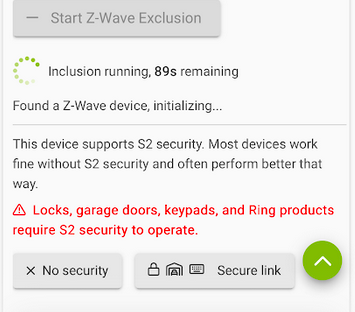
I noticed the warnings about using S2 have been softened but the subtle (maybe not that subtle) message is to NOT use S2 security. Is there a good reason for this? I though S2 was a benefit, not a liability. Something about more rigorous handshaking? Or does using S2 consume CPU resources and slow down response times? It would be good to understand the logic behind the "discouragement".
It does note that things that really need that security will require it. How secure does a simple switch really need to be? I'm just not concerned about someone hacking into my Zwave light switch so they can turn on and off my light, and I can't imagine why anyone would even bother.
Latency: S2 requires extra handshakes (credential verification) for each command, adding a small delay compared to no security, but this is often negligible in modern systems.
Definitely a fair point, but I accept any potential latency hit (which I've never noticed) for the additional error-checking S2 has. Beyond that though, I totally agree that the additional security-related yadda-yadda is a pretty wildly over-blown "plus"
All of my ZW devices have been S2 for several years now.
I recall there are options when you pair with S2 - non authenticated, authenticated and access control (IIRC). Just wondering, which do you use?
I only have S2 on two devices currently; one is a shutter module controlling the garage door (I included that S2 unauthenticated), the other is Fibaro implant which can arm/disarm my alarm system (which I included S2 authenticated).
So my query would be if including everything S2 what would be used, for say, switches and outlets that don't need to be super secure?
As and when the C-9 Max Turbo Special Edition is released I may go to the trouble of starting again from scratch.
I'm not at home to verify in my ZW table, but I think "authenticated"? I just use whatever of those options is that device's default when I select to pair it S2.
In other words, I have never made a deliberate point to review or intentionally select one of those options when I'm pairing.
Almost every device in my house is paired with SmartStart and in turn S2 security. My experience with the the type of s2 is that you want to probably leave it alone and let the device use what it expects. I am a firm believer in the concers with S2 are blown wait out of perportion because of issues with S0 and older security designs. It is my understanding zwave 700 devices even include built in crypto processing components so cpu impact and such is minimal if at all.
It is my understanding that LR requires SmartStart. When using SmartStart it will by default include with S2, but i don't think it is required.
I wouldn't worry at all about including anything with S2
S2 also includes Supervision, which could/should improve reliability of devices like switches/dimmers, AFAIK.
I have started including my Z-Wave devices (blinds, switches, & dimmers, etc.) with S2, based on some comments from HE staff that it's currently in the can't hurt, could help category.
Use what the device defaults to. Think of each group like a separate VLAN, they are security buckets and devices in one group cannot talk directly to devices in other groups via associations. Repeating (hops) are not impacted by the groups.
UnAuth is the most basic S2, the device can be paired without a DSK PIN. I think once paired the features are the same as Auth. I have only seen UnAuth in very early S2 devices. I suppose since they are paired without the PIN they are possibly less secure, and thus restricted into their own group.
Authenticated - this is where most of your S2 devices should be. Paired with a DSK PIN (or QR code which includes the PIN)
Access Control - This is for devices that... "Control Access", like locks or other entry devices. I think possibly security keypads go in here also. This prevents you (or a thief) from creating a direct associations something like, a light switch that unlocks a door.
Also to pile on with everyone else, that messaging when pairing is outdated and I thought they removed it. I fought to have it changed a while back so at least there has been some improvement. Here is how I see the advantages:
Control devices (light switches, etc...) - Supervised transmissions. Allows for automatic retries if the device does not respond with minimal overhead. This should make devices more reliable if handled correctly at the hub level, which typically Hubitat did NOT do at all in the past (it was up to the driver). I believe this is supported in Zwave JS, not sure to what extent it is being utilized at this point (possibly fully).
Sensor Devices - as mentioned S2 offers better error checking. This comes in handy with sensor devices where erroneous reports can lead to false alarms. There has been evidence of this in the community in the past and in multiple cases re-pairing the device with S2 solved the issue with erroneous reporting.
I would think the extra handshaking would be infrequent. Surely a security key isn't negotiated with every command? After a key established I wouldn't suspect much overhead after that. Then when you pick up supervised transmissions it tips over to benefits>costs in my mind.
Anyway I have two systems one where I dutifully (2 years ago) followed the don't select S2 and another where I did S2 if the device supported it. I am going to try some comparisons.... It would be nice if you could turn on/off S2 for A/B comparison on the same system because re-pairing devices is too much of a chore.
Wasn't there also a concern/issue with firmware updates on devices paired with authentication? Or am I remembering wrong? I paired mine with no authentication initially (seems like that was the reason) and have not gone back to re-pair them.
Not for S2. I am 9 in en-route to 14 OTA upgrades on ZEN77 devices. Other than having to queue up each one manually, it has progressed uneventfully. About 5 minutes per device.
That was true for a while -- in the past, the built-in firmware updater tool couldn't handle S2, so other workarounds to update S2 devices were necessary. That was resolved though.
It's not.. I think this comes from S0's horrible need to get a nonce before each packet.. I should clarify .. S0 is still not recommended if it can be avoided..
S2 only renews the nonce if it gets out of sync, which should be very rare in a properly functioning mesh..