Periodically I was/am trying FP2 sensors (have 2 of them) but so far no luck. They are always creating ghosts resulting in useless automations. In my case everything is automated and driven by sensors. Sensor's reliability is a must. Unfortunately FP2 sensors do not meet the reliability requirements.
2 Likes
For this reason undersink cabinet doors equipped with diy actuators driven by Hubduino. WAF is elevated.
3 Likes
Waiting patiently for pics, video, 2,000 words typed, double spaced. 
Did it work?
Worked like a charm - up at daybreak, down at night, just like I asked it to. 
Here's the setup:
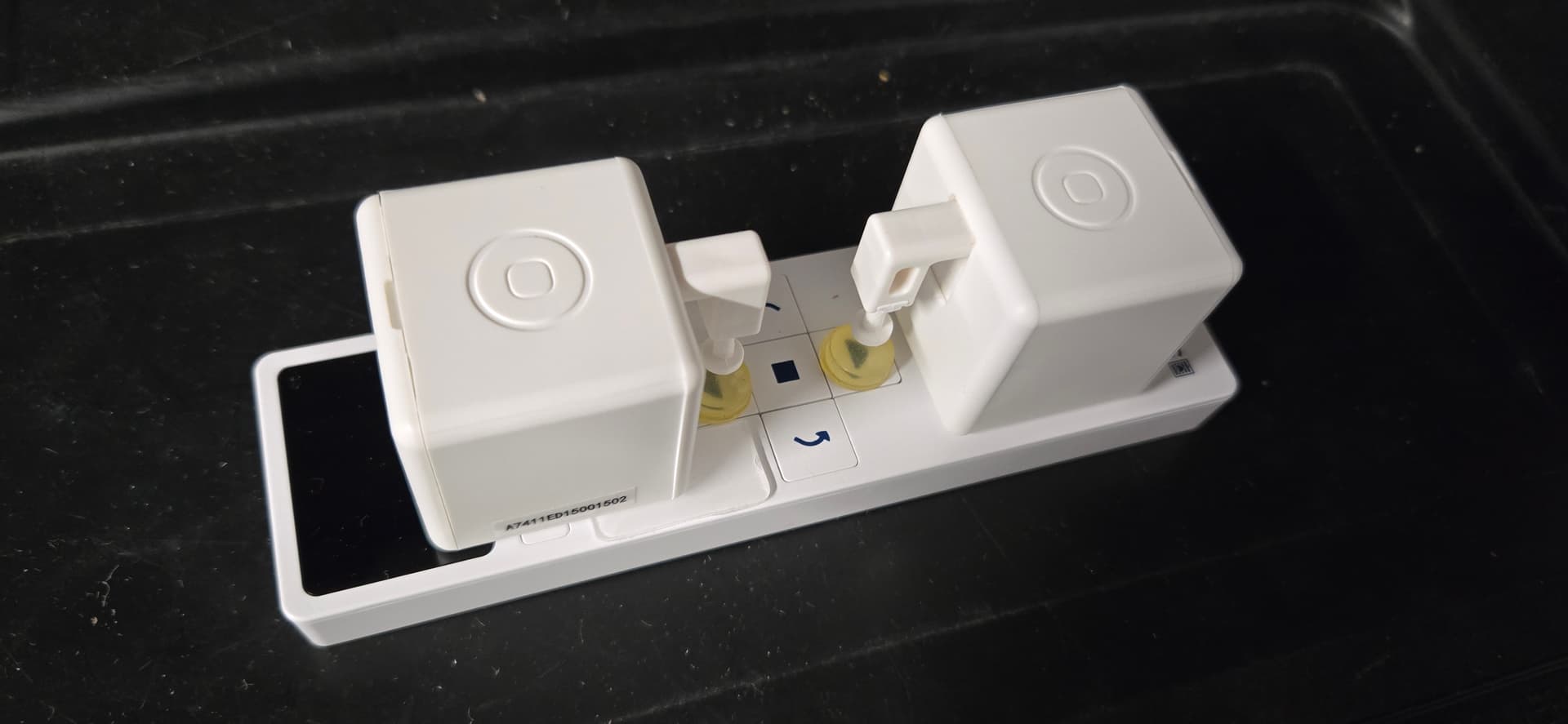
The little yellow dots are stick-on circular cabinet bumpers, as the "fingers" didn't quite reach the surface-flush remote buttons.
4 Likes
Thanks. So it seems clear that you can open it via voice. For those of us without voice, can you confirm:
- It can also be opened via motion of some sort of foot wave under the cabinet?
- It can be closed via motion of some sort of foot wave under the cabinet?
Also, how much was it, and since it's from Europe, does it come with us power?
And do you mind sharing how you acquired it? Using the option to find a retailer results in not available no matter what zip code I enter.
Thanks.
It can open via foot wave under the cabinet.
It cannot be closed automatically. The actuator just pushes the door out.
It is powered by USB-A and does come with a power brick with interchangeable plugs, 2-prong North-American standard is one of them.
No idea how much it cost… it was part of my kitchen package and I didn’t ask to have it broken out. I expect it would be in the $300 range…
My builder purchased it from Richelieu. They sell mostly to contractors, but I think they also do walk-in’s at a higher price. Seems they sell both in Canada and the US:
There’s a phone number on their site.
I’ve recently added a couple Aqara FP1E mmwave sensors. They’re working great 2 plus weeks in. Zero false positives so far, and no issues staying connected. So far they seem much more reliable than my Linptech sensors, that routinely have false positives, and need to be rebooted weekly to keep them from becoming unresponsive. Also, they are no more chatty than the Linptechs.
This is exactly what I need for my blind that doesn't work with the RF blaster. Thanks.
Here is a link to a installation video of the Libero Smart Door Opener from Hailo. https://www.youtube.com/watch?v=mGBMhD9eKqs
1 Like
I added an Aeotec Home Energy Meter 8 (3 clamp), but had to create a driver for that (available on HPM). Does work well, but you must configure it so it will not send too many updates like any power meter.
Also working on the Shelly Wave Pro Dimmer 2PM QPDM-0A2P01EU which is a dual dimmer in single DIN rail package with, on paper, nice features. The Hubitat build in driver is useless, so created my own as well (https://raw.githubusercontent.com/reneboer/Hubitat/refs/heads/main/Shelly/Shelly%20Wave%20PRO%20Dimmer%202PM%20Driver.groovy). I have not yet put in on HPM because the device it self is not working according to specs (buttons do not work as advertised, only push mode works) and Shelly seemed to have stopped selling them. Shelly knows but they say updating depends on a new zwave SDK version, it has been there answer for nine months or so now for any zwave firmware issues.
Cheers Rene
Not really a new product but tinkering with an existing upgraded product. With Alexa's new capabilities with Alexa Plus I have been tinkering around with notifications playing through my Sonos speaker to Alexa through an Echo speaker. Who needs virtual devices and such.
Haven't actually deleted any virtual switches yet. My most useful notification so far has been to tell Alexa to shut up with a simple dashboard tap. Kind of funny to hear Hubitat tell Alexa to shut her pie hole.
With some clever rules and notifications I could probably keep her talking for hours to simulate people being home and having a conversation when we're away.
1 Like
Have a couple that require this, the others were fine, but at some point I confused myself as to which were which, so I reboot all six that I have once a week. Too lazy to try figure out which ones are the picky ones.
I don't get false positives with them, except for ceiling fans, which can really mess them up.
Have you tested the Aqara with ceiling fans yet?
2 Likes
I have successfully configured one of my Aqara FP2 sensors to ignore my ceiling fan. I currently have zero issues with my FP2 sensors.
6 Likes
Nice. I have one location currently using Linptech where an mmW sensor that can be taught to ignore a ceiling fan would be a useful replacement. Can you point me at a post/posts where the steps to do that have been described? Is dark magic involved?
2 Likes
Similar problem here, I fear that I have too many grandfather clocks for a FP2
1 Like
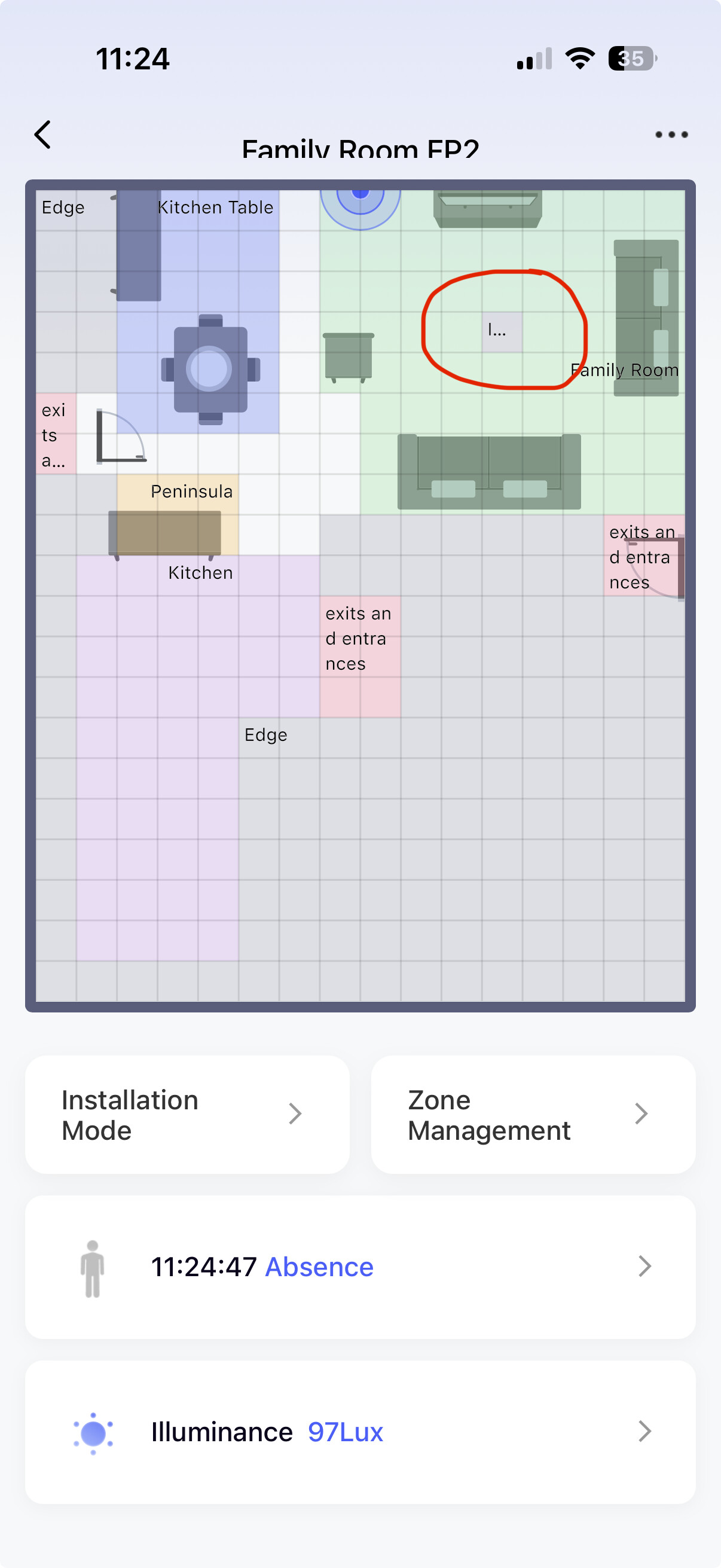
It is really easy. You simply map out your room in the Aqara app, and then mark specific grids that should be ignored for motion detection. Here is an example where I circled my ceiling fan exclusion.
2 Likes
Thanks! Looks super easy. Does that require you have an Aqara hub?
I'm thinking Aluminium foil lining the inside of the clock cases should work to screen the pendulums
I don’t have a ceiling fan in the rooms that have mmwave sensors to test, but one aqara is in the garage and working perfectly routing through a Linptech in the house. You can set a baseline noise level, but that may make it too insensitive in the case of a fan. They also seem to have a wider field of view than the linptech, making them more suitable for ceiling mounting, which I haven’t tried.
I have four Limptech mmwave sensors. Every few weeks one or two would go on a walkabout. Since they are line powered my solution is a couple of inexpensive small smart Wasa WiFi wall warts that power cycle twice a week at 4 am. Not a single failure in the last couple of years.

