Mini server? Im thinking of something to set homebridge, cameras, and maybe a few other things on my network,
These were built to be small form factor PCs for office and school environments.
They make excellent machines for home lab environments and for things that you mention.
3 Likes
Seems like it would work for that purpose. I’ve a 12-yr old Mac mini with similar specs (i5, 16GB RAM, 256 GB SSD) that I’ve loaded Ubuntu 24.04 on, which gets used as a server for Homebridge and a bunch of other things.
2 Likes
You can also find a lot of these HP micro/mini PCs too:
I've picked up a couple and found them to be completely functional. They tend to come with a Windows HDD and I've popped those out on arrival and installed a nvme stick to run Linux.
4 Likes
A guy I work with just bougt something like that. Thats what got me going down this rabbit hole! To mae sure, something like that would ALSO work work for what im looking at doing?, Homebrdge, Blue Iris or Scrypted. HA currently run on a Bee link S12, but could consolidate if it makes sense I guess.
3 Likes
It's essentially a laptop in a small box, minus the display and keyboard.
1 Like
I can't speak to Blue Iris. But I know the hardware linked to by @csteele, or the Dell mini PC that you linked to, is amply sufficient to run multiple servers. Here's what I have running on my Mac-mini, which has similar hardware, using Ubuntu 24.04 as the OS:
- DNS/NTP services for my LAN
- NFS/SMB to share Music libraries with Sonos speakers
- Channels DVR with an external 2 TB SSD for recording/sharing broadcast TV with TVs
- Zigbee2MQTT (bare metal)
- ZWaveJS UI (Docker)
- Homebridge (Docker)
- Home Assistant (in a VM)
- Node-RED
- Uptime KUMA
There is barely any CPU utilization. I know it will also handle Scrypted just fine; I am planning on using it. There's probably a couple more things that I am not remembering right now.
2 Likes
looks like im headed down another rabbit hole.... and hey, @csteele saved me $30!
3 Likes
My work issues these to every employee as an AoVPN for working from home. They work quite well.
1 Like
Your Beelink mini PC could also do all that.
With the possible exception of blue iris, it would depend how many cameras, are you transcoding, using AI for object recognition.
But scrypted, Homebridge and home assistant could run on pretty much anything.
1 Like
True - I hate the pokiness of those Atom CPUs though. If it has one of those.
Celeron i think? Probably not a great option for blue iris unless the camera system needs are very modest.
1 Like
Now if you’re looking for moar power than most people can actually use in such a tiny box, there’s the minisforum MS-01.
Yes. I had thought of that. The issue (or at least I think it's an issue) is I wiped windows and its Running HAOS, would that make a difference? Doesn't whatever I want to run on it need to have a HA integration now?
As for the number of cameras, initially three, I can't really see more than seven. The only real reason I'm messing with HomeBridge is to bring the Cameras (Reolink) into AppleTV.
I really hadn't decided between Scrypted and Blue Iris yet, but those are the two I'm leaning toward now.
It has an N100 Alder Lake processor. It has been fine for what I'm using for with home assistant. but then I don't use home assistant for more than bringing a few devices into Habitat that I otherwise can't.
Since you're already running HAOS on your Beelink mini PC, you can simply use HAOS to run the Scrypted Add-on. HA also can pretty easily replace Homebridge, as HA can share any of its devices with Apple Home via HomeKit.
You can also run Node-RED, InfluxDB, Grafana, NUT, Zigbee2MQTT, Z-WaveJS UI, plus a whole lot of other add-ons directly within HAOS.
Managing these add-ons (just Home Assistant's name for docker containers) from within HAOS is really trivial. Much simpler, IMHO, then trying to manage then on bare-metal Linux or Windows.
5 Likes
This is a pretty nice little box.
1 Like
I'm willing to play with it! I really need to get a better grasp on home assistant. All I have really been using it for is to bridge stuff (mainly my litter box and power wall ) into Hubitat. It set up and running, but I don't do much with it. One thing that has confused me is all these pairing codes it's showing me. I'm not really sure what they are for, or how to use them. I think they are for Blink cameras, and when I add them to the Apple Home app, all i get is the thumbnail image, not the live view. Same thin happened on the dashboard .
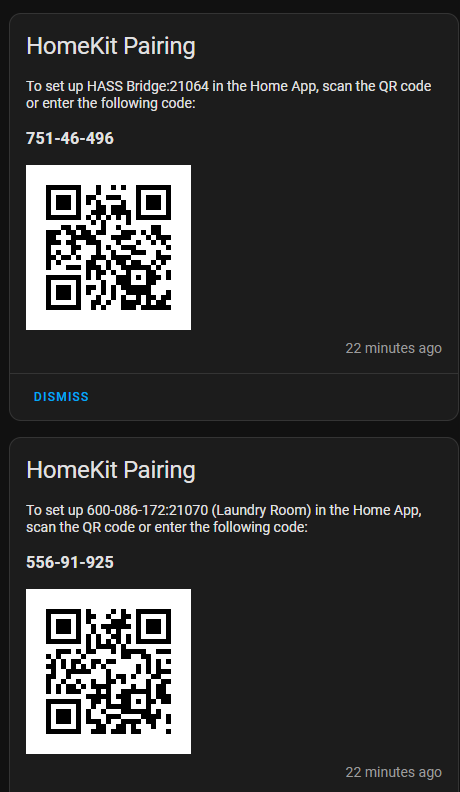
I do not use Blink cameras, so I cannot be much help with those. I use Ubiquiti UniFi Protect cameras, which I have integrated with Apple Home via Scrypted. I tried HomeBridge as well, but found that Scrypted was noticeably quicker in starting a live video feed versus HomeBrigde.
1 Like
The blinks likely wont be around much longer. Just something that is here now I thought I could experiment with. Not sure what the point of havng an add on is if it doesnt let you see the live shot, motion sensor maybe? I got plenty of those, and those blink motion sensors aren't all that accurate anyway.
I saw someone comment on Scrypted the other day, thats what made me consider it. Im not married to homebridge, so if I find anything equal or better, im open to it. The easier the better.
I do find Homebridge to be a little more straightforward/intuitive to use versus Scrypted. YMMV, of course.
1 Like

