I have a webcore piston that reboots my entire home network when needed. I power cycle the wifi devices first with smart plugs. I reboot my Hubitat hub at the very last so that I can control all of the smart plugs connected to my wifi devices during their reboot. But this webcore piston should still be running when my Hubitat reboots. What happens to that piston when the hub reboots?
I'd think it's cancelled. Just run a test piston to reboot Hubitat, then have a command do something like a notification after the reboot command and see if you get the notification. I'd even put a WAIT 30s after the reboot command to make sure the piston doesn't have a change to complete before Hubitat actually reboots.
From my experience the Reboot command is the last action performed. In RM I set a Hub Variable true just before the reboot. Then my Boot rule checks if the Hub Variable is true, then sets the Hub Variable false and logs that the boot was initiated by the reboot rule.
Why would the piston continue running if the hub reboot action is the last thing the piston does?
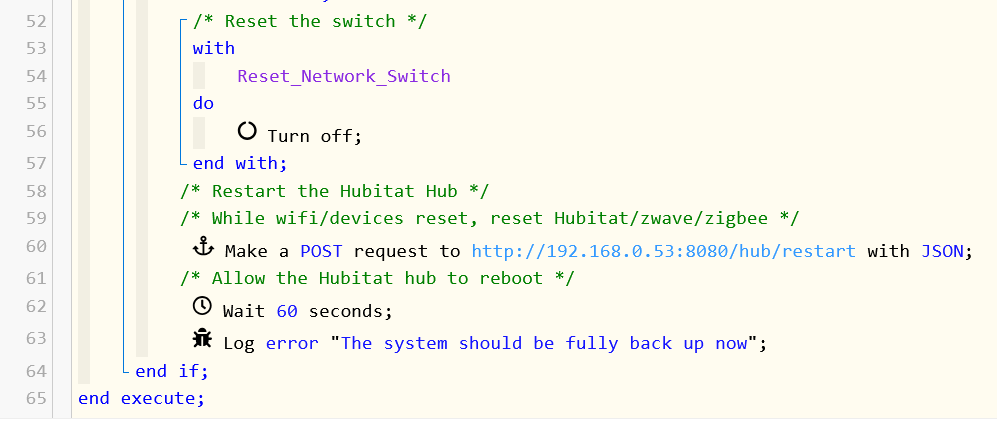
I don't know what webCoRE does internally for this, but the most likely option (and what I would do if I were writing such an app) is a scheduled job, technically created via runIn(). Contrary to popular belief, these survive hub reboots, and the job will be executed if the hub is running at the scheduled time -- no matter what happened in between (except, of course, for something else deleting the job).
However, you're only giving the hub 60 seconds to reboot. That seems pretty quick (although I really only reboot for updates, so I've probably never paid much attention otherwise...). While it may depend on what model you have and what you have on it, I'd maybe give it a few minutes just to be sure. For initial testing, you can go even longer and see if that scheduled job is still there (check the App Status page for the piston, or "Scheduled Jobs" in "Logs" for a different view of the same data) after the reboot. This matters because as I mentioned above, the hub needs to be up at the scheduled time (no giant game of catch-up for anything missed). But that's generally the only concern, other than ones people might create themselves from whatever their rules, pistons, etc. depend on.