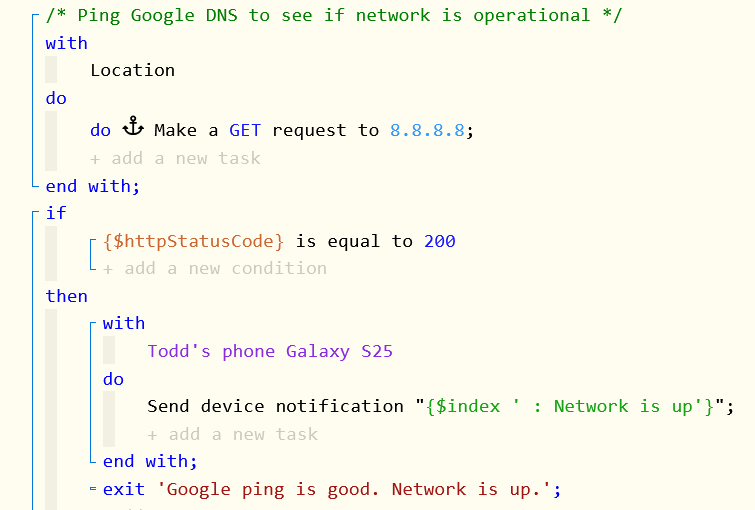
I have been running my code through Gemini recently seeking possible improvements. Gemini says this ...
Problem: WebCoRE’s Make a GET request expects a fully qualified web URL (e.g., https://... or http://...). Passing a raw IP address like 8.8.8.8 without an HTTP scheme or endpoint will fail or throw an HTTP error before returning a 200 status. Furthermore, Google's DNS server on 8.8.8.8 does not serve a web page over HTTP/HTTPS on port 80/443, so an HTTP GET request to 8.8.8.8 will likely timeout or return a connection refused error, never returning 200.
Fix: Use an HTTP endpoint designed for uptime checking. [http://clients3.google.com/generate_204](http://clients3.google.com/generate_204) (returns HTTP 204) or a reliable site like [https://1.1.1.1](https://1.1.1.1) or [https://www.google.com](https://www.google.com) (returns HTTP 200).
You can't send a get request to a DNS server. It doesn't serve web pages. You need to send a ping. Or, use one of the suggestions in the Fix section you posted above.
I find that the easiest way to ping any device on your local area network, or on the Internet is to use a user driver written by @thebearmay. Once the driver code is installed, you can create a virtual device called Hubitat Ping. You can create multiple instances of this device to ping vartious devices or web sites. Search for "Hubitat Ping" to find the code.
To determine if you Hubitat is connected to the Internet, simply ping any public DNS server such as Cloudflare (1:1:1:1 or 1:0:0:1) or Google (8:8:8:8 or 8:8:4:4). I also find it useful to ping my router and modem IP addresses.
Thanks for all of the information. The 8.8.8.8 does work and produces a status code of 200. But I read elsewhere that it probably would not work. But it seems to be working properly. https://www.google.com also works. So I was curious if I needed to make changes.
I usually get comments when I speak up - you might want to actually look at what your local network DNS server is - often you get a faster response from your ISP dns. I'm on 2Gig Ziply, so I get a bit faster response from their DNS servers.
c:\wamp64\www>ping 192.152.0.1
Pinging 192.152.0.1 with 32 bytes of data:
Reply from 192.152.0.1: bytes=32 time=5ms TTL=56
Reply from 192.152.0.1: bytes=32 time=4ms TTL=56
Reply from 192.152.0.1: bytes=32 time=4ms TTL=56
Ping statistics for 192.152.0.1:
Packets: Sent = 3, Received = 3, Lost = 0 (0% loss),
Approximate round trip times in milli-seconds:
Minimum = 4ms, Maximum = 5ms, Average = 4ms
c:\wamp64\www>ping 8.8.8.8
Pinging 8.8.8.8 with 32 bytes of data:
Reply from 8.8.8.8: bytes=32 time=8ms TTL=114
Reply from 8.8.8.8: bytes=32 time=7ms TTL=114
Reply from 8.8.8.8: bytes=32 time=8ms TTL=114
Reply from 8.8.8.8: bytes=32 time=8ms TTL=114
Ping statistics for 8.8.8.8:
Packets: Sent = 4, Received = 4, Lost = 0 (0% loss),
Approximate round trip times in milli-seconds:
Minimum = 7ms, Maximum = 8ms, Average = 7ms
We had our upstream provider give us a warning that pinging google.com could be problematic and to use more localized hardware/IP's so that partial internet outages didn't give a false positive or affect us (I was working for a school district as the network manager at the time): No, Google does not mind if you ping their public DNS servers (8.8.8.8 or 8.8.4.4). Millions of people and network tools ping them daily to check internet speed or connection health. However, ICMP pings have low priority, so Google may drop or slow down ping replies if too many are sent.
Pinging 8.8.8.8 with 32 bytes of data:
Reply from 8.8.8.8: bytes=32 time=11ms TTL=119
Reply from 8.8.8.8: bytes=32 time=11ms TTL=119
Reply from 8.8.8.8: bytes=32 time=10ms TTL=119
Reply from 8.8.8.8: bytes=32 time=10ms TTL=119
Ping statistics for 8.8.8.8:
Packets: Sent = 4, Received = 4, Lost = 0 (0% loss),
Approximate round trip times in milli-seconds:
Minimum = 10ms, Maximum = 11ms, Average = 10ms
Pinging 1.1.1.1 with 32 bytes of data:
Reply from 1.1.1.1: bytes=32 time=10ms TTL=59
Reply from 1.1.1.1: bytes=32 time=10ms TTL=59
Reply from 1.1.1.1: bytes=32 time=10ms TTL=59
Reply from 1.1.1.1: bytes=32 time=10ms TTL=59
Ping statistics for 1.1.1.1:
Packets: Sent = 4, Received = 4, Lost = 0 (0% loss),
Approximate round trip times in milli-seconds:
Minimum = 10ms, Maximum = 10ms, Average = 10ms
Those speeds are not important for me though as I am just ensuring that I am online.
If you can ping google’s DNS at 8.8.8.8 with webcore that is probably a better strategy than sending an http get. ICMP ping uses a different protocol and port than http.
My thoughts exactly. If you're going to something, do it right. This is being used to test for connectivity. Use the right methods for their intended purposes. Ping to IP addresses that accept ping. http requests to URLs that accept those requests.
Agreed. Since a domain name server, strictly speaking, doesn’t reply to an http request, Google must have something else answering those http calls that go to 8.8.8.8.
For the OP’s purposes, I’d consider that to be a happy accident. I suppose it’s unlikely Google will ever shut down that web server at 8.8.8.8, but Google does strange things sometimes.
In contrast, unless Google disappears completely in the future, google.com will always respond to http GETs since that’s literally what it’s designed to do.
just commenting, not furthering this discussion - a bit of clarification to my past comment - using a hostname such as google.com requires the DNS to actually be there for the lookup! this adds overhead/delay time. As a previous poster mentioned, DNS is a different protocol then a ping. so point of clarity an HTTP get is not really the same as an icmp echo. I'd be sure I was pinging an IP addr not a hostname, and use the right tool - if I'm checking a website is there an http get to it's ip is a clear task to do so, where checking an IP is there is an icmp call. The web could be down but the ip there, the dns could fail to respond (ddos?) if overwhelming by lookups etc. etc.
Ping is the easiest and what you want to test for Internet access. Even Ubiquiti uses ping within their UniFi routers to test for Internet connectivity.
This is from the UniFi Network dashboard on a Dream Machine Pro:
Those times are from ping tests to those services.
An http request to a URL, as mentioned above by @jshimota, requires DNS. If whatever you are using for DNS is down, that request will fail regardless if you have actual Internet access.