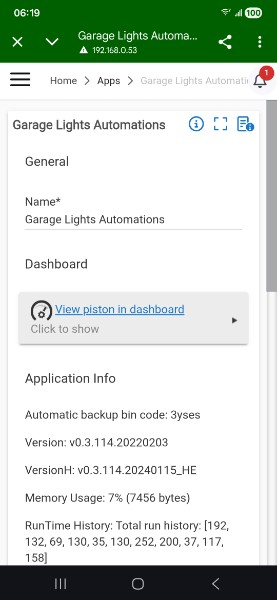
Can a PAUSE button be placed on the piston page in the app so that I don't have to "View piston in dashboard" in order to pause a piston?
1 Like
You could open the dashboard that displays all your pistons and click pause via the 3 dot menu on the right of the piston you want to pause.
I find this easier IMO.
I'm not sure where to find that.
EDIT : I see. You have to log into the dashboard. Wouldn't a PAUSE button be easier on the screenshot that I noted above? I would not have to log into the dashboard. Maybe I am missing something....
1 Like
My brain is wired to look at webCoRE stuff on the webCoRE dashboard. I can see why it might be desirable to have it available in the Hubitat app, but I doubt that I would remember to look there. I only go there to add a device or register a browser.
Perhaps I am just a relic stuck in the old days?
1 Like
The reason this came up is because I wrote a small piston late last night to monitor my water heater ON time. It started going off (sending me notifications to my phone) just after my wife and I went to bed. I grabbed my phone, thinking I could just push a PAUSE button on the piston. Half asleep, I ended up just deleting the piston.
Makes perfect sense for normal people. I am one of the holdouts that still has a sideloaded copy of the android webCoRE app. This issue would have never occurred to me, but is probably the way things need to evolve.

