@nh.schottfam
Maybe I'm not clear on this but it seems to not work.
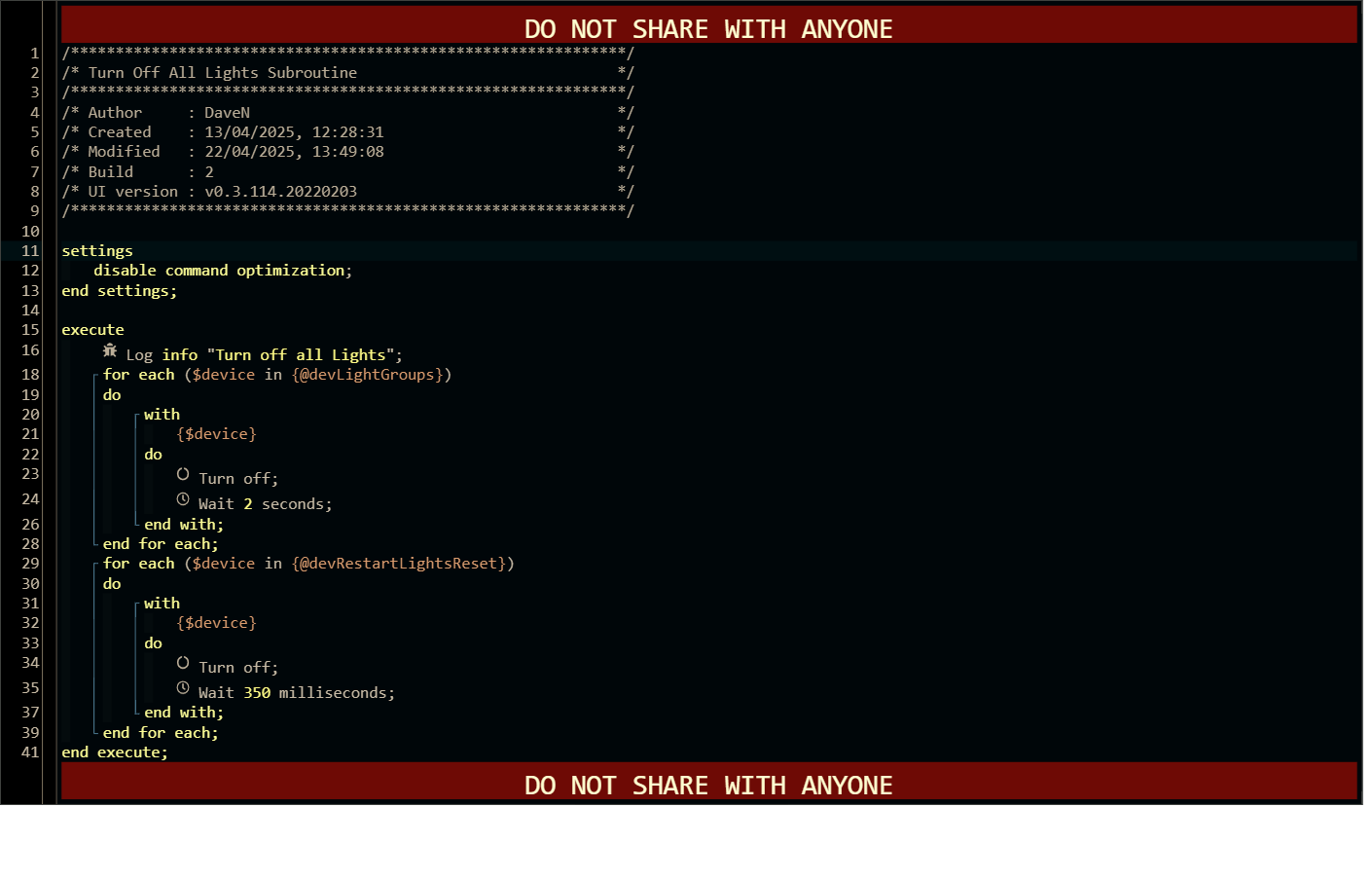
I Execute a piston from my System Start called Turn off all Lights.
I have the flag to wait for execution to complete as True.
That piston should take about 20 seconds (see below) but the System Start keeps on executing lines after 1 second - Speaker Group init.
I only discovered this today as I had manual Wait statements and I thought, there is a more elegant way.
app:20102025-10-28 11:11:39.634info ║ Everywhere Speaker Group Initalizing
app:20092025-10-28 11:11:38.845info ║ Turn off all Lights
It says right in the yellow warning banner on the Execute Piston dialogue box that a wait or pause used in the callee piston will cause the caller piston to just continue. You have a two second wait in your device loop, so it returns as soon as it hits the wait.
So it looks like it returns on the first pass through the loop, as soon as the first device turns off and then it hits the wait statement.
I'll reread the warning.
I just focused in the fact it had to be in the same instance.
I guess I'm not allowed the keys to the nuke; my dad taught me never to read instructions as a male.
Yeah, I had to go reread it myself, I just remembered it saying something about why the piston would just continue. I think when we first see these warnings, and it doesn't apply to what we were doing at the time, we never really look at it again, and over time we forget what it said.
Edit: This is the kind of stuff that pushed me to learn how to do everything in Groovy instead of using Webcore. I used Webcore for about 6 years, bringing my Pistons with me from SmartThings to Hubitat. I really just wanted to be able to call a method, and get a return value, and be able to keep things simpler and more organized. I had close to 200 pistons, and with them calling other pistons and passing arguments, it was getting hard to debug things, and adding new features got very cumbersome.
I say this because I was trying to think of a solution for this issue, but really, using apps code instead just makes the most sense. Once you get the basics of setting up a Hubitat App (which can subscribe to other devices, and control them), and virtual device drivers (that can store data in attributes, perform logic, and send events), you pretty much just drop your Webcore pistons into an app, driver, or app/driver combo, and repeat the logic in the pistons. Most of my individual pistons just became methods in a larger app, using the same loops and structures I was using in Webcore.
Time calculations are more difficult in Groovy, to some extent, needing to do library includes and the need to create the Date objects and such, but there are plenty of examples out there. I think maps and lists are easier and way more useable in Groovy, they are really cumbersome and limited in Webcore.
Yes. I came from ST porting my pistons over as well.
It was the best thing Samsung ever did to me.
I spent a fair portion of my career writing code but alas, that was the Assembler, Cobol, Pascal and VB days.
Needless to say I think I'm probably older than you. I started on transistors and the 8008.
Once Java, HTML and C++ came along I was into another career and had to reason the "keep up"; I' so far behind it's not funny.
I've lost the patience to learn Groovy and the like but WC is just plain awesome for getting something done in a quick, legible script.
Rule based architecture drives me nuts.
I have a little over 100 pistons but many of them are subroutines. Thank Ady for Args.
I really only miss Functions(); I would love to return a variable rather than setting a Global. @ady.adrianu has done a miraculous job coding this piece of digital sculpture.