Hi - I recently switched away from the Wink hub and over to a new-to-me Hubitat C7 hub and Lutron Smart Bridge Pro. Got my old Cree bulbs working fine, as well as a few Lutron switches. So far, so good!
I originally planned to work my way through the tutorial on reconfiguring my one Wink Relay so that I could continue to use it. But watching a YT video (youtube dot com/watch?v=C1TswNMT7nk) and reading through the instructions (community dot hubitat dot com/t/beta-wink-relay-lan-integration/272) - both 7+ years old, I started to think maybe there's an easier, more foolproof way to deal with this.
So I'm looking for ideas about what to replace my Wink Relay with. My Relay is installed where 2 old school light switches used to be. It took my electrician some doing to get the Wink running and to get one of the buttons to turn on the overhead light (it's installed right inside my front door).
Anywaym I would love to pop something in where the Relay is installed. Any recommendations?
What are your needs? In other words, would two smart switches work here? Would you want to consolidate to one switch with a dimmer and an on/off switch? Do you want multiple buttons here?
Two smart switches - one hardwired to run the regular light bulb in the entryway ceiling fixture, the other one wireless and set up to control the living room and hallway smart lights. That's a basic set-up that would fulfill immediate, basic needs.
I like the control over specific lights and the smart thermostat that the Relay used to supply (though it tended to go offline a lot). So replacing it with something that gave that level of control plus maybe show what the temps are outside and the time - that's all useful as you're prepping to head out for the day which is where this device is located.
The Inovelli smart switches/dimmers would give you some of what you are looking for - control of the regular and smart bulbs. They also have a series of LEDs which can be used to provide notifications. They wouldn’t show you the temperature though. (I do this with my Sinopé Thermostats - super nice to have!)
I also setup an old iPad I was not using as a kiosk - has been nice, though I’m finding that I only very rarely use it now since I have most everything automated.
It is going to be tough to have a multi-functional panel like the Wink.
Given what you said, I would consider using a set of Zooz devices.
For the light, you could use a variety of Zooz dimmers. Or consider using a Zen30 that has a dimmer and a button in one gang. That lower button on Zen30 can either be a button for an automation, or directly control an on/off device like a fan or light.
For a multi-button device, consider the Zooz Zen32 scene controller + switch or the similar Zen35 scene controller + dimmer.
The interesting thing about Zooz are in addition to having hold available for automations, the have multi-taps so for each button you can have up to 5 taps. I suspect people rarely use that many, but double tap and occasionally double tap are very useful as "secret" buttons.
Google AI says the Wink relays have a Zigbee radio hidden in them, if you want a project to try and root them to get Zigbee working. There are instructions out there how to do that.
"Connecting a Wink Relay to Hubitat for Zigbee control involves leveraging its built-in Zigbee radio, but it's an advanced process requiring custom setup (like using socat for the radio), as the Relay is primarily a Wi-Fi device, not natively designed for direct Hubitat Zigbee integration; you'll need to access its underlying Linux OS, configure network access for the Zigbee module, and then use Hubitat's Zigbee pairing with a generic driver or custom code for the Relay's relay/button functions. "
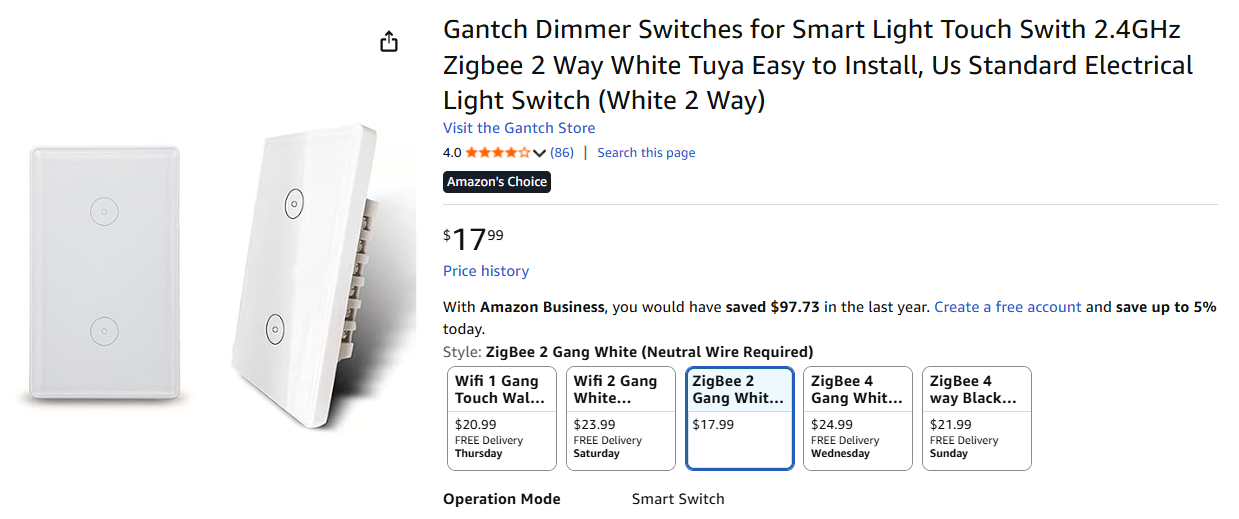
As far as a replacement, something like this may work for you. At least it has touch buttons, if not a touch screen:
Hi @chrisbvt - I watched a really good video that walks through every step needed to get the Relay to work with Hubitat. And read through the instructions available here in the Hubitat community which is what the video is basedon. The work of it seems straightforward enough. What concerns me is that both of these resources are many years old - as is my Relay (I bought mine in 2017). I worry that I will get half way through and the apps needed to complete the conversion are no longer available or the versions are too advanced at this point to actually run on the Relay. Then the Relay becomes just a brick. As it is right now, I can stick it on eBay and may get a little cash to put toward something like the switch you've just pointed me to.
Re this switch - thanks for this. This particular switch isn't coming up for me - I'm in Chicago USA. I'll search for it online. Is there a reason I would need to go with the Zigbee version? Is that the only way to get it working with Hubitat?
I think this is where I'm landing - to keep it simple and just install two switches in place of the Relay. One switch for the entryway ceiling light, one for the living room ceiling fan.
Our ceiling fan works with a remote. Is there a smart switch for a 3-speed reversible ceiling fan that works with Hubitat? Hmmmm....
I have a few Inovelli Fan switches and one lamp/switch module. It has 3 speeds, and works on AC fans. It doesn’t reverse though…
Another option that I used before since it had a module with an RF remote was to use a BroadLink Pro to sent it commands based on rules (humidity/temperature combinations…). This would also work with a wall switch / button that supports multi-tap.
Just be aware those bulbs are zigbee ZLL and do not make good repeater/messengers. If you mix them with zigbee ZHA devices (sensors and whatnot) You may have problems on your mesh. They should be isolated to their on mesh. Zigbee 3.0 bulbs do not have these issues.