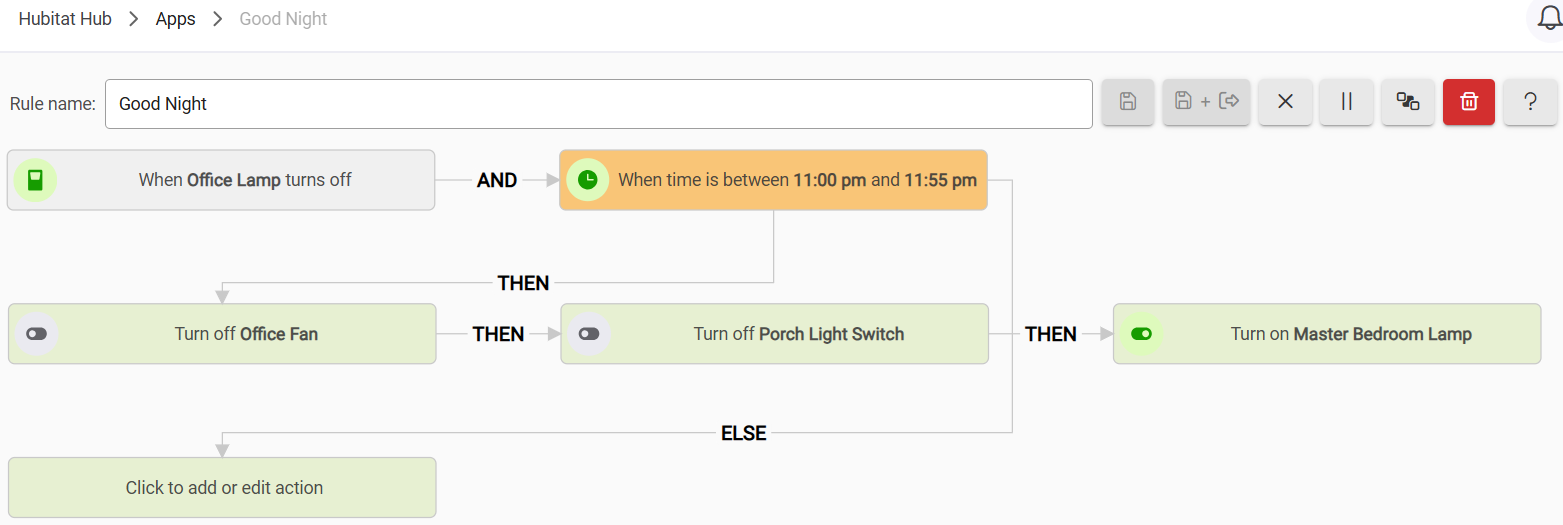
I created the rule below using the Visual Rules Builder. Can someone tell me if this is possible using Simple Automation Rules? I don't see how to apply the same logic.
Yes, something like this should work:
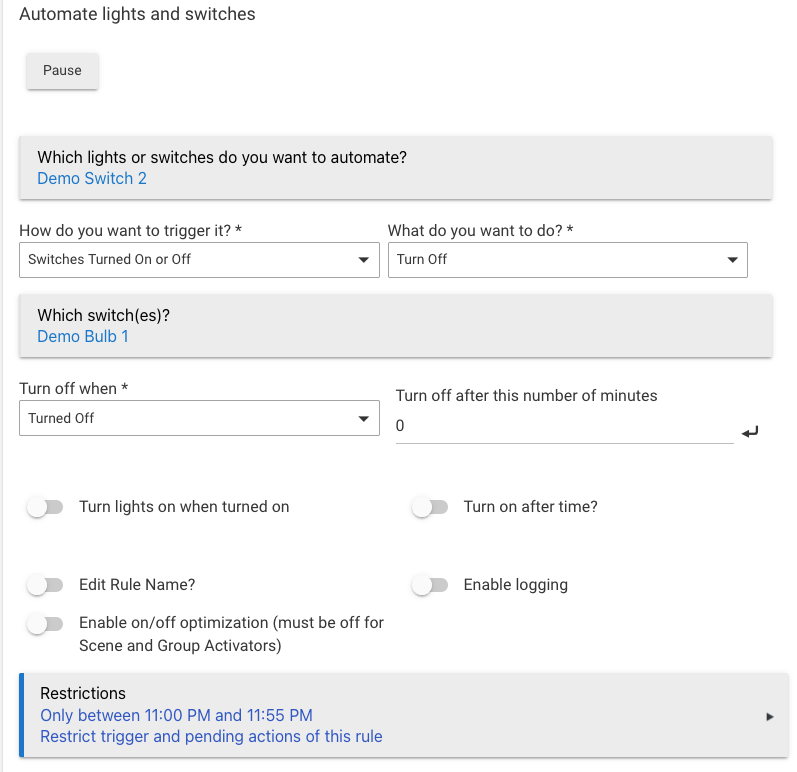
Here, Demo Switch 2 would be Office Fan for you, and Demo Bulb 1 would be Office Light.
But I've got to ask: why? If your Visual Rule is working well for you, there is no reason to change, and if you do want to change for some reason, I think Simple Automation Rules would not be my first (or second?) choice.
1 Like
What would be your choice? There are four rule apps I believe.
My first choice would be whatever I have that is currently working, which it sounds like you already have.
If I were starting over, I'd use a purpose-built app if one is available and meets my needs (e.g., Room Lighting, Notifier, etc.), otherwise I'd probably start with Basic Rule and move to Rule Machine if I can't do it there. I'd reserve Simple Automation Rules for a matter of preference, maybe because it's an older app (it is -- the newer ones reflect some learning about how most people think about automations; note how you might find it unintutive to start with the device you're trying to control, not trigger off of, as you do in SAR) and you were already used to it.
Ultimately, it's all up to you. But that first point is worth repeating again. 
The problem is that I have automations working in 3 different "apps", and cannot get all of them working in a single app. So I have the most working in Simple Automation Rules, which is why I asked about duplicating the Visual Rules Builder automation I posted in Simple Automation Rules.
FYI, the example you gave does not duplicate the functionality of the visual rule I posted. The Visual Rule Builder rule I posted does the following with 4 different switches:
If the "office lamp" is turned off then
turn off the "office fan" and
turn off the "porch light switch" and
turn on the "bedroom lamp"
Why is this a problem? You do not need all of your automations in "a single app." Use the app that is best suited for your particular automation. Or, as I suggested above, simply continue to use whatever solution you are already using that already works (it sounds like there isn't an actual problem with it?).
Just select multiple switches instead of "Demo Switch 2" in my example. You might need to supplement this with an additional automation for the oddball that goes "on" instead -- or you could do it (all) in Basic Rule for sure. Or, again, keep what you have.

