Hi, I’m and new hubitat owner after Sengled hub stopped working. I’m completely new at setting up my own hub. Prior to this we use Sengled Bulbs w/ hub through Google home for all of our smart devices so this is new to me. I’ve added about 20 of our bulbs and so far it’s worked great. I wasn’t sure how many bulbs one hub can handle. The only thing I’m using the hub for is the zigbee bulbs and I will be using it through Google Home. I’ve seen the 32 limit, but I’ve seen other people Indicate they have more without the repeater (and honestly, I have no idea what that is :-). I currently have the C8 hub, but wasn’t sure if the C8 pro could handle more. I can’t seem to find anything definitive to indicate if the C8 pro allows you to add more devices then the C8. I had originally planned to get a second hub, but if the C8 pro could handle more, that would obviously be cheaper and easier than two hubs. I also wasn’t sure if Google Home would automatically see the devices in both hubs or if I would need to connect the hubs somehow. Again, we’re only using it for bulbs and not for any of the automations, etc.. Any help would be so appreciated!
Welcome to Hubitat!
Both the C8 and C8 pro have that limit without repeaters.
I have over 70 Zigbee devices on two different hubs (two locations) using repeaters.
So the C8 will work fine for you with repeaters.
These are Zigbee devices that are AC line powered devices like light switches and dimmers, outlets, and even dedicated devices like the Ikea TRÅDFRI Signal Repeater.This will allow more devices and provide a stronger mesh.
It is always best to look at the Device Compatibility list. It can be found on the Devices screen next to the Add Device button. Also, it is best to add the repeaters first, starting closest to the hub. Then add the battery devices, also closest to the hub first.
I realize you are only planning to use Sengled bulbs, But some day, you might want to actually automate them instead of controlling them with your voice, so other devices like motion sensors will need to be added.
FYI, from an old post of mine. Still available. FREE plus $15 shipping. I'd prefer to keep them out of the landfill.
That is 32 directly connected devices. That is a Zigbee design all hubs have. You can have more Zigbee devices than just 32, but they will be indirectly connected to the hub via a repeater.
The closest I can explain it is like an atom. There are limits to electrons in each valence ring. However if you add more rings to the atom, you can have more electrons. That is similar to Zigbee.
Repeaters are devices that take the Zigbee signals from the hub, and extend that somewhat weak signal. It also is a device that can allow you to have more devices. A repeater is always a line powered device, not a battery powered device. As someone mentioned above, they can be a dedicated device that only is a repeater, or something like a wall switch or wall plug that serves double duty.
If you add a repeater, your Zigbee count goes from 32 to 32+31 (one slot is used to connect to the hub). If you add a second repeater it goes from 32+31+31 devices, and so on.
There is a theoretical limit of 65,535 devices in Zigbee if you were to have enough repeaters and a hub with enough processing power. Reality says that the limit is probably closer to 150 devices, but that depends upon a lot of factors.
To @neonturbo point with repeaters your mesh can grow and grow well beyond the 32 devices.
I have a C8 Pro and I currently have 102 connected zigbee devices to Hubitat which is a mixture of repeaters and battery powered end devices.
Not sure about the C8 but my C8 Pro is running the 102 zigbee devices, 6 z wave devices, and a host of virtual switches, matter devices, matter devices via an Aqara hub, and zigbee and matter devices into Hubitat from Home Assistant via the Home Assistant Device Bridge for a total of currently 276 devices. The C8 Pro is still snappy , responsive, and the app I use to monitor memory usage and CPU power still shows to be well below 50% usage.
Thank you so much! All of this is so incredibly helpful! So right now we have about 55 Zigbee bulbs. They are recessed lighting/ candelabra’s, etc. So they wouldn’t be connected to a smart plug or switch for a repeater. We have smart plugs that are compatible with habitat but they aren’t in use right now. I’m assuming that a smart plug that’s not connected to the bulbswould not function as a repeater. But I was looking at dedicated signal repeaters. It seems like that would be the easiest (or if not, what would be the simplest)? Would anybody recommend a good dedicated signal repeater? I saw someone mentioned the Ikea one, but it looks like it’s been discontinued. I’ve seen a few different types on Amazon, but I would love a recommendation. This has been a huge learning curve, but i’m having fun with it! I honestly didn’t think I could get the Hubitat hub up and running after reading the reviews for the hub and some comments on Reddit. I thought it would be beyond me., but it’s been great so far! People that I know are completely clueless when it comes to automation so I’m so grateful for this community! Thank you again!
If you join the smart plugs that are compatible with Hubitat to your Hubitat hub as long as they are zigbee smart plugs then you will have your repeaters or a good start on them since I don't know how many you have. The bulbs or light the bulbs are in does not have to be plugged into the smart plug for them to be repeaters. The plugs or main powered devices just needs connected to your Hubitat hub and then the mesh will take care of itself. There doesn't have to be a direct plugged connection.
You may be misunderstanding. You don't have to connect or plug in your bulbs physically to a switch to have repeaters.
Simply having the repeaters joined (paired) to Hubitat will allow something like your bulbs to find these repeaters. You don't have to, nor can you tell a device to use a certain repeater. It just magically does so.
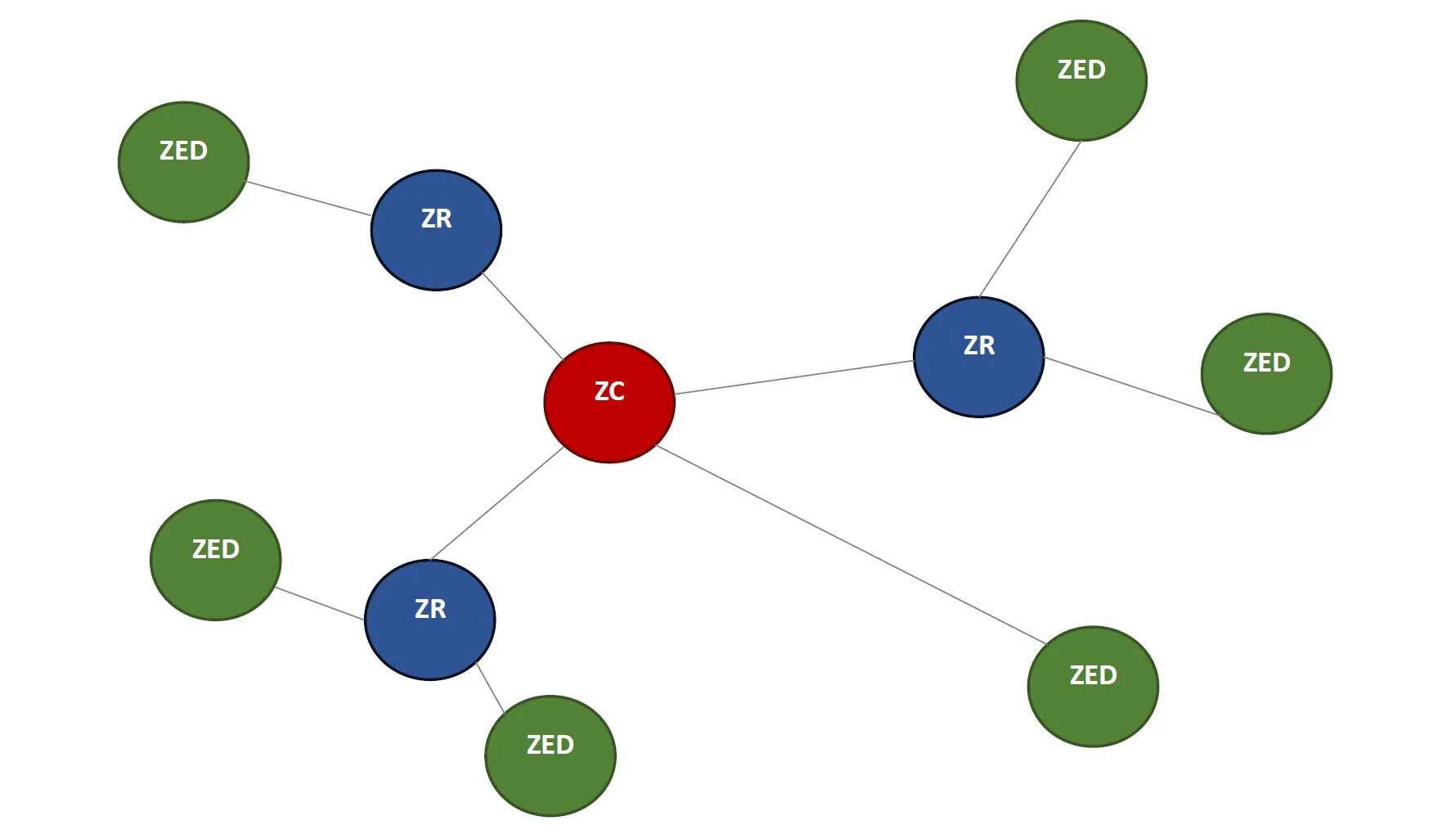
I "borrowed" this picture from the internet. You can see how the green dots go through the blue dots to get to the red dot.
- ZC is the coordinator, in other words the Hubitat hub. There is a 32 device limit here.
- ZR are repeating devices. They can extend your network distance, or allow joining more end devices (see below).
- ZED is an end device, which are typically battery devices like sensors, but could include bulbs or other devices that are too far from the hub to connect direct. OR these are devices that have to go through a repeater due to that 32 device limit on the coordinator.
Notice how some of these end devices go through a repeater, others don't. Some of the repeaters have more than one end device, others have only one device. These form their own network and therefore their own routes to the central hub.
OK, that makes so much more sense! Thank you for explaining all that. This is so incredibly helpful. So last question (I promise). We have 4 THIRDREALITY ZigBee Smart Plugs. We use them for Christmas but can definitely have them plugged in and connect them to the hub. Someone mentioned to add them to the hub first. But if I already added 20 of the 55 zones bulbs should I remove them add the plugs and then re-add the bulbs? Also, how many of the 4 would you recommend connecting? Again, thank you so much for taking the time to explain all that!
No need to remove any bulbs, just add your plugs. I would add all 4.
And space them out.
I'd use them all too (bird in hand), but spread 'em out common-sensically around the house... If they were all being used in one room or otherwise close together for Christmas, that sort of setup won't be nearly as helpful.
Perfect! Thank you!
Excellent! Thank you!
Great, thank you!
Adding Zigbee repeaters to your mesh is easy. Nearly any mains powered Zigbee device also serves as a repeater. I use a lot of Zigbee smart plugs in my setup to control lamps and other devices. I have 16 of these plugs. In a few cases, I am only using the devices as repeater to enhance coverage in remote areas such as my garage and basement.
My preferred outlet is one by Third Reality. They offer two types of outlets. One type reports power usage and is a little more expensive. The other does not report power. Since the power monitoring generates more Zigbee traffic, I suggest getting the non-power monitoring version for those locations where it is not needed. I suggest purchasing four packs, you will find a use for them.
https://www.amazon.com/THIRDREALITY-Zigbee-Smart-Plug/dp/B0BPY5D1KC?th=1
Thank you so much! That’s so good to hear because I actually purchased that exact same set yesterday on a whim. It seemed to fit what people were recommending and I was hoping it was a decent choice. So glad to hear you’re recommending it! Thanks again!