Hi there,
I would like to submit a feature request for VLD for consideration.
The simple feature request is to add an option to turn off selected lights when VLD is set to finish. For my scenario this is when mode changes to home from away or vacation mode. I have come home several time to find lights on and can only assume they were left on by this process. I could add a rule when changing to home to turn off lights but this would cause WAP issue when house mode changes from night to home in the mornings and she is using bathroom lighting. I could also setup some Boolean logic but though much neater to keep in the app if possible.
Thanks 
1 Like
Vacation lighting director was originally written for SmartThings and was ported to Hubitat years ago.
So while anyone can make changes to the code (it’s open source after all), I’m not sure there’s anyone in particular to make feature requests to.
1 Like
Any devs willing to pick up this FR, it’s really a great core app all hubs should have imo…
Then don't write that rule.  Instead, write a rule that triggers in mode changing to "Home" with a required expression of "Mode is Vacation." That will capture only that specific state change, one of the use cases for this feature. This sounds like what you want, based on your description.
Not exactly sure what you were thinking, but no need for that given the above.
Can't help you with that, but if no one is maintaining the app (or someone is but is not amenable to this change) and you aren't able to do the changes yourself, it's probably the best option. Good luck!
3 Likes
Thanks for the encouragement ambassador Bert! I did look into a rule that triggers when changing to "Home" with a required expression of "Mode is Vacation" but i thought this may not work if the trigger is mode changing the requirement will be false as the mode will already be "Home" and the requirement is mode = Away or vacation
You don't want a "Mode *changed*" trigger but rather a trigger for mode becoming "Home" specifically, at least according to your original description -- just in case that's not what you meant.
The required expression as suggested, with this trigger, will capture this specific transition. The usefulness of this feature would be significantly reduced if the expression were evaluated after any trigger event changes were accounted for. See the documentation for more on this feature, which it sounds like does not work as you expect.
1 Like
I believe i have modified the VLD code and added in " Lights to turn off when cycle ends" under setup. I have also removed the 120 sec delay for starting and ending this feature as i already have a slight delay in changing of modes.

Code can be found here:
2 Likes
This link doesn't work for me, would you mind resharing?
I just checked and the link worked for me. I was able to download and open the code
Thank you! Since I couldn't get to the file, I went ahead and downloaded the original to tweak it, and instead spent the last 2 days drastically re-writting it for my needs... Ha!
Anyhow, if anyone is interested, I've posted it here;
Main things it does (including your feature request @ThunderboltsRock);
- Lights turn on randomly within your configured set.
- Per-light on duration vary using ± ~20% jitter (style B randomness) - Goal is to mimic walking into another room vs all instantly on everywhere.
- Cycles run only within your allowed time window and day-of-week constraints.
- Automatically stops when outside allowed modes or when vacation switch is turned off. So if you interrupt it mid-cycle (so coming home while some lights are randomly on) it will turn them off immediately so the house is back in the state it was when you triggered this mode.
- The first cycle delay is 2 min, but you can set it to 0 and that makes it immediate.
- You can use modes (what I use) and/or have it use a switch to trigger on/off.
- In the app I show a Dashboard status of what is happening and why
- Optional Daily Summary notification so you know exactly what it did and what lights were turned on sent to your Hubitat app or whatever notification device you have configured in HE.
- Verbose logging (on by default) to understand what's going on, with a setting to toggle off.
- Testing mode. You can immediately kick off a single first cycle to test what you have configured, including the notification, so you don't have to force your house into a fake state.
- Cleaned up a lot of the code to make it more efficient, as I specifically have this on my older C5 where I still have most my lights directly connected vs my C8.
Example of the Summary;
Vacation Lighting Daily Summary:
•7 cycle(s) simulated
•18 light(s) turned on
•18 light(s) turned off
•
••
Additional light offs may still occur (queued)
Summary covers the last 24 hours of vacation-mode behavior.
And an example of my App Status right now that help understand what is happening or going to happen;
Status:
Idle (waiting for trigger)
Current mode: Sleep Night
Since last summary: 0 cycles, 0 light-ons, 0 light-offs.
Next cycle: not scheduled.
Why not running: Not running because: Mode 'Sleep Night' is not in allowed modes [Away, Vacation]; Current time is outside the configured window (Sunset-30 min to 23:30)
Anyhow, if you use it and have any thoughts, I'm very open to it. Might post this on the Custom Apps and Drivers if people fine this useful.
Nice work, did you update code linked in HPM and installing via this method contains your modifications?
p.s. you have the wrong install link in your manual install section, should be :
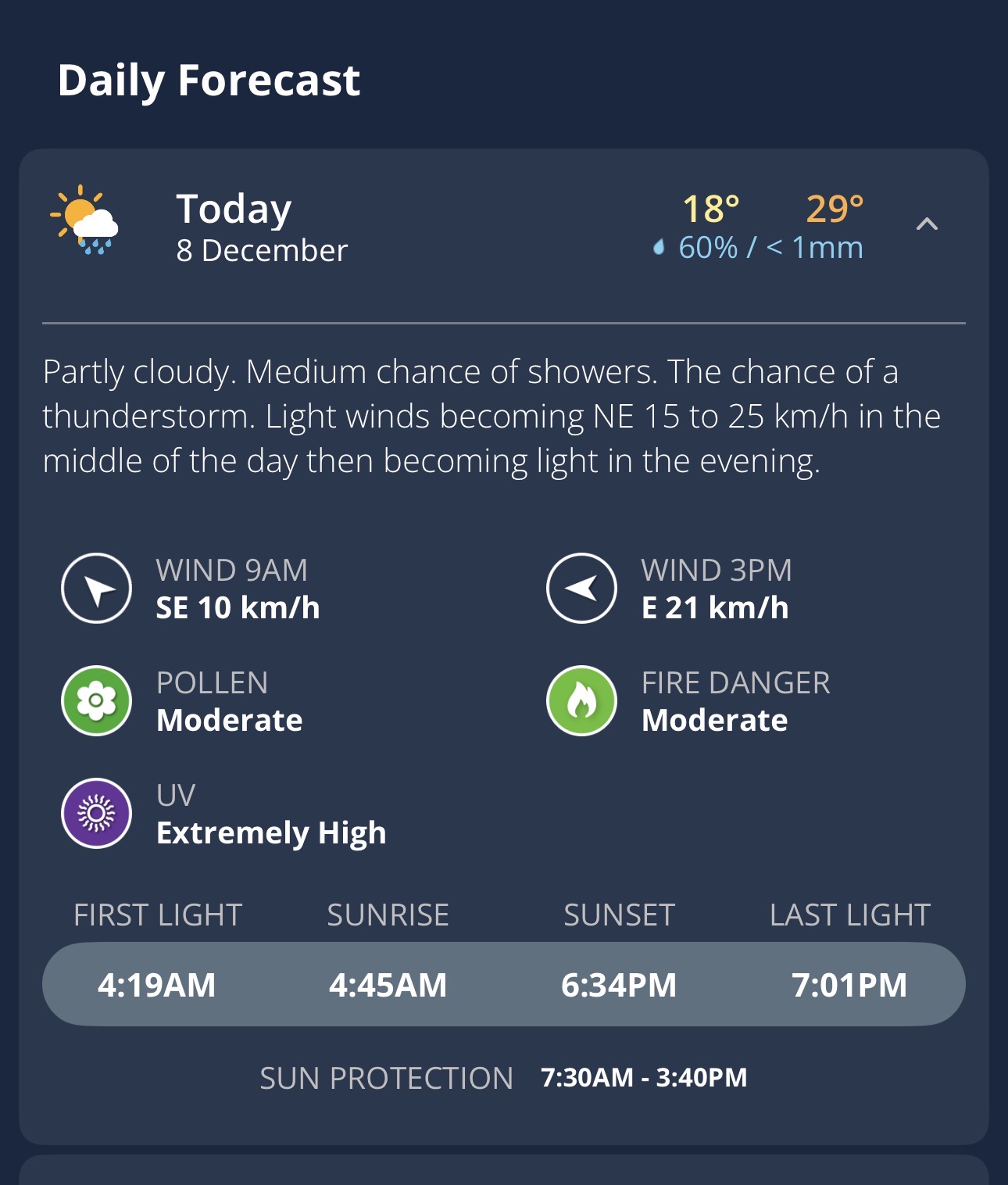
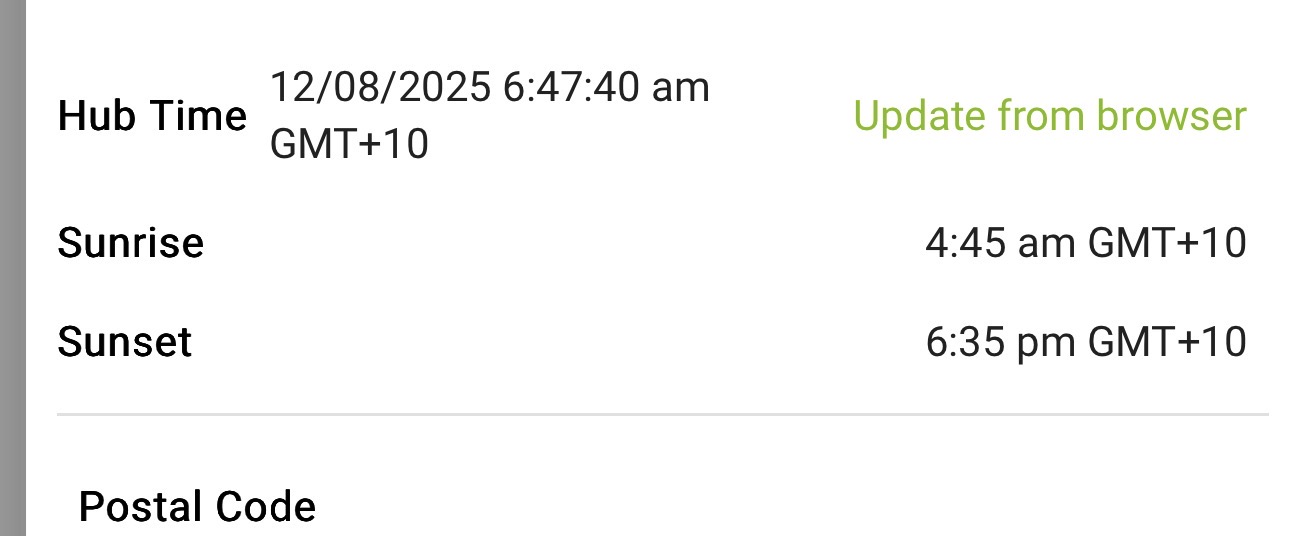
Not sure if this is an error but it states that the current time is outside the configured window "Sunset +45 to Sunrise +45" and current time is 8:15pm

Great catch, thank you! I shamelessly had ChatGPT write that, so appreciate the catch.
Yes, the HPM has all of this pulling from the same groovy file. So I added this version of the app to HPM, but I'm not seeing it appear yet in "Fast search", it does appear in slow search so I'm assuming that is a caching thing, it should be there soon in fast search when searching for "Vacation Lighting Simulator".

Interesting....
Mind if I ask, at 8:15pm your time, what time was sunset + 45min? Would love to determine if this is a bug, HE bug, or something else.
Edit: And THANK YOU for trying this out. I did this so just for me, as I've been using Alex Away feature for this over the last few years, but I really don't like that I can't tweak anything, and I like even less that it will fail if I loose internet. So wanted something local, and the now deprecated At Home Simulator didn't quite cover what I wanted. It makes me feel better if the time I've spent is helpful to others as well.
I vote heck yes. Appreciate the contribution!
2 Likes
Huh, I trippled check the logic and simulated the times and I'm not finding a bug... yet.
I just pushed a new version 0.2.5 that adds an additional log.
If you don't mind turn on logging, then we can figure out if there is an issue with Start/Stop being off, or the hub reporting off, or something else.
i have updated and now waiting for valid window to check
1 Like
Same issue with logs below:


Logs:
2025-12-09 07:40:58.448 PMdebuggetTimeOk(): start=Tue Dec 09 19:21:00 AEST 2025, stop=Tue Dec 09 05:28:00 AEST 2025, now=Tue Dec 09 19:40:58 AEST 2025, tz=sun.util.calendar.ZoneInfo[id="Australia/Brisbane",offset=36000000,dstSavings=0,useDaylight=false,transitions=18,lastRule=null]
app:3632025-12-09 07:40:58.447 PMdebugtimeWindowStop = Tue Dec 09 05:30:00 AEST 2025 adjusted: Tue Dec 09 05:28:00 AEST 2025
app:3632025-12-09 07:37:31.235 PMdebugmodeChangeHandler: armOk=false (mode='Sunset>Night mode', switch='n/a') - clearing and unscheduling.
app:3632025-12-09 07:37:31.229 PMtracemodeChangeHandler Event[archivable=true,data=,dataString=,date=Tue Dec 09 19:37:31 AEST 2025,description=Sunset>Night mode,descriptionText=Hubitat c8 pro Rules Hub is now in Sunset>Night mode mode,device=,deviceId=,displayName=Hubitat c8 pro Rules Hub,displayed=false,forceAttributeUpdate=false,hubId=,id=7409377,installedAppId=,isStateChange=true,location=,locationId=1,name=mode,producedBy=,source=LOCATION,subscriptionData=,translatable=false,triggeredListeners=,type=LOCATION_MODE_CHANGE,unit=,value=Sunset>Night mode], armOk=false
app:3632025-12-09 07:23:00.121 PMtraceschedStartEnd(): startendRunning = true
app:3632025-12-09 07:23:00.102 PMdebugscheduleCheck(): wrong time window - stopping Vacation Lights
app:3632025-12-09 07:23:00.098 PMdebuggetTimeOk(): start=Tue Dec 09 19:21:00 AEST 2025, stop=Tue Dec 09 05:28:00 AEST 2025, now=Tue Dec 09 19:23:00 AEST 2025, tz=sun.util.calendar.ZoneInfo[id="Australia/Brisbane",offset=36000000,dstSavings=0,useDaylight=false,transitions=18,lastRule=null]
app:3632025-12-09 07:23:00.097 PMdebugtimeWindowStop = Tue Dec 09 05:30:00 AEST 2025 adjusted: Tue Dec 09 05:28:00 AEST 2025
app:3632025-12-09 07:23:00.089 PMdebuggetTimeOk(): start=Tue Dec 09 19:21:00 AEST 2025, stop=Tue Dec 09 05:28:00 AEST 2025, now=Tue Dec 09 19:23:00 AEST 2025, tz=sun.util.calendar.ZoneInfo[id="Australia/Brisbane",offset=36000000,dstSavings=0,useDaylight=false,transitions=18,lastRule=null]
app:3632025-12-09 07:23:00.088 PMdebugtimeWindowStop = Tue Dec 09 05:30:00 AEST 2025 adjusted: Tue Dec 09 05:28:00 AEST 2025
app:3632025-12-09 07:23:00.056 PMdebuggetTimeOk(): start=Tue Dec 09 19:21:00 AEST 2025, stop=Tue Dec 09 05:28:00 AEST 2025, now=Tue Dec 09 19:23:00 AEST 2025, tz=sun.util.calendar.ZoneInfo[id="Australia/Brisbane",offset=36000000,dstSavings=0,useDaylight=false,transitions=18,lastRule=null]
app:3632025-12-09 07:23:00.055 PMdebugtimeWindowStop = Tue Dec 09 05:30:00 AEST 2025 adjusted: Tue Dec 09 05:28:00 AEST 2025
app:3632025-12-09 07:21:00.021 PMtracesetSched() scheduling initCheck in 120 seconds
app:3632025-12-09 07:21:00.018 PMtracestartTimeCheck
app:3632025-12-09 06:29:19.896 PMtraceschedStartEnd(): startendRunning = true
app:3632025-12-09 06:29:19.856 PMdebugscheduleCheck(): wrong time window - stopping Vacation Lights
app:3632025-12-09 06:29:19.854 PMdebuggetTimeOk(): start=Tue Dec 09 19:21:00 AEST 2025, stop=Tue Dec 09 05:28:00 AEST 2025, now=Tue Dec 09 18:29:19 AEST 2025, tz=sun.util.calendar.ZoneInfo[id="Australia/Brisbane",offset=36000000,dstSavings=0,useDaylight=false,transitions=18,lastRule=null]
app:3632025-12-09 06:29:19.853 PMdebugtimeWindowStop = Tue Dec 09 05:30:00 AEST 2025 adjusted: Tue Dec 09 05:28:00 AEST 2025
app:3632025-12-09 06:29:19.846 PMdebuggetTimeOk(): start=Tue Dec 09 19:21:00 AEST 2025, stop=Tue Dec 09 05:28:00 AEST 2025, now=Tue Dec 09 18:29:19 AEST 2025, tz=sun.util.calendar.ZoneInfo[id="Australia/Brisbane",offset=36000000,dstSavings=0,useDaylight=false,transitions=18,lastRule=null]
app:3632025-12-09 06:29:19.845 PMdebugtimeWindowStop = Tue Dec 09 05:30:00 AEST 2025 adjusted: Tue Dec 09 05:28:00 AEST 2025
app:3632025-12-09 06:29:19.837 PMdebuggetTimeOk(): start=Tue Dec 09 19:21:00 AEST 2025, stop=Tue Dec 09 05:28:00 AEST 2025, now=Tue Dec 09 18:29:19 AEST 2025, tz=sun.util.calendar.ZoneInfo[id="Australia/Brisbane",offset=36000000,dstSavings=0,useDaylight=false,transitions=18,lastRule=null]
app:3632025-12-09 06:29:19.836 PMdebugtimeWindowStop = Tue Dec 09 05:30:00 AEST 2025 adjusted: Tue Dec 09 05:28:00 AEST 2025
app:3632025-12-09 06:27:19.887 PMdebugScheduling daily summary for Wed Dec 10 07:01:00 AEST 2025
app:3632025-12-09 06:27:19.815 PMtracesetSched() scheduling initCheck in 120 seconds
app:3632025-12-09 06:27:19.813 PMtraceschedStartEnd(): startendRunning = true
app:3632025-12-09 06:27:19.738 PMdebugmodeChangeHandler: armOk=true - scheduling vacation lighting.
app:3632025-12-09 06:27:19.734 PMtracemodeChangeHandler Event[archivable=true,data=,dataString=,date=Tue Dec 09 18:27:19 AEST 2025,description=Away,descriptionText=Hubitat c8 pro Rules Hub is now in Away mode,device=,deviceId=,displayName=Hubitat c8 pro Rules Hub,displayed=false,forceAttributeUpdate=false,hubId=,id=7408789,installedAppId=,isStateChange=true,location=,locationId=1,name=mode,producedBy=,source=LOCATION,subscriptionData=,translatable=false,triggeredListeners=,type=LOCATION_MODE_CHANGE,unit=,value=Away], armOk=true
app:3632025-12-09 04:37:39.053 PMdebugmodeChangeHandler: armOk=false (mode='Home', switch='n/a') - clearing and unscheduling.
app:3632025-12-09 04:37:39.050 PMtracemodeChangeHandler Event[archivable=true,data=,dataString=,date=Tue Dec 09 16:37:38 AEST 2025,description=Home,descriptionText=Hubitat c8 pro Rules Hub is now in Home mode,device=,deviceId=,displayName=Hubitat c8 pro Rules Hub,displayed=false,forceAttributeUpdate=false,hubId=,id=7405550,installedAppId=,isStateChange=true,location=,locationId=1,name=mode,producedBy=,source=LOCATION,subscriptionData=,translatable=false,triggeredListeners=,type=LOCATION_MODE_CHANGE,unit=,value=Home], armOk=false
app:3632025-12-09 04:26:46.641 PMtraceschedStartEnd(): startendRunning = true
app:3632025-12-09 04:26:46.612 PMdebugscheduleCheck(): wrong time window - stopping Vacation Lights
app:3632025-12-09 04:26:46.610 PMdebuggetTimeOk(): start=Tue Dec 09 19:21:00 AEST 2025, stop=Tue Dec 09 05:28:00 AEST 2025, now=Tue Dec 09 16:26:46 AEST 2025, tz=sun.util.calendar.ZoneInfo[id="Australia/Brisbane",offset=36000000,dstSavings=0,useDaylight=false,transitions=18,lastRule=null]
app:3632025-12-09 04:26:46.608 PMdebugtimeWindowStop = Tue Dec 09 05:30:00 AEST 2025 adjusted: Tue Dec 09 05:28:00 AEST 2025
app:3632025-12-09 04:26:46.601 PMdebuggetTimeOk(): start=Tue Dec 09 19:21:00 AEST 2025, stop=Tue Dec 09 05:28:00 AEST 2025, now=Tue Dec 09 16:26:46 AEST 2025, tz=sun.util.calendar.ZoneInfo[id="Australia/Brisbane",offset=36000000,dstSavings=0,useDaylight=false,transitions=18,lastRule=null]
app:3632025-12-09 04:26:46.598 PMdebugtimeWindowStop = Tue Dec 09 05:30:00 AEST 2025 adjusted: Tue Dec 09 05:28:00 AEST 2025
app:3632025-12-09 04:26:46.592 PMdebuggetTimeOk(): start=Tue Dec 09 19:21:00 AEST 2025, stop=Tue Dec 09 05:28:00 AEST 2025, now=Tue Dec 09 16:26:46 AEST 2025, tz=sun.util.calendar.ZoneInfo[id="Australia/Brisbane",offset=36000000,dstSavings=0,useDaylight=false,transitions=18,lastRule=null]
app:3632025-12-09 04:26:46.590 PMdebugtimeWindowStop = Tue Dec 09 05:30:00 AEST 2025 adjusted: Tue Dec 09 05:28:00 AEST 2025
app:3632025-12-09 04:24:46.590 PMdebugScheduling daily summary for Wed Dec 10 07:01:00 AEST 2025
app:3632025-12-09 04:24:46.568 PMtracesetSched() scheduling initCheck in 120 seconds
app:3632025-12-09 04:24:46.567 PMtraceschedStartEnd(): startendRunning = true
app:3632025-12-09 04:24:46.424 PMdebugmodeChangeHandler: armOk=true - scheduling vacation lighting.
app:3632025-12-09 04:24:46.409 PMtracemodeChangeHandler Event[archivable=true,data=,dataString=,date=Tue Dec 09 16:24:46 AEST 2025,description=Away,descriptionText=Hubitat c8 pro Rules Hub is now in Away mode,device=,deviceId=,displayName=Hubitat c8 pro Rules Hub,displayed=false,forceAttributeUpdate=false,hubId=,id=7405422,installedAppId=,isStateChange=true,location=,locationId=1,name=mode,producedBy=,source=LOCATION,subscriptionData=,translatable=false,triggeredListeners=,type=LOCATION_MODE_CHANGE,unit=,value=Away], armOk=true
not sure what port of this you are running but mine ported years ago.. turns off all lights when it stops running,.
1 Like
Yes, the thing I added to this one was to immediately stop the cycle and return back to original state. So for example, if I arrive home and there is still 50minutes left of a cycle, instead of waiting for it to complete it will end right away. That functionality wasn't available in the version I extended.