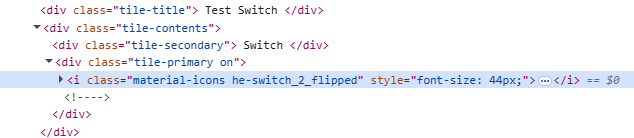
Morning,
I feel that I am close to a resolve but I need a push over the line. This is all inspired by 2 indoor/outdoor cats that do not get along. Only one can be out at any given time.
The cat with the most seniority has her own private door which is manually locked/unlocked as needed to allow her free access. The door and its lock are each equipped with a contact sensor. Mounted to the door frame, is a motion sensor to track activity. It may be a cat passing in/out or an animal of some species confronted by the locked door. When there was just the one this all worked fine and dandy then Orange Cat arrived on the scene and he inspired me to adapt.
Here are the cat location tiles as I would like to see them only editing the code in each of these 2 tiles versus using multiple tiles/layers.
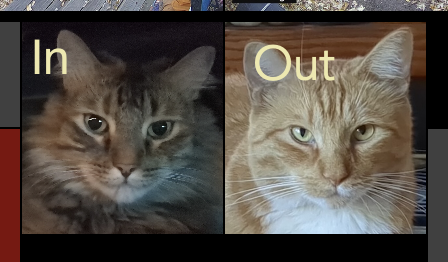
The text on the tile changes either by rule/s when 'something' is detected passing through the door or when tiles are manually selected to reflect In/Out status.
Present configuration uses virtual switch tiles. A virtual value tile overlays the top half of the switch tile. This pretty much works as long as the bottom half of the tile is selected. This can be somewhat problematic when using a wall mounted tablet running FKWB.
My self-imposed challenge is to be able to press the tile anywhere to set the location. I have accomplished this using a push button tile but that involves yet another tile layer.
I like simple no matter how complicated it might be to get there. 
From what I have learned here I have managed to get it down (ALMOST) to having the functionality and look desired using CSS on the switch tile itself.
Here is where I have come up against the wall.
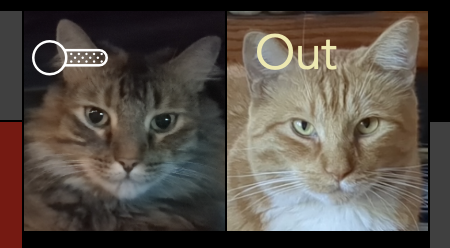
I have seemingly successfully edited the tile switch code so when the switch is "On" the left tile appears as in first image. Alas I have not been able to figure out how to edit/add code to reflect the switch being "Out" a.k.a 'Off'
Here is the CSS that is working thus far.
/* tile on the left */

#tile-227 .tile-title {
visibility: hidden;
}

#tile-227 .he-switch_2_flipped::before {
    content: "In" !important;
Color: PaleGoldenRod !important;
font-size: 24px !important;
text-align: left;
vertical-align: top;
}

#tile-227 .tile-primary {
text-align: left;
vertical-align: top;
margin-top: -5px !important;
}

/* #tile-228 on the right is a switch tile displaying background image of (orange cat)  */

#tile-228 .material-icons{display:none}

#tile-228 .tile-title {
visibility: hidden;
}

/* #tile-230 is a virtual value tile overlaying #tile-228 */

#tile-230 .tile-primary {
text-align: left;
vertical-align: top;
font-size: 24px !important;
padding-left: 10px;
padding-top: 0px;
margin-top: -5px !important;
Color: PaleGoldenRod;
}

#tile-230 {background: transparent;}
I have read and tried suggestions from this thread https://community.hubitat.com/t/changing-attribute-of-a-switch-from-on-off-to-any-other-word-on-the-dashboard/93106/8
but the proper syntax has thus far been escaping me.
I presume I need to include some reference to this somehow in order to differtiate between on/off - in/out states.
If you have read this far. Thank you.
charlie