Hi, I am trying to create a rule machine rule that will send me the name of the contact that has triggered as part of the message. I assume it is some type of %variable% but I am unable to get it working. Any help would be appreciated. Below is the list of devices I see in Hubitat as reported by my Konnected system. Thanks!

A screenshot of your rule would be more helpful. But without knowing anything more, the %device% variable will refer to the name of the last trigger event device. See the Rule 5.1 docs for more.
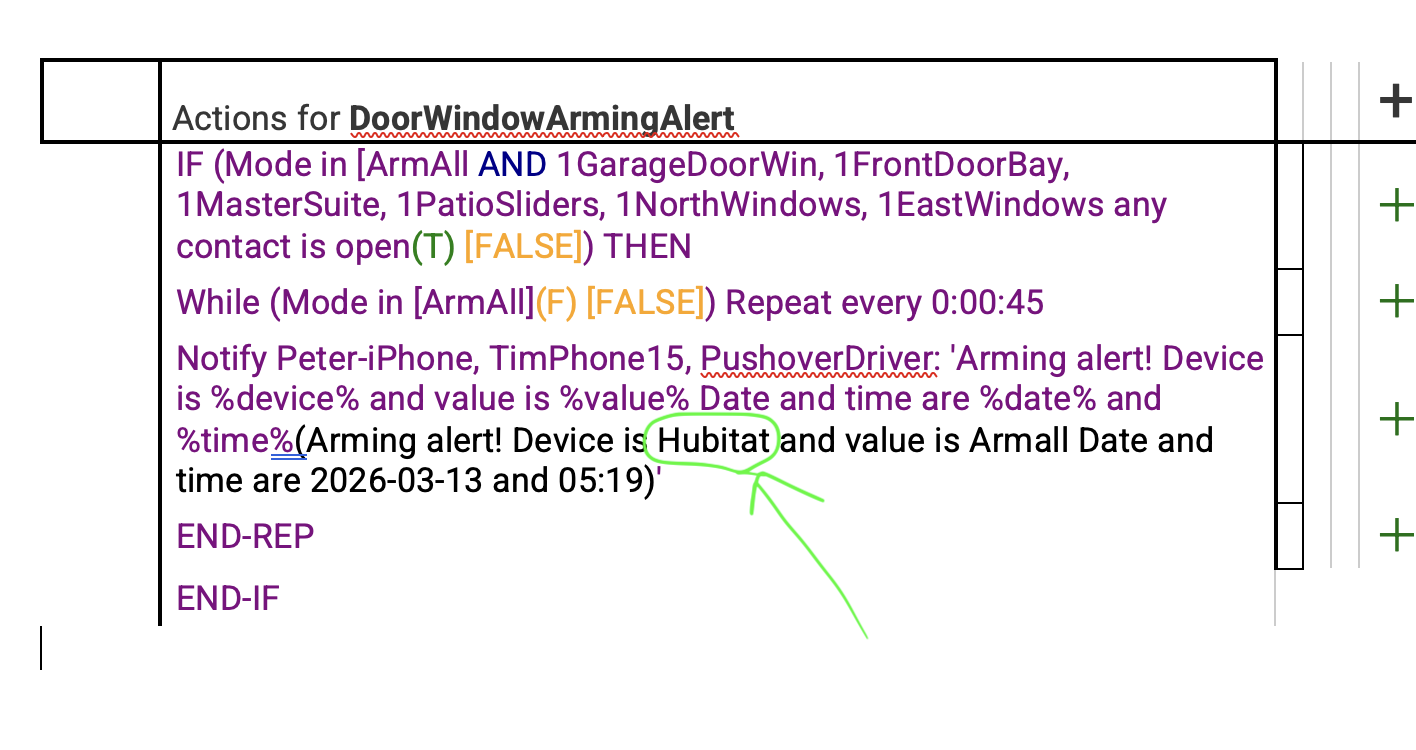
We'd need to see a screenshot of your entire rule, including the triggers (and actions), to say more. But all your screenshot shows is that this was the value of this variable the last time your rule was triggered. Simply having a device as a trigger event for the rule doesn't change anything (e.g., if you've edited the rule since the last time it triggered) -- what matters is when it actually runs. You can read more about that in the docs, too; it's noted there since this is not an uncommon misconception.
If you still don't see how this could explain what's happening for you, I suggest enabling all logging for the rule (if you disabled it), then examine the output of Logs, filtered to just this rule, or share them here so others can see more.
Maybe this is a red herring in all of this, but that "...(T)[FALSE]..." caught my eye - that doesn't look right.
In both the IF and the WHILE stmt, it looks like you had numerous conditional elements at one point and then removed some of them, but not all of the corresponding parentheticals were cleaned up correctly.
Edit - I think the While stmt is OK... I'm guess I'm just stumped why there are brackets around ArmAll in the While stmt, but ArmAll doesn't have the closing bracket in the IF. Or maybe it shouldn't have the opening bracket 
Thank you for taking a look at my simple rule. I use 2 modes ArmAll and ArmWhippet. FYI ArmWhippet is when my Whippet dog is home and I do'nt want the motion sensors enabled  What is happening is that the values being returned are the name of my hubitat device and the name of the current mode value. These can be seen in the code since I have toggled on the "Display current version" option.
What I would like the rule to report on is the contact sensor (Which window) and the current status (open/closed).
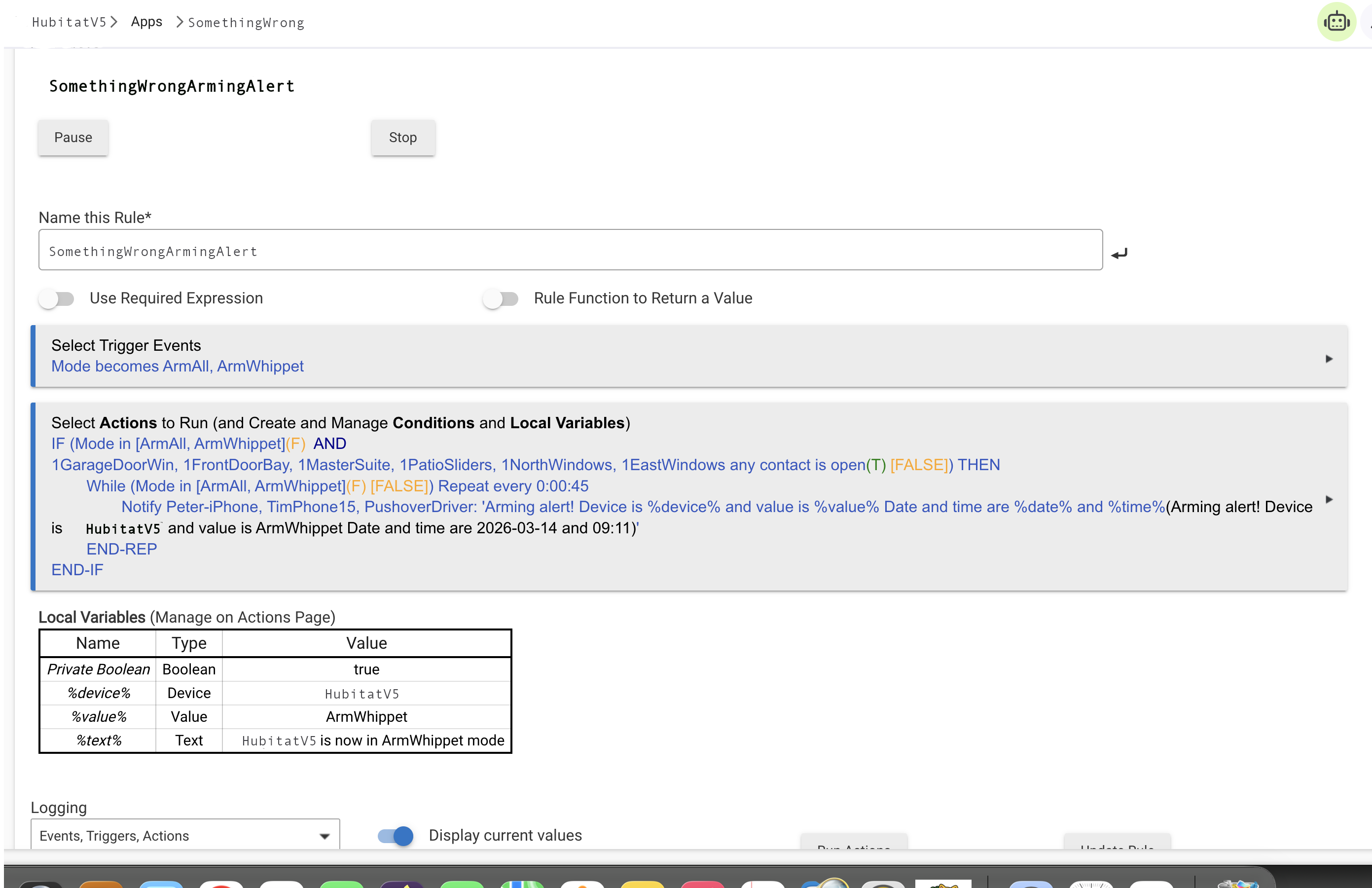
That rule is working as documented: the device variable refers to the trigger event. Conditionals in your actions, contrary to what sounds like your expecations, do not affect these variables. (You can read more about what actually happens in the docs I linked to above.) Your trigger event is the mode changes.
webCoRE, also built in, might be able to do what you want with a bit less effort, but I rarely use that these days aside from testing things. With Rule Machine, you'd need to check the states yourself and append text to a string variable to make it say what you want. This can get tedious, so personally, I wrote a custom app instead and shared it with the community here. You might want to look, as it sounds like your goals are similar:
But if you don't want to use custom code, there's an example there too of the rule it replaced for me. Something like that will probably work for you, too.
Hope this helps!
Thanks, Robert. I really appreciate the information you provided. I have 6 zones so I have created 6 RM entries coded to report specific details if a contact opens when my system is armed.
I like your idea of a single rule with multiple if/else entries but I can see how that can get ugly and difficult to debug/troubleshoot if there is an error. I will certainly take a look at the custom Device/Status Announcer code you posted and let you know how it goes.
Question: I have some background in code development, how do you get started in developing custom code for Hubitat?''=
Thank you!
I got started by bringing existing knowledge from ST development, where I was not very good but did manage to crank out some automations I wanted, and then learning what was different on Hubitat. Today, I'd recommend Hubitat's developer documentation, starting with the Developer Overview and then moving into the App Overview (since that's what you want) and then the more detailed docs for developing apps:
Great info, thanks for the link to the DEV docs, a great jumping off point!
Instead of recreating the rule six times and maintaining all six you could use hub variables. Setup a string variable like "triggeredContact" and then have six quick rules that assign the zone name to that variable. Then when your main rule triggers it inserts the variable instead of %device%.
Hey Lairdknox that sounds like a good idea; any chance that you have a screenshot of the code logic you are referring to? Thanks.