Newbie that has had enough YouTube time and RTFM that I feel like I personally know the Hubitat gurus!
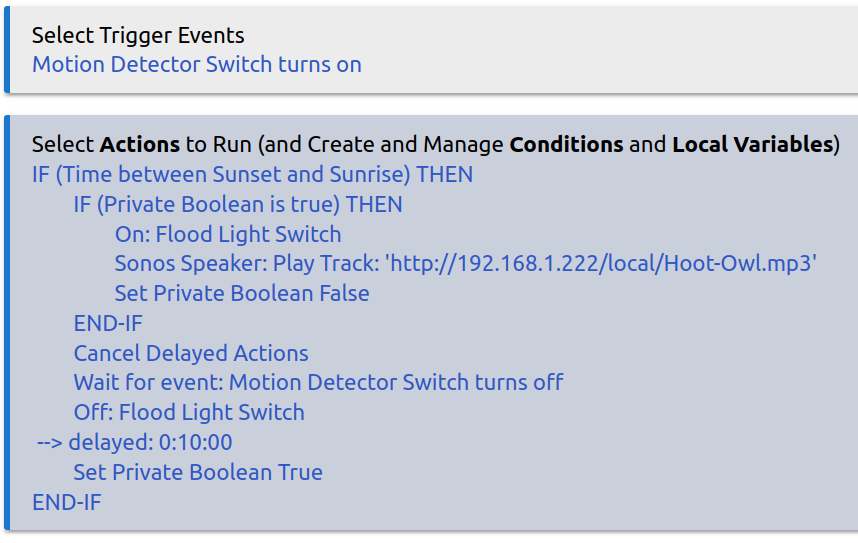
I am trying to set up an Alert for my outdoor motion sensor that only triggers once within a set time-frame. I do not want multiple alerts if there are additional trigger activities after Wait. (WAF) The motion detector is set to time out after 30 seconds, and will set the total timeout period in the script. I am a student of Professor Bruce using his Cancel Delayed Actions and Wait example, but cannot find a SIMPLE method to avoid re-triggering alert! Using RM-5.1 and plan to add other ELSE-IF conditions like "garage door open" so not using Mode Manager. Exit status for Wait? Please, no 2-Rule solutions. Any help is much appreciated!
You will just need to add a command « Set Private Boolean False » at the start of your rule, and then add a delay to the « Set Private Boolean True » command.
The « Cancel Delayed Actions will do nothing in that rule, so can be removed.
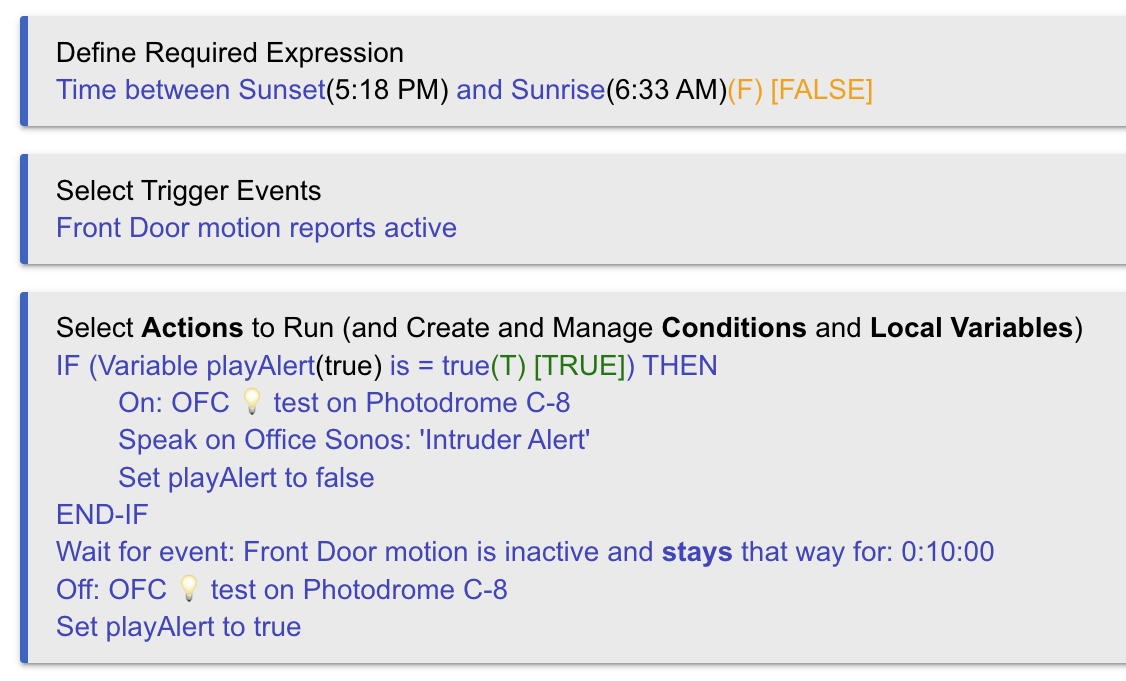
Instead of the 2 « IF » conditions, you can define the same in « Required Expressions ».
My personal preference, to avoid a rule firing (at all) outside of the designated timeframe, is to set your outermost IF-THEN as a Required Expression instead:
After all, you have no ELSE going on, so the R.E. option makes sense and somewhat uncomplicates the rule's ACTIONS.
On further analysis, you could also modify the R.E. to contain a 2nd condition, namely that Private Boolean: This Rule be True, to absolutely prevent additional triggering, which is what you're after.
So long as you then follow the advice above (of setting PB to False as your 1st action, then resetting it to True at the end, you're all set.
I haven't used the private boolean before and I wasn't seeing it in the conditional so I created a new variable. Either way should be fine. I just didn't want to spend time looking for it.
You have no idea how I appreciate ALL your replies! New and my first post so please be kind. I am overwhelmed!
I may be missing something from @Sebastien by adding a delay to the « Set Private Boolean True » command? The rule still re-triggers. Isn’t “Delayed Canceled Actions” required when motion is within the delayed Wait period? Professor Bruce in his April 28 2020 Hubitat Live 2020 indicated that we could avoid a repeated “turn on light” action while the script was running?
Thank you @xavib57905 and @hubitrep, but I intend to expand this basic script with other ELSE-IF conditions.
Please edit :
Set Private Boolean False
IF (Private Boolean is false) THEN
On: Flood Light Switch
Sonos Speaker: Play Track: 'http://192.168.1.222/local/Hoot-Owl.mp3'
END-IF
Wait for event: Motion Detector Switch turns off
--> delayed: 0:10:00
Set Private Boolean True --> delayed: 0:00:05
END-IF
IF (Private Boolean is false) THEN
Set Private Boolean True
On: Flood Light Switch
Sonos Speaker: Play Track: 'http://192.168.1.222/local/Hoot-Owl.mp3'
Wait for event: Motion Detector Switch turns off
--> And stays off for: 0:10:00 Off: Flood Light Switch
Set Private Boolean False --> delayed: 0:00:05
END-IF
The above changes will make the rule turn on the Flood Light and leave it on until there has not been any motion for 10 minutes. The rule will not run the actions within the « IF » statement again for 5 seconds after the light has turned off by the rule.
@Sebastien; Sorry that I mislead you, and thanks for your patience and time. I should have gone back to my original script.
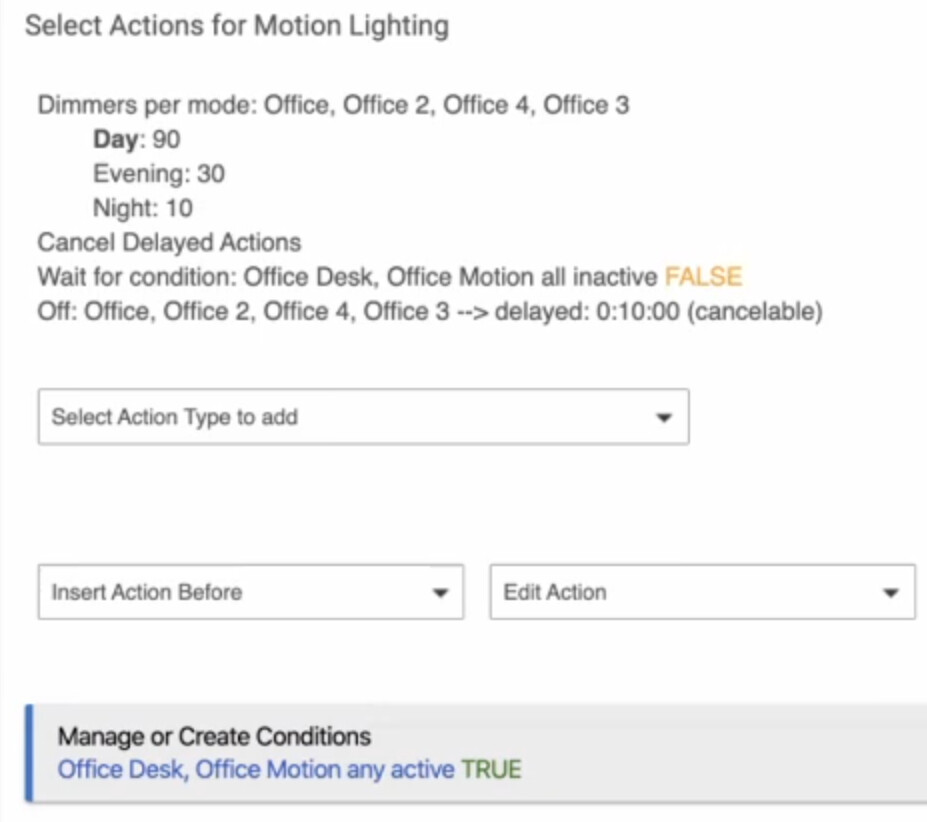
This is a script by @bravenel from Hubitat Live video on 4/28/2020. This incorporates a cancelable Wait that re-triggers when people come back into the room. I would like to incorporate into an outdoor motion detector for audible alert in the house. I do not want a simple wait period – only one alert per event to not upset my wife.
In Mr Bruce’s example below, when the Actions re-trigger – how do eliminate repeating ON: Lights when the lights are already on. Or in my case repeating the alert?
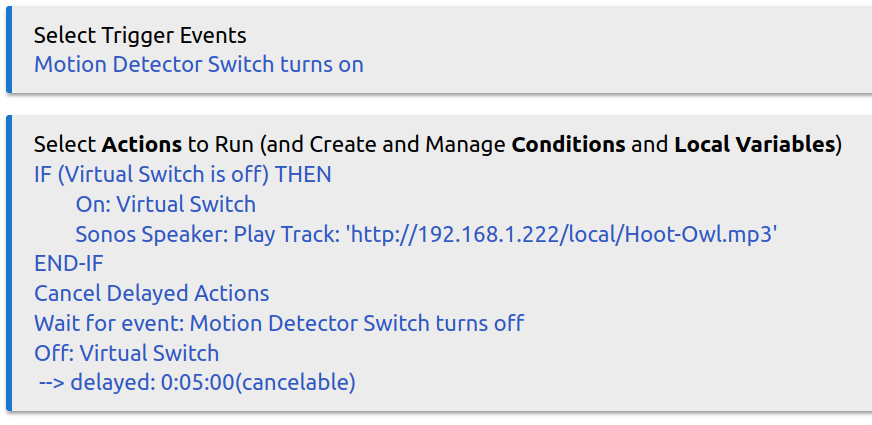
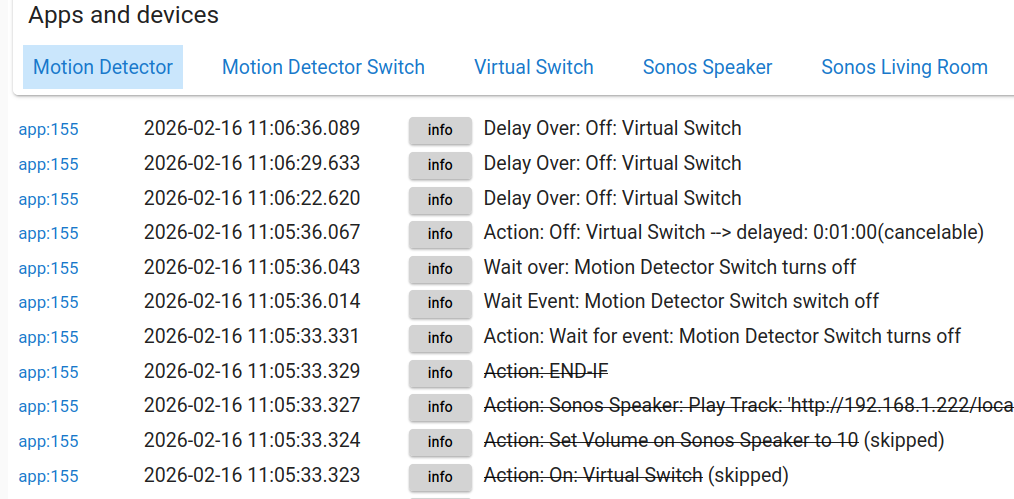
Please find my take on a motion sensor script using RM-5.1. I did not want audio alerts that repeated during a set time frame and drive my wife crazy. Please see my example. It is simple to substitute the Virtual Switch with an actual Flood Light (switch) for evening/night mode. Learning Hubitat and now I can throw out all my X-10 devices. Thanks for everyone’s help! All comments appreciated!
Any type of "Wait" action is cancelled upon re-triggering of a rule. (The Cancel Rule Timers action will also cancel waits but is rarely necessary, and it affects all rule timers, as described elsewhere.) Note that this behavior differs from delays, which must be explicitly cancelled.
…and
Note that "cancelation" means that the delay or wait will be removed and that action execution will not proceed to the next action but rather exit.
I don’t think Cancel Delayed Actions effect waits.
I would have too, but it’s implemented virtually identically, in both cases a scheduled job is created, the only difference is the cancel delayed actions action which is necessary for delays and not for waits.


 I am overwhelmed!