I am experiencing an issue with my hub that I would like to see if I can resolve.
Updates have become a problem for me, and I don't believe it is the hub's fault, but rather due to my poor Internet connection. Every time the hub attempts to update, it never manages to download the full package; halfway through, it reports that something went wrong.
My connection actually suffers from constant dropouts, and that may very well be the cause.
I have tried performing the update via the diagnostic menu, but the same thing happens... it seems to freeze or get stuck halfway through the process.
Would it be possible to implement an offline update system—one where we could download the firmware from a source that supports resuming interrupted downloads, and then load it onto the hub to apply the update?
My apologies, as I realize this is a very specific issue—perhaps one affecting only a small minority of users—but if there is anything you can do to help, I would be very grateful.
In the past, staff have said no to any other methods of updating the hub firmware, I believe due to concerns about maintaining control of the source code.
I don’t know if that’s something they might ever reconsider.
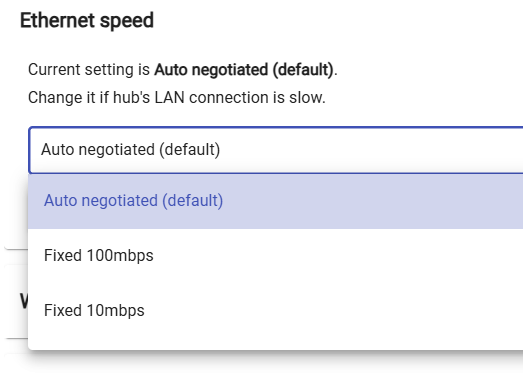
I would go to settings, ethernet speed, and then select something different then what you have. So, if you have auto selected. Then select Fixed 100mbps or Fixed10mbps. Then try the update.
There are download related improvements in 2.4.4, they're a part of the latest general public release. A short connection drop should be fine, and the logic has a number of built-in retries, too.
I understand that you'll need to download the latest version to take advantage of this, so it's a bit of a catch 22. There's no workaround or secret handshake on our end to push a version, either.
Do you have access to a stable connection elsewhere?
I was thinking using a cell phone tethered with your router with the Hubitat attached to it just to get the update. That's if your router supports using a tethered connection.
Thanks for all the replies.
Maybe I needed to be more specific on my issue description.
The negotation speed of my router is ok.
My internet has some small glitches but nothing more than a few seconds but for some reason after half of the download process fails. When that happen the hub still having internet and I know it because no notification arise on it saying it lose connection or similar, apart from that the hub still with a good ping to my router.
It SEEMS, I am not sure, the downloading process do not have resume but that is just a guess.
If that is a problem the hub can download to a internal location. Actually I think this is what it is doing but the process get a corrupt file or something because it never ends whatever I do.
Firmwares are always encrypted so I dont see the problem of download locally with an external downloader. A lot of devices like routers for instance use similar methods.
I don care the way but if my hub do not lose acces to web why is failing the update.
If you're referring to the suggestion to change the Ethernet Speed setting, that is a valid request/troubleshooting step regardless of how things look. It's not that your current speed/negotiation is right or wrong, it's that in many (many) cases here we have found that simply changing the connection setting results in a successful download. Something about making that change gets things working again.
So if you haven't tried that yet, please do. If it's set to Auto, set it to 100, if it's set to 100, Set it to Auto. Then try the update again. Might not help, but has been the right fix for many users having trouble w/downloading Platform updates.
I realize Danabw said this too, but I'll just foot-stomp it here... Changing that setting is often not really about what you're changing it to (although that may also be relevant); it's really more just about simply changing it...
The act of just changing it seems to (for whatever reason) shake sticky stuff loose.