Does the lock reliabily lock and unlock from the driver?
We may release this driver, though the final determination on this hasn't been made as of yet.
No, usually the 2nd try about 5 seconds from the first try. Like I said, it instantly reports manual unlock/lock log entries.
Again, it worked flawlessly on my C-4. C-7 has introduced something different I guess.
Well yes, different radio, different zwave stack, differend mesh also, however what we have observed more reliable s0 command execution on a c7, not less.
Lock to hub commands are being received perfect, hub to lock commands arent, there may be a router in the mix that's not doing such a great job.
I would take all your routers off line, one at a time, with a repair in between if required, see if anything changes.
Yeah, that's the weird thing. There are about 3 repeater devices in the immediate vicinity, but according to the Z-Wave device routing tables, the lock is routing directly to the hub bypassing any and all routers. I have repaired each node. However, I have not did a general Zwave repair. Would that, rather than a node repair, make use of any of the repeating devices?
Just another data-point FWIW on C7 (FW .119, .145): My BE469 Z-Wave works ww/my C7, both keypad and autmation locks/unlocks, so doesn't appear to be a C7 "always" doesn't work issue.
I paired w/the hub 3' from the lock. There are two beaming switches 7' from the lock, and the hub is one wall away about 10-12' feet total, maybe.
Hi not sure if April ever responded to this thread but here is what worked for me:
She gave me the code for the lock and asked me to use it to create a USER device which I did. As soon as I switched to that it worked straight off.
The thing is however that when I switch back to the built-in driver it still doesn't work.
So currently I have a C-5 Hub running on FW 2.2.3.145 and using the USER device I created to get my Schlage locks to work...
Hope that helps someone.
Cheers
Anson
I am having the same problem as you were. My BE469ZP was successfully paired to my C-7, and it seems to update back to my hub instantly when I manually lock/unlock at the lock itself. However, the lock rarely responds when I issue a 'Lock' or 'Unlock' command from within the device page on my hub. I have gone through @april.brandt 's instructions of switching to the generic Z-Wave driver and back to the built-in driver, but it's still sketchy/doesn't respond to commands from the hub...
To clarify your comment above, did you receive new custom driver code for your lock that fixed your issues?
TIA,
Quinn
Do you have a beaming repeater very near the lock? I’m having no problems with my 2 BE469ZP locks with beaming repeaters (Ring Extender 2) near each lock, C-7, 2.2.3.148.
I do; I just installed a new Inovelli LZW31 within 2 feet of the lock BEFORE my last unpair/repair trial, but, according to the Z-Wave details page, my lock is not using that switch to route through; rather, it is routing through a couple of other LZW30/LZW31 switches farther away instead...
I'm on a C-7 hub, 2.2.3.148
My understanding is that z-wave communication from the hub to any device will begin with the z-wave repeater that is closest to the hub.
In my case, I believe it is. According to the hub's Z-Wave Details page, this is the route:
Hub > (~5 feet) > GE Z-Wave Plus outlet > (~10 feet) > Inovelli LZW30 switch > (~10 feet) > BE469ZP
In doing a repair of the BE469ZP, it decided NOT to use the Inovelli LZW31 ~2 feet from the lock.
Hope that makes sense.
Well, you could power down the LZW30 switch it is using now to repeat, try a repair of the lock, perhaps it will get a new route that will stick. Then power switch back up, repair the switch.
Edit: the LZW30 does support beaming, though.
I've experienced z-wave in general issues with .148. I rolled back to 135 and have remained there. The locks work with that build. I've reached out to support on it, but they're not doing much for the schlage at this point. My Alfred locks also quit working on 148, but work fine in .135. Try rolling back to 135 if you haven't and it's available. You can get there through your hub ip:8081
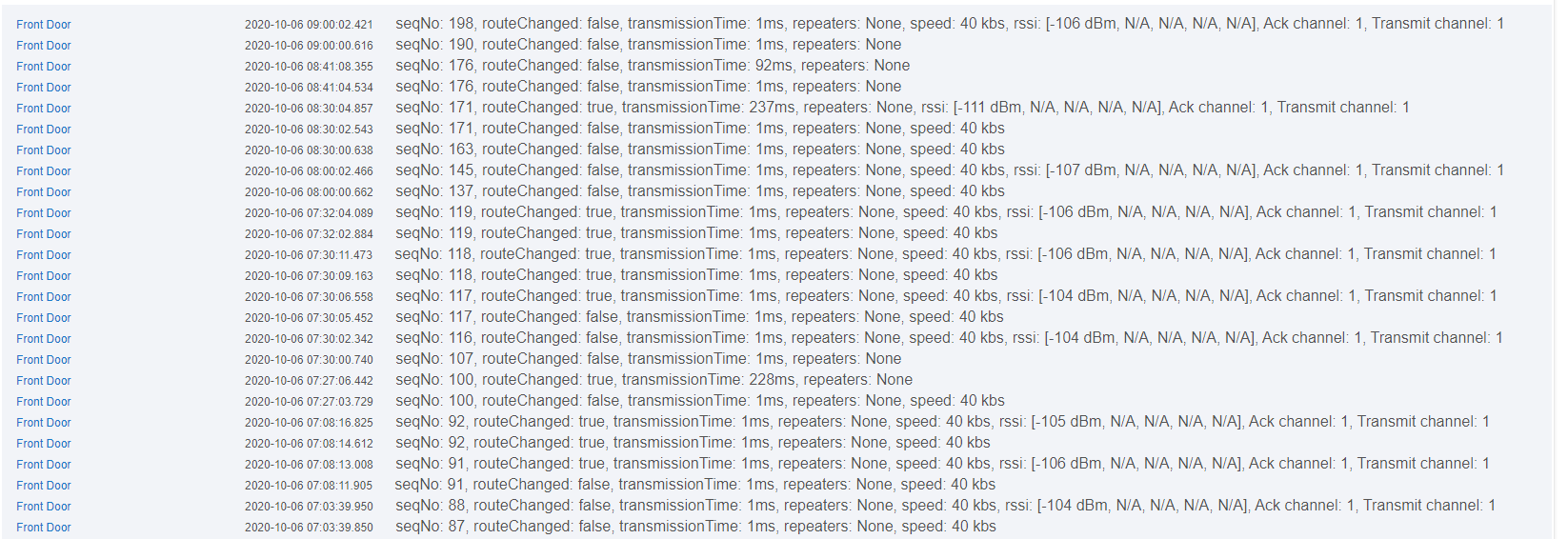
I see the same thing with my schlage lock on latest firmware. The lock does not use the repeater closest to it. instead it likes repeaters that are closest to my hub, or to directly talk to the hub. That is the other thing I have noticed is that my lock changes routes frequently. this logs shows 3 times in a couple of hours. I am not sure if this indicative of weak/bad mesh. My Zwave network is pretty sparse. One kwikset zwave lock, one schlage zwave lock, a fibaro zwave button, 1 ge dimmer switch zwave plus and one ge fan control zwave plus. Then 5 or 6 of the iris gen 2 dual zigbee/zwave plus devices.
Everything except the schlage lock is 100% reliable. I have a brand new one in the box I have been tempted to replace the original with to see if things improve. Currently I use a combination of autolock rule and periodic refresh plus lock commands to keep the door locked as wanted.
I tried this, and it did change the route, but it ended up JUST removing that one LZW30 from the route, and did NOT decide to use the LZW31 right next to the lock...strange it wouldn't want to route through that...
After going to hub IP:8081, my only options are .145, .142 or .129 (I may have skipped .135???)...any benefits of rolling back to any one of those that you're aware of?
I get why Hubitat removed support for these...everything else works perfectly, but this lock is giving me quite the headache (not quite ready for the sledgehammer...yet...)
129 is confirmed to work. If you roll back, then swap the driver like before again. then reboot the lock and give it a couple of manual spins to get it talking. Run A repair. One. Then let things settle. Unfortunately, you can't predict what route your lock will take. Your lock will not work if you do not have a device that supports beaming. If you don't have that, then pick something up and put it within 5 feet of the hub. I have aeotec repeater 6's and they work very well for improving mesh reliability.
Alright, I have reverted to 2.2.2.129, swapped the lock drivers per previous directions, rebooted lock, gave the lock a few turns (saw the status update in the device page immediately each time) and now I'm running a Z-wave repair. I'll let it calm down overnight and see what tomorrow brings.
Thank you (everyone) for your help!
Hi
April gave me the code to create a user driver which I did and it worked. I have since tried to revert to the system driver and it does not work. The user driver works even when I update the FW so I am on 2.2.3.148 and my lock is currently working fine...
April says that the code is the same as the system driver so I don't know what to make of it.
I have also had intermittent issues, with some updates working and others not with the Schlage.
I don't have a C7, so I can't see that, but what I do see with my C5 is the one lock runs the batteries dead in a couple days now where they used to last months. I assume that is due to the routing issues you note. I do think it is a routing or signal issue, it sure acts like it is having a hard time reaching the locks where it did not do this previously.
My locks worked fine too until 2.2.3? (Maybe it was one of the later 2.2.2 updates?) Anyway, they worked perfect for 18 months and then blammo nothing but troubles. The locks didn't change, all 3 of mine and everyone else's could not have all failed simultaneously. Something within Hubitat changed. I wish they could or would figure out what that is.
This is my one sore spot, everything else is working great on my hub. But to break something and then not want to reverse that for whatever reason is annoying.