Unifi Protect Motion Sensors not detected

Huibtat CZARS -

I am working to integrate a Ubiquiti deployment for a household. They have purchased protect motion sensors and other items that integrate with the super link gateway. I have activated the network and protect apps accordingly. I noticed that the sensors do not show up as a client device to be recognized as a supported element, however, I am seeing the logs when the device is tripped the following:


app:34
2026-03-30 12:48:00.586 PM

debug

No child device found for ID 69c5c551005cf803e40017f5; skipping

app:342026-03-30 12:48:00.585 PM

debug

parseNvrJson()

app:342026-03-30 12:48:00.583 PM

debug

Parsed JSON: [item:[start:1774900081049, end:null, id:69cad3710032a003e403302d, type:sensorMotion, device:69c5c551005cf803e40017f5, modelKey:event], type:add]

app:342026-03-30 12:48:00.581 PM

debug

componentParse: {"item":{"id":"69cad3710032a003e403302d","modelKey":"event","type":"sensorMotion","start":1774900081049,"end":null,"device":"69c5c551005cf803e40017f5"},"type":"add"}

dev:242026-03-30 12:48:00.578 PM

debug

parse: {"item":{"id":"69cad3710032a003e403302d","modelKey":"event","type":"sensorMotion","start":1774900081049,"end":null,"device":"69c5c551005cf803e40017f5"},"type":"add"}

Can someone help with how we can create potentially a virtual device that can match on an ID here to then make it a valid device to build a rule against, OR, does the groovy driver need to be updated with additional logic to remediate and recognized the new sensors. Any help would be greatly appreciated.

What integration are you running. Ia it the built in one or one of the community variants.

Built in integration

The built in integration as i understand it is just for cameras and not superlink. Try Snells integration i am pretty sure he supports the superlink stuff.

Tagging @bertabcd1234

Can you send me the link to his drivers please and thanks as I was seeing that as a parallel

2 Likes

Thanks!

The built-in integration only supports cameras. However, it does appear some data is coming over the API for these, so if you share full discovery data with debug logging enabled for the console device and integration app on your hub, I might be able to figure something out.

2 Likes

@snells code will not work as 2FA is default now in Unifi and continue to get 401 unauthorized when trying to get it to log into a user account with superadmin rights to the systems. I will post the output I am getting from the native integration as it uses and API Key to make this integration much easier.

Here is the output from the logs folder when I moved a motion device

app:362026-03-30 04:36:40.724 PM

debug

No child device found for ID 69c6b11903103703e40086b5; skipping

app:362026-03-30 04:36:40.723 PM

debug

parseNvrJson()

app:362026-03-30 04:36:40.721 PM

debug

Parsed JSON: [item:[smartDetectTypes:[alrmSpeak], start:1774913767358, end:1774913791158, id:69cb08f5019fa003e403741e, type:smartAudioDetect, device:69c6b11903103703e40086b5, modelKey:event], type:update]

app:362026-03-30 04:36:40.720 PM

debug

componentParse: {"item":{"id":"69cb08f5019fa003e403741e","modelKey":"event","type":"smartAudioDetect","start":1774913767358,"end":1774913791158,"device":"69c6b11903103703e40086b5","smartDetectTypes":["alrmSpeak"]},"type":"update"}

dev:362026-03-30 04:36:40.717 PM

debug

parse: {"item":{"id":"69cb08f5019fa003e403741e","modelKey":"event","type":"smartAudioDetect","start":1774913767358,"end":1774913791158,"device":"69c6b11903103703e40086b5","smartDetectTypes":["alrmSpeak"]},"type":"update"}

app:362026-03-30 04:36:38.088 PM

debug

No child device found for ID 69c5c551005cf803e40017f5; skipping

app:362026-03-30 04:36:38.087 PM

debug

parseNvrJson()

app:362026-03-30 04:36:38.085 PM

debug

Parsed JSON: [item:[start:1774913798562, end:null, id:69cb09060233a003e403742b, type:sensorMotion, device:69c5c551005cf803e40017f5, modelKey:event], type:add]

app:362026-03-30 04:36:38.083 PM

debug

componentParse: {"item":{"id":"69cb09060233a003e403742b","modelKey":"event","type":"sensorMotion","start":1774913798562,"end":null,"device":"69c5c551005cf803e40017f5"},"type":"add"}

dev:362026-03-30 04:36:38.080 PM

debug

parse: {"item":{"id":"69cb09060233a003e403742b","modelKey":"event","type":"sensorMotion","start":1774913798562,"end":null,"device":"69c5c551005cf803e40017f5"},"type":"add"}

app:362026-03-30 04:36:38.001 PM

debug

No child device found for ID 69c5c6990214f803e4001980; skipping

app:362026-03-30 04:36:37.999 PM

debug

parseNvrJson()

app:362026-03-30 04:36:37.998 PM

debug

Parsed JSON: [item:[start:1774913798476, end:null, id:69cb090601dda003e4037429, type:sensorMotion, device:69c5c6990214f803e4001980, modelKey:event], type:add]

app:362026-03-30 04:36:37.996 PM

debug

componentParse: {"item":{"id":"69cb090601dda003e4037429","modelKey":"event","type":"sensorMotion","start":1774913798476,"end":null,"device":"69c5c6990214f803e4001980"},"type":"add"}

dev:362026-03-30 04:36:37.993 PM

debug

parse: {"item":{"id":"69cb090601dda003e4037429","modelKey":"event","type":"sensorMotion","start":1774913798476,"end":null,"device":"69c5c6990214f803e4001980"},"type":"add"}

app:362026-03-30 04:36:37.958 PM

debug

No child device found for ID 69c5c45603e2f803e4001510; skipping

app:362026-03-30 04:36:37.957 PM

debug

parseNvrJson()

app:362026-03-30 04:36:37.955 PM

debug

Parsed JSON: [item:[start:1774913798423, end:null, id:69cb090601a8a003e4037426, type:sensorMotion, device:69c5c45603e2f803e4001510, modelKey:event], type:add]

app:362026-03-30 04:36:37.954 PM

debug

componentParse: {"item":{"id":"69cb090601a8a003e4037426","modelKey":"event","type":"sensorMotion","start":1774913798423,"end":null,"device":"69c5c45603e2f803e4001510"},"type":"add"}
dev:362026-03-30 04:36:37.951 PM

debug

parse: {"item":{"id":"69cb090601a8a003e4037426","modelKey":"event","type":"sensorMotion","start":1774913798423,"end":null,"device":"69c5c45603e2f803e4001510"},"type":"add"}

I don't suppose you see anything from the app when discovering devices? I'm thinking you won't since it's only looking for cameras specifically, and from what I can see, that will probably be filtered before it even gets to logs.

I'll see if their API docs have any information about what might be expected here (there...wasn't much when it was new, which is still is relatively speaking, so it was a lot of poking around and see what happens!).

1 Like

Did you try it?

Were are you setting up the account. I have been using 2FA since i got unifi and it has worked for me. I just setup my environment on my dev hub. So it does still work.

1 Like

I create a user in the system. The email
Invite went to my account. I created the account with a password. I put both details into the virtual device and get 401 unauthorized. The user is active as a state in the UDM PRO SE

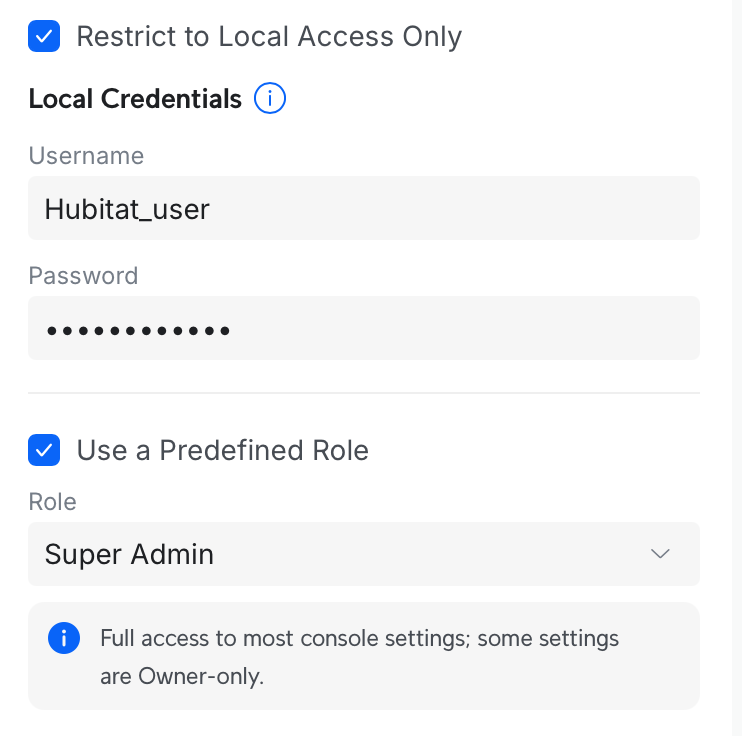
If it sent out an email it is the wrong type of account. Toggle on the option for " Restrict for local access only"

1 Like

Still getting the same output error in logs after that change

dev:372026-03-30 06:56:47.315 PM

debug

Expected HTTP 101 response but was '401 Unauthorized'

dev:372026-03-30 06:56:47.297 PM

debug

UDM_PRO_SE_Verbena - WebSocket Failure: failure: Expected HTTP 101 response but was '401 Unauthorized'

dev:372026-03-30 06:56:47.228 PM

info

UDM_PRO_SE_Verbena - Updated preferences saved

Here is the setup for the admin in UDM

I found the issue.. Can someone point me to the readme for SNELL to onboard sensors as it appears I have to build virtual's for each one and use the identifier to map them correctly. Any help would be greatly appreciated.

Go into the unifi protect main device and click on refresh or just wait a few min. It will create the child devices. Make sure you have the drivers installed first though.

You may want go load my unifi integration manager app which will help manage snells integrations and then also help with inbound and outbound webhooks for alarm manager if needed.

My drivers automatically create children for all identified devices the API returns, and use a "generic" child driver if the type is not yet identified.

As @mavrrick58 stated, they should be identified and automatically created. If there are still problems shoot me a message or post in my main Unifi Protect thread:

I am traveling at the moment so my options are far more limited until I get back next week, but I can still try to help.