My project has Fingerprint capability... but I have not seen data from my cameras with facial information (they could be too old or such), but if you are using my driver and can send some samples... at the very least I could try to get it to start putting the facial ID (if it is anything like the fingerprint one). Shoot me a message if you want to try it out. If you have questions about it you can always message me, or if it is more general then posting on the thread works: [PROJECT] Driver for Unifi Protect Controllers - Community Apps and Drivers / Community Drivers - Hubitat
That was my understanding too. The AI Turret camera has built in AI. My system sent me a massage to my iPhone that included my name. But all I ever saw in the Hubitat log was "face."
A basic solution might be to create some web hooks in Alarm Manager. It only triggers on known/unknown/PoI and I don't know if it sends any additional information with the hook.
AI also threw this out when I was searching. I don't know if it is correct, but it at least infers that you might be able to add it to one of the integrations.
You can do this while using my Unifi Integration app along with Snell's Unifi Protect drivers.
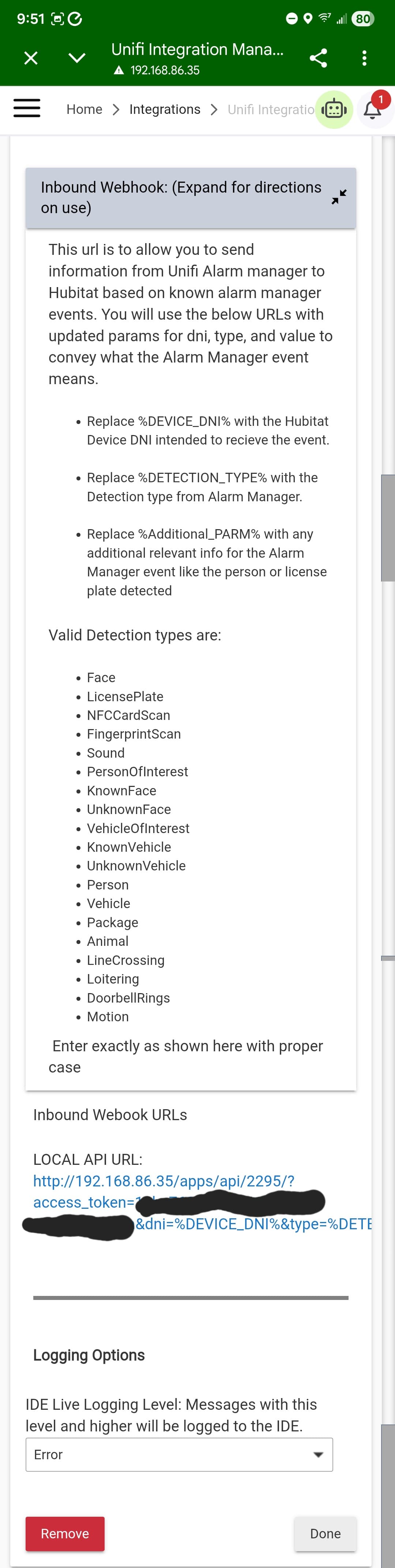
The Unifi Integration app creates a webhook on the Hub that Alarm Manager can post a call to. Then you just need to create a alarm in alarm manager to call it.
Here is an example of what you setup in alarm manager
All...been rebuilding my whole Unifi system ...cameras switches unvr Dream 7 and an indoor and outdoor AP. All that makes sense to me since I was a router/switch jock before I retired. IE - If you wanted to route your traffic to offices around the world...or protect a few billion behind firewalls...that I get.
I've never been a server guy. I feel really dumb trying to figure out the webhook stuff and often don't understand the syntax at all. I mean I understand the difference between get/post...but it ends there.
Is there anyone who has sent the users face ID name from a Unifi UNVR to Hubitat that could show how they did it...and where the found the stuff they needed to fill in the URL?
I find a lot of You Tube videos for the UNVR ...but most are a couple years old and the menus and options are not the same...and none for sending face detections/users names.
I know I'm being lazy because I really should spend some time understand things.
I do have it far enough along that I get a Hubitat log message that includes the words person AND face...but not the name associated with the face in the Protect App.
Awesome… And thanks for taking the time. As soon as I get back home, I’ll see if my poor little feeble mind can figure that out, but that looks pretty straightforward,… and provided the information I was clearly missing ….THANKS!
Did ypu configure known faces in protect. If not you may not have the ability for face recognition. Like i said it is beinf done by my AI Port i have. I think you need G6 cameras for the ability ti be buit into the camera.
Thanks...All 6 of my cameras are G6 Instants or AI Turrets that all run face on the device. I have all the features turned on in Protect. I get face ID pop ups on my iWatch.
The name after the token of the device http://192.168.100.200/apps/api/903/?access_token=XXXXXXXXXXXXXXXXXXXXXXXXXXXXXXXXXXX&dni=Doorbell (in yours) <-----Is that the name of the device in Protect or in Hubitat? Or the name of the device under the dni entry in Hubitat (mine just says "camera" in the dni entry)...PS - Can you have white spaces in the name? Since my device name in Protect and Hubitat is "AI Turret - Front Porch"
That should be the number of the Unifi Integration Manager
It is the DNI for the Camera. With Snell's Unifi protect integration i believe it is the device type and then MAC Address. And spaces seem to be allowed because that works for me. Just go to the camera in queston in Hubitat and retrieve the DNI from the device page.
If you open my Unifi Integration Manager app, scroll down and expand the Inbound Webhook section you should see a example URL to put in Alarm Manager. Just replace the fields that are surrounded with % with valid data. Below is what mine shows.