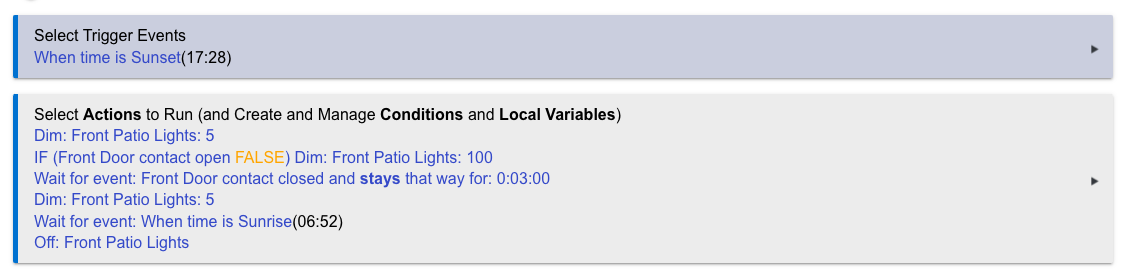
Looks like this is not working for me. Anyone got any suggestions?
You have no ELSE action after your IF statement. If the door is closed then only your first dim action will happen. If the contact is open, then the rest will go.
What are you trying to accomplish, in plain language?
your rule will trigger at sunset and dim the lights. if the door is open at sunset, then it will put the lights at 100, wait for the door to close for 3 minutes, then dim the lights to 5 and wait for the sunrise event.
i would suggest using a virtual switch, and potentially multiple rules for this.
RULE 1:
Trigger: When time is Sunset or When time is Sunrise
Actions: IF time is Sunset THEN turn VS ON
ELSE turn VS OFF
ENDIF
RULE 2:
Trigger: When Front Door contact changes
Actions: IF VS is ON THEN
IF Front Door contact is OPEN THEN
Dim: Front Patio Lights 100
ELSE
Dim: Front Patio Lights 5
ENDIF
ENDIF
1 Like
Here's an option for a single rule
Define Required Expression
Time between Sunset and Sunrise
Trigger Events
Front Door contact opened
OR
When time is Sunset
Actions to Run
IF (Front Door contact open) THEN
    Dim: Front Patio Lights:  100
ELSE
    Dim: Front Patio Lights:  5
END-IF
Wait for Expression: Front contact closed --> duration: 0:03:00
IF(Time between Sunset and Sunrise) THEN
    Dim: Front Patio Lights:  5
    Wait for event: When time is Sunrise
END-IF
Off: Front Patio Lights
Hi, thanks for the suggestions. I am a rookie when using this language and obviously don't understand it.
I am trying to have the light come on at sunset in a dim state and go to 100% if the front door opens. Then wait 3 minutes with the door closed and then dim it again.. ultimately off at sunrise.
So, I agree with the two rule approach. The first would handle turning the light on at sunset and off at sunrise. You can do that with Rule Machine, Basic Rules, Simple Automation Rules, or Room Lighting. Then the second rule to adjust brightness for the door:
Required Expression:
	Time is between sunset and sunrise
Trigger:
	Front Door contact opens
Action:
	Set Front Patio light to 100
	Wait for event: Front Door contact closed and stays that way for: 0:03:00
	Set Front Patio light to 5
So, you were pretty close.
Thank you, I agree with you. I appreciate the input.
1 Like
@deserthillsdrive Setting a light level is an interesting exercise in figuring out the logic. If the door is already open when it become sunset, what do you want the light level to be? 100% or 5%? If you want it to be 100%, what logic brings it to 5%? I suspect you'd use the second rule but I think you'd need changed for the trigger (plus the associated actions) as the door would have opened outside of the required expression. Similarly, if the door is already open at sunrise, do you want the light to stay on until it's been closed for 3 minutes or turn off immediately?
The single rule example I provided includes the logic to turn the light on to 100% if the door is already open and sunset. It also keeps the light on if it's already open at sunrise until it has been closed for 3 minutes. This example can also be a good basis for how you might want to update two separate rules.
2 Likes
Hi, yes I want the light to dim up to 100 when it is open. You make a good point that the door could be open at sunset and the rule would need to fire. I will play around with both variations on front and back patio lights to see what I prefer. If I can build the logic into one rule with your suggestions, I would prefer that. Thank you
If you want a single rule, you'll want something more like this. Was about the only way I could think of that would not have the logic fall a part somewhere.
Required Expression:
	Time is between sunset and sunrise
Trigger:
	Time is sunrise
	Time is sunset
	Door contact opens
Action:
	IF(Time is sunset) THEN
		IF(Front Door open) THEN
			Set Front Patio Light to 100
			Wait for event: Door contact closed and stays that way for: 0:03:00
			Set Front Patio Light to 5
		ELSE
		Set Front Patio Light to 5
	END-IF
	IF(Time is sunrise) THEN
		Turn off Front Patio Light
	END-IF
	IF(Front Door open) THEN
		Set Front Patio Light to 100
		Wait for event: Door contact closed and stays that way for: 0:03:00
		Set Front Patio Light to 5
	END-IF
A two rule approach could look something like this
Rule 1
Trigger Events
When time is Sunset
Actions to Run
IF (Front Door contact open) THEN
    Run Actions:  Rule 2
ELSE
    Dim: Front Patio Lights:  5
END-IF
Wait for event: When time is Sunrise -3 minutes
Wait for Expression: Front contact closed --> duration: 0:03:05
Off: Front Patio Lights
Rule 2
Define Required Expression
Time between Sunset and Sunrise
Trigger Events
Front Door contact opened
Actions to Run
Dim: Front Patio Lights:  100
Wait for event: Front contact closed --> duration: 0:03:00
Dim: Front Patio Lights:  5
Hmm, this set up did not seem to turn on last night at sunset. I will verify again today to see if I missed something.
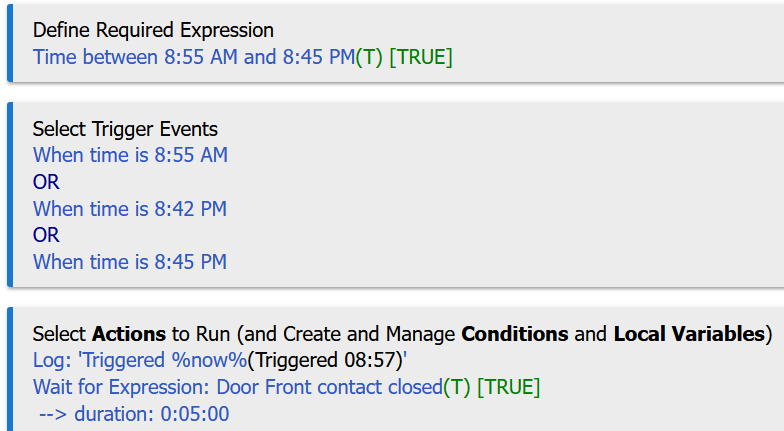
@deserthillsdrive post a screenshot of your rule and turn on logging. It is possible that the required expression is evaluating true after the rule tried to trigger at sunset. I checked it with a certain time before posting that example and it worked as expected. Perhaps sunset is different? My suggestion would be to change the restriction to sunset -1 minute or the trigger to sunset +1 minute. The logging will show how many milliseconds after the required expression and the trigger are happening to see if this is the issue.
Edit: I just updated and reran my test rule and you can see that the trigger is happening before the the required expression evaluates as true but the actions are running.

I posted a 2-rule option that is similar if you want to try it. The only difference is an extra 5 seconds on the off command.
I have turned the logs on and will monitor them for tomorrow morning. I set up a simple rule to turn them on. Everything else was working requested.

I'm glad it's working. I have a though how to make the single rule work if you're interested in trying it again.
Those logs don't show the rule firing until the door was opened at 19:38. It does not look like the rule turned on the porch light at sunset.
I believe deserthillsdrive is using a two-rule approach now.
1 Like
Hi there, I have decided to add a motion under my patio for my front door to trigger the lights to come on without the door needing to be opened first. How do I integrate this into the above-mentioned rules. I have tried a couple what I thought would work ideas with no success.
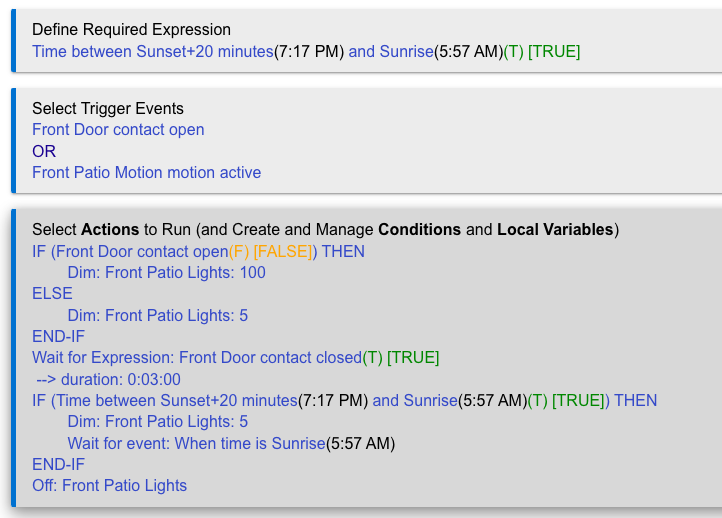
Using your posted rule, I'd add the motion sensor like this
IF (Front Door contact open OR Front Patio Motion motion active) THEN
...
Wait for Expression: Front Door contact closed AND Front Patio Motion motion in active --> duration: 0:03:00
...
Notice the IF is using OR so either event will turn on light. The Wait is using AND so both states must be true for the 3 minute duration to advance to the next action.
I'm not sure that the ELSE is doing anything unless your calling the actions of this rule from another rule. If you're not then you can probably eliminate the IF-THEN-ELSE and just leave the Dim: Front Patio Lights: 100. The logic, though, looks like it could be setup for use with a time trigger, too.
1 Like

