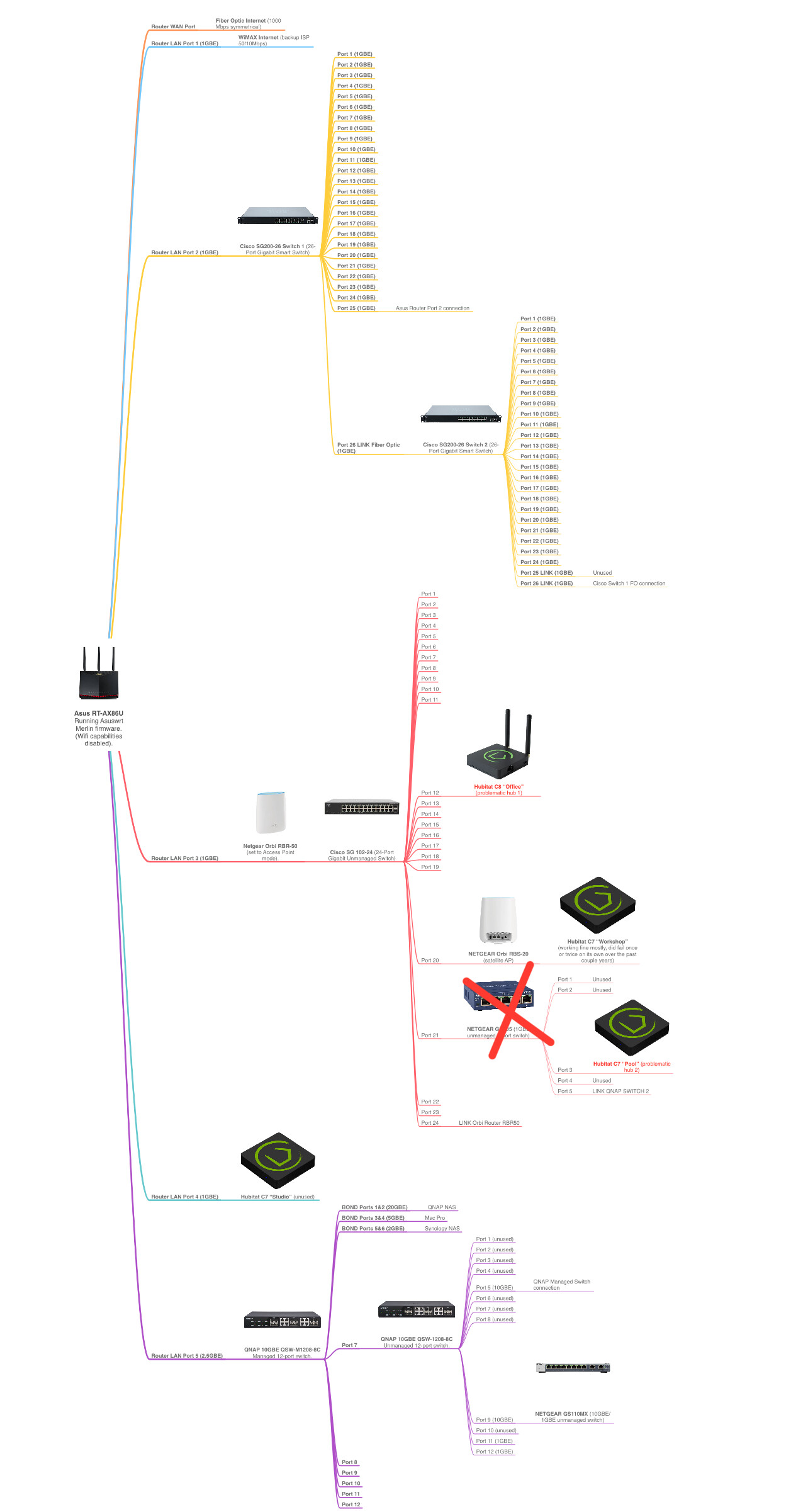
So the original issue in this thread has occurred to me again after turning off jumbo frames like a month ago or more.. affects two out of 4 of my running hubs (always the same two and they both go offline simultaneously).
Port 8081 is not accessible on either hub either so am going to have to physically pull the power on each. Any ideas for further troubleshooting? It seems strange there isn’t a way to diagnose what’s going on via logs or something..
Also does Hubitat no longer offer actual support/tickets? It would be nice to just work with someone and get this nailed down since the hubs run critical systems.. I pay 4 subscriptions so it seems weird they can’t offer true tech support.
you can go to support.hubitat.com and if the hub is under warranty click warranty support to generate a ticket. Otherwise staff does all support in the forum.
Which is it? You have both? Are both acting as routers? I think @rlithgow1 would be the one to ask about having two routers like this.
Could you draw out your network configuration? (MS paint or something like that is fine. Even a picture of hand drawing of the layout would work. Like where the hubs are (in the network), the router(s), modem, and how everything is wired together with some labels and/or model numbers.
It is very odd and would be super coincidental to the Hubitat hub firmware that two hubs would crash at the exact same time.
I have no dog in the fight, so to say, it just seems extremely unlikely this is the hubs being that it is two of them. It seems likely the hubs are being subjected to the same environmental condition, like are they in a rack together or near some "noisy" electrical device or sitting on top of a Wifi router?
The crossed out 5-port switch I realized wasn’t currently feeding anything but the Hubitat so I have bridged it to simplify for the time being.
My idea with the architecture changes is to get all the offending Hubitat hubs connected to the same 1Gbe network switch and that switch connected more directly back to the router instead of coming off the 10Gbe QNAP switch. This also consolidated all my Orbi satellites into a single hub or otherwise connected back through the Orbi router (running in AP mode. There is not, nor has there been, a double router/NAT situation happening due to the Orbi router, it just handles wifi and passes dhcp from the Asus router).
Let me know if you think the original configuration could have been problematic to begin with and if these changes might help. So far no problems since the I made the changes yesterday but it took a month or two to have it happen again since starting this thread.
Originally I thought it might be a hub mesh issue causing two hubs to fail simultaneously but it sounds like that is not likely in your opinion.
The network maps are not complete but are pretty much just missing endpoints (a lot of rj45 wall jacks with nothing currently plugged in, and a couple POE switches and devices, etc.), but everything is downstream from what is in the network map. If you need more info I plan to complete the full map and can share it if necessary.
on the sg200's and the qnap switch, make sure that Jumbo Frames is turned off (or MTU is only at 1500 max) Is most of this equipment in the same area? Most of it looks really uneeded.
Can I ask this delicately, but why do you need all those switches, especially that many 24 port ones?
And you have your mesh router connected to the same wired network? The way you show it, it loops right back on itself. Why?
This is complete chaos, I am not sure how this is all supposed to work together??? Personally, I think you need to rethink what you are doing here, unless this is a data center or something like that where you need this level of complexity.
Which router do you see this on? The Asus it connected to the SG200-26 #1 on Port 25 only, it is just indicated oddly on the chart. I don't think that switch has any sort of "WAN" or special uplink port so you just connect to any port and then configure it correctly.
Same for the Orbi RBR-50, it is connected to only port 24 on the next switch in line after it.
Thats the "Old" design and also those are two different mesh nodes, not the same device connected in two places. In the new layout the remote AP connects back to the main Orbi, which then connects to the router. Seems that the Asus has Wifi disabled (per the notes on there) and the two Orbi's are a mesh Wifi network. I think as long as they both connect to the upstream router it should not cause any problems.