Bought a Tuya Smart Human Presence Sensor 24G from Ali express.
However, cannot find a compatible driver in Hubitat.
Tried using the Tuya 4 in 1 sensor driver, but not successful.
Unable to detect motion.
Below is what I found in the logs:
(_TZE204_eaulras5, UNKNOWN, 1.5.3 2023/09/30 12:32 PM) descMap = [raw:catchall: 0104 EF00 01 01 0040 00 810F 01 00 0000 02 01 00A70902000400000157, profileId:0104, clusterId:EF00, clusterInt:61184, sourceEndpoint:01, destinationEndpoint:01, options:0040, messageType:00, dni:810F, isClusterSpecific:true, isManufacturerSpecific:false, manufacturerId:0000, command:02, direction:01, data:[00, A7, 09, 02, 00, 04, 00, 00, 01, 57]]
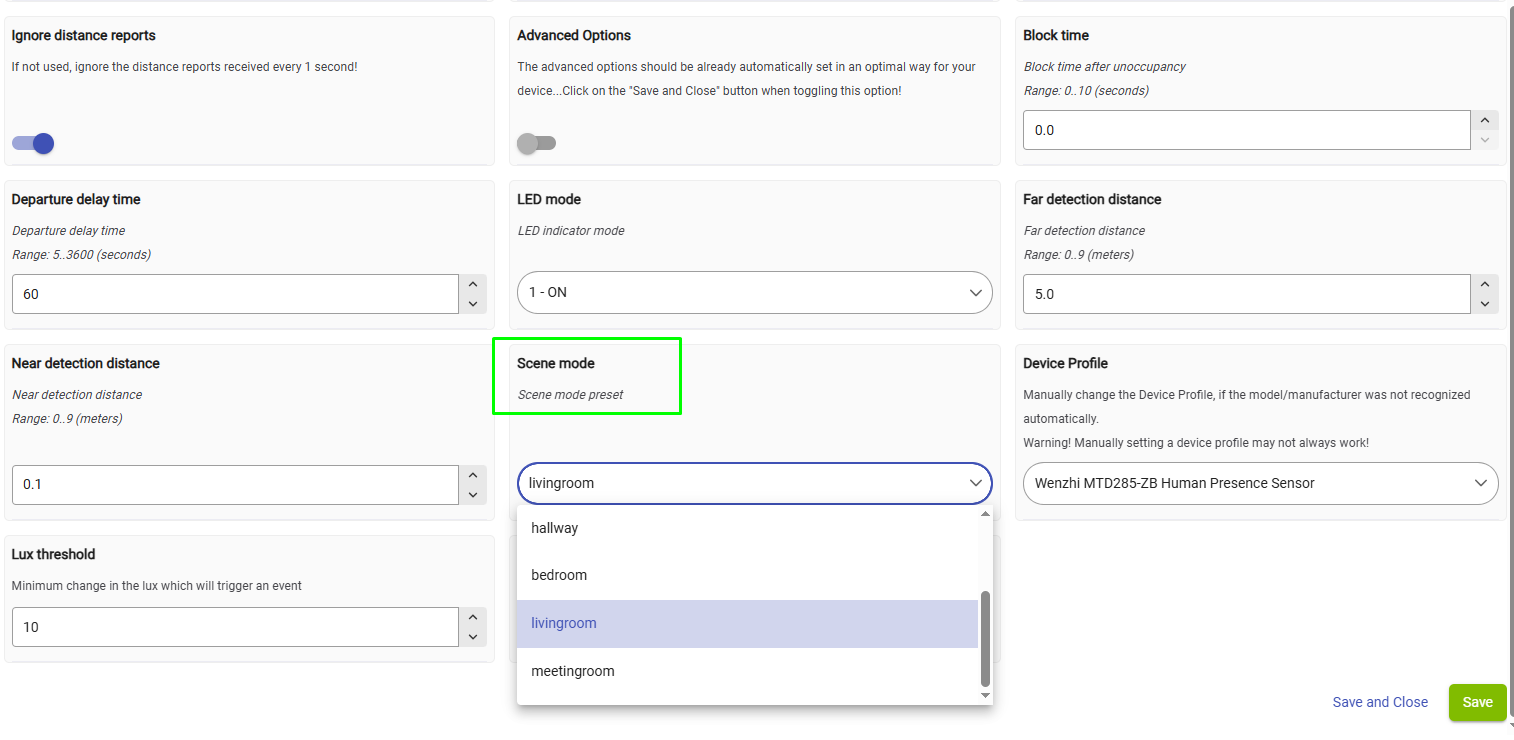
Hi @irengimu.valdymas , I replied in the Tuya mmWave Sensor thread here. Select the device profile as in my screenshot, click on the Save button in the Preferences tab and let me know if it works.
The mmWave sensors typically need some more precise tuning to achieve better results, they are not plug-and-play as the PIR motion sensors...
I don't have this particular device; there are nearly one hundred different mmWave sensors based on the Tuya platform, so I don't know how well it performs. This seems to be rather complicated device, have you tried different 'Scene Modes' ?
This is the model MTD285-ZB 24G. In theory, it should detect human presence. I tested all the scenarios. For example, I have another sensor, Manufacturer_TZ321C_fkzihax8, model TS0225, and it clearly detects whether a person is present or not (present, not present). The distance to a calmly seated person is about 2 meters.
It is quite possible that the problem with not keeping the 'motion active' for this device (TS0601 _TZE204_aai5grix) as expected is in the driver; however, troubleshooting it will require a lot of effort and time.
An easier and faster solution would be to get a Tuya Matter Gateway hub, use the native Smart Life app for fine-tuning all the possible settings, and then bring the mmWave sensor locally to HE via HE inbuilt Generic Matter Bridge driver.
Now I’ve read the description of this device. It says that this device has two sensors (a Motion sensor and a Presence sensor). Their sensitivity can be adjusted separately for each one.
The individual settings for the mmWave and PIR sensors are not exposed in the Tuya driver at the moment, but exposing them would make driver troubleshooting even more difficult and time-consuming...
Are you sure that the 'Scene mode' parameter doesn't have any effect on the device performance? Enable the Debug logging and try to analyze the logs that follow clicking on the 'Save' button after you change the Scene mode. Do you see any log messages meaning an error or problem changing the mode?
A better debugging approach is to change one parameter / preference at a time.
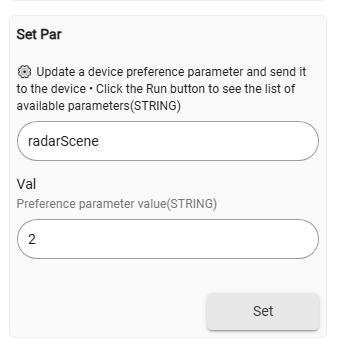
Test the SetPar command with parameters 'radarScene' and a number from 1 to ??
What is in the live logs after sending this command?
If you click on the 'Set' button without any parameters, you will see the list of the preferences that can be changed one by one for this particular device :
Currently, there are six parameters that can be adjusted - shown in the screenshot above.
When you have a chance, please test them and let me know whether they work or not.
Yes, I have tested these modes. I noticed how the parameters (Motion Detection Sensitivity, Static Detection Sensitivity, Maximum Distance, Fading Time, Minimum Distance) change, but apparently that is not enough for my case, because if you sit still and don’t move, after some time the sensor becomes inactive.
I would also like to be able to adjust the (Fading Time) independently of the scenes, ideally from the minimum possible number of seconds, for example from 0 to 3600 seconds.
Can you confirm that when you change the 'radarScene', the other parameters change to a preset combination/set of (Motion Detection Sensitivity, Static Detection Sensitivity, Maximum Distance, Fading Time, Minimum Distance)?
What are the Motion Detection Sensitivity and the Static Detection Sensitivity values when you change the radar scene to 'Bedroom' ? (you can see the values in the debug logs). I suppose the Bedroom scene should have the most sensitive settings.
You should be able to change the 'fadingTime' parameter independently from the last selected 'radarScene' even now, using the setPar command. When you change the fadingTime to a new number, does it work? Do you see the same new fadingTime reported by the device back in the debug log, and is fadingTime changed in the Current States?
To keep the 'presence' active when a person is sitting still, use bigger 'Fading Time' values of at least 30 seconds, better 60 seconds. Too small values may result in false 'no presence' detections.