Hi
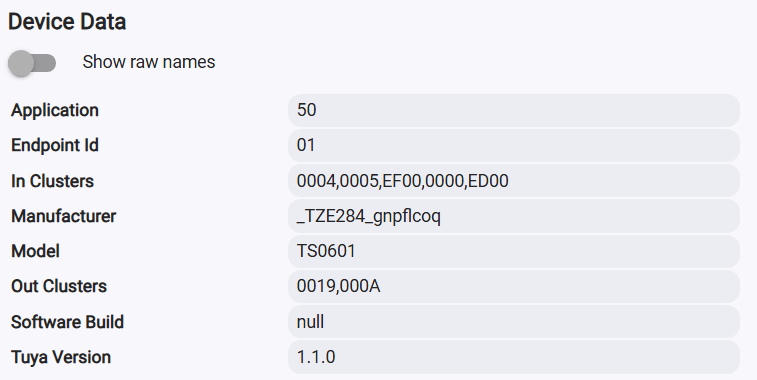
Got a new Tuya radar/temp/hum/lux 4-in-1 from our friends at AliExpress. I figured it would just plug n play with the great drivers we have, but they gave it yet another new identity and now I cannot see how it comes together. It initially comes up as a Tuya temp with display, but that doesn't work. I tried 4-in-1 and have yet to see any report of luminance, which is really a major deal in why i bought this item.
The log is below, as I tried to limit it so no duplication, as well as the current status as a 4IN1.
Any ideas what I can do to bring this to life?
Thanks, Don
==================================== STATUS
Current States
Show raw names
| battery | 100 |
|---|---|
| healthStatus | online |
| lastBattery | Tue May 12 18:03:02 PDT 2026 |
| motion | inactive |
| powerSource | dc |
| Status | clear |
| temperature | 32 |
State Variables
| deviceProfile | TS0202_4IN1 |
|---|---|
| driverVersion | 3.5.2 2025/07/14 7:56 AM (TS0601 _TZE284_gnpflcoq) (C-8 Pro 2.5.0.135) |
| health | {"checkCtr3":0} |
| lastRx | {"timeStamp":"2026-05-12 17:56:10.273","checkInTime":1778633770284} |
| lastTx | {"cmdTime":1778633767893} |
| motionStarted | 2026-05-12 17:55:35.092 |
| states | {} |
| stats | {"cfgCtr":2,"rxCtr":4,"txCtr":16} |
Capabilities
Battery
Configuration
HealthCheck
IlluminanceMeasurement
MotionSensor
PowerSource
Refresh
RelativeHumidityMeasurement
TemperatureMeasurement
================================= LOG
dev:2672026-05-12 17:56:20.218
error
groovy.lang.MissingMethodException: No signature of method: user_driver_kkossev_Tuya_Multi_Sensor_4_In_1_829.getTemperatureDiv() is applicable for argument types: () values: on line 761 (method parse)
dev:2672026-05-12 17:56:20.194
debug
New Don's Place Window Radar-Lux 58 (DP=0x07) unexpected 4-in-1 temperature (dp=07) is 23.8 238
dev:2672026-05-12 17:56:20.192
warn
New Don's Place Window Radar-Lux 58 NOT PROCESSED from deviceProfile Tuya cmd: dp=7 value=238 descMap.data = [00, 9D, 01, 04, 00, 01, 00, 04, 02, 00, 04, 00, 00, 00, 64, 07, 02, 00, 04, 00, 00, 00, EE, 08, 02, 00, 04, 00, 00, 00, 35, 0B, 02, 00, 04, 00, 00, 00, D3]
dev:2672026-05-12 17:56:20.190
debug
New Don's Place Window Radar-Lux 58 customProcessTuyaDp: dp=7 dp_id=2 fncmd=238 dp_len=0 descMap.data = [00, 9D, 01, 04, 00, 01, 00, 04, 02, 00, 04, 00, 00, 00, 64, 07, 02, 00, 04, 00, 00, 00, EE, 08, 02, 00, 04, 00, 00, 00, 35, 0B, 02, 00, 04, 00, 00, 00, D3]
dev:2672026-05-12 17:56:20.189
debug
New Don's Place Window Radar-Lux 58 standardParseTuyaCluster: command=02 dp_id=2 dp=7 (0x07) fncmd=238 fncmd_len=4 (index=13)
dev:2672026-05-12 17:56:20.185
info
New Don's Place Window Radar-Lux 58 battery is 100 %
dev:2672026-05-12 17:56:20.183
debug
New Don's Place Window Radar-Lux 58 (DP=0x04) Tuya battery status report dp_id=2 dp=4 fncmd=100