Unfortunately a Google search result on this same issue has been removed or deleted so I cannot see what the resolution was.
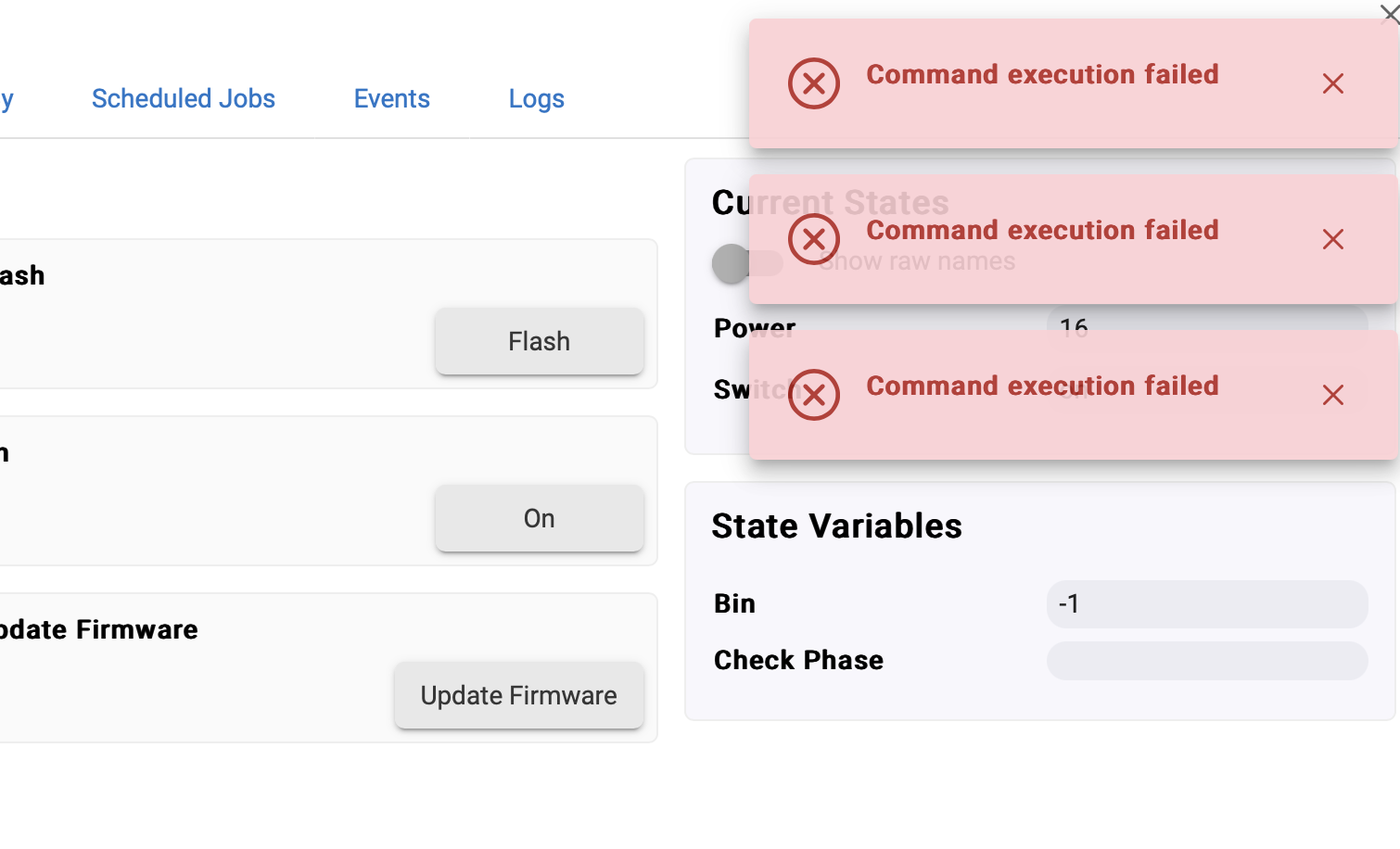
Using a secured cloudflared for a tunnel to access my Hubitat remotely. It used to have no issues but a recent update I get this error when trying to run commands on a device: Command Execution Failed
The command is executed properly as far as I can tell, but it displays an error.
+1. C8 Hub, running 2.4.0.147 - same issue when running behind Traefik v2 - only started with the new GUI. the pop ups pop up during any interaction but otherwise the GUI functions perfectly behind the popups
traefik docker commpose file (allows configuration of headers etc)
Traefik 2 - Reverse Proxy
traefik:
container_name: traefik
image: traefik:v2.11.2
restart: unless-stopped
command: # CLI arguments
- --global.checkNewVersion=true
- --global.sendAnonymousUsage=true
# - --global.insecureSNI
- --entryPoints.http.address=:80
- --entryPoints.https.address=:443
# Allow these IPs to set the X-Forwarded-* headers - Cloudflare IPs: IP Ranges
- --entrypoints.https.forwardedHeaders.trustedIPs=173.245.48.0/20,103.21.244.0/22,103.22.200.0/22,103.31.4.0/22,141.101.64.0/18,108.162.192.0/18,190.93.240.0/20,188.114.96.0/20,197.234.240.0/22,198.41.128.0/17,162.158.0.0/15,104.16.0.0/12,172.64.0.0/13,131.0.72.0/22
- --entryPoints.traefik.address=:8080
- --api=true
# - --api.insecure=true
# - --serversTransport.insecureSkipVerify=true
- --log=true
- --log.level=DEBUG # (Default: error) DEBUG, INFO, WARN, ERROR, FATAL, PANIC
- --accessLog=true
- --accessLog.filePath=/traefik.log
- --accessLog.bufferingSize=100 # Configuring a buffer of 100 lines
- --accessLog.filters.statusCodes=400-499
- --providers.docker=true
- --providers.docker.endpoint=unix:///var/run/docker.sock
# - --providers.docker.defaultrule=Host({{ index .Labels "com.docker.compose.service" }}.$DOMAINNAME)
- --providers.docker.exposedByDefault=false
# - --entrypoints.https.http.middlewares=chain-authelia@file
# Add dns-cloudflare as default certresolver for all services. Also enables TLS and no need to specify on individual services.
- --entrypoints.https.http.tls.certresolver=dns-cloudflare
- --entrypoints.https.http.tls.domains[0].main=$DOMAINNAME
- --entrypoints.https.http.tls.domains[0].sans=.$DOMAINNAME
- --entrypoints.https.http.tls.domains[1].main=$DOMAIN # Pulls main cert for second domain
- --entrypoints.https.http.tls.domains[1].sans=.$DOMAIN # Pulls wildcard cert for second domain
- --providers.docker.network=t2_proxy #- --providers.docker.swarmMode=false
- --providers.file.directory=/rules # Load dynamic configuration from one or more .toml or .yml files in a directory.
# - --providers.file.filename=/path/to/file # Load dynamic configuration from a file.
- --providers.file.watch=true # Only works on top level files in the rules folder #- --certificatesResolvers.dns-cloudflare.acme.caServer=https://acme-staging-v02.api.letsencrypt.org/directory # LetsEncrypt Staging Server - uncomment when testing
- --certificatesResolvers.dns-cloudflare.acme.email=$CLOUDFLARE_EMAIL
- --certificatesResolvers.dns-cloudflare.acme.storage=/acme.json
- --certificatesResolvers.dns-cloudflare.acme.dnsChallenge.provider=cloudflare
- --certificatesResolvers.dns-cloudflare.acme.dnsChallenge.resolvers=1.1.1.1:53,1.0.0.1:53
- --certificatesResolvers.dns-cloudflare.acme.dnsChallenge.delayBeforeCheck=5 # To delay DNS check and reduce LE hitrate
Similar issue here using NPM reverse proxy. Version 2.4.0.151. Every command seems to execute properly, but the errors keep popping up when triggering commands from the UI. Works without errors when browsing to local IP address instead
Why would you expect Hubitat staff to comment on, or offer suggestions for, something they haven't setup? I find your expectation bizarre.
Hubitat offers their own Remote Access package, which they actively support.
There are plenty of users, including me, who use OpenVPN, WireGuard, or Tailscale to access their Hubitat hubs; these setups were done without anticipating Hubitat staff to troubleshoot or assist.
Well, I'm not "disappointed" that Hubitat staff hasn't responded but I don't think it's fair to imply that they shouldn't support certain networking situations because they have a paid remote access feature. This is a bug of some kind. One of the attractions of Hubitat is that it gives prosumers like us more control over our smart home destiny, rather than a locked-in ecosystem. Surely Hubitat staff doesn't setup and test every single product it supports.
In my case, and I suspect others here, it's not simply about cost (yes it's one more added item), but we typically already have a complex networking environment set up for accessing our home devices privately and securely on something that we control. It's not simply only cloudflare or reverse proxy for accessing Hubitat alone, it covers a gamut of devices and services that we already run out of our home.
Anyway, it's a bug and I hope that one of the devs will address this in a future update.
Maybe the question here is enable/disable the 'toast' notification. It works fine on OpenVPN, but honestly, I would love to shut it off. Had the same 'problem' with SharpTools, and they allow you to turn it off. It is just a nag in my opinion.