Troubleshooting hub crash

I've been having a similar problem with my Hubitat. I would say about once every week or two it becomes non-responsive. Here's my info:

Hardware version: C-8
Platform version: 2.4.2.138
Diagnostics version: 1.1.131
Powered by a UPS.
I am unable to disable jumbo frames on my router, so I have no idea if they are being used.
Router uses fixed channels, so no channel optimization is going on.

It has a static IP. It's on Wifi and I can't run a permanent Ethernet cable to it. I can run a temporary cable to it from one of my mesh nodes but I haven't tried to do this.

Today it crashed again so I thought I'd do the steps I'd seen previously in this thread. It was definitely working this fine this morning and I noticed it had stopped working when one of my lighting automations failed.

The lighting automation that failed uses a Zigbee motion detector to turn on a Z-wave relay, so no Wifi is involved in the automation.

The light on the hub was solid green. I tried to access the diagnostic tool on port 8081 with no luck. I tried pinging the static IP assigned to it, but it failed to respond. I tried using the Android Hubitat app but it wouldn't display the "Hub Diagnostic Tool" option.

So that left me with trying a Network Reset. I turned the hub over, found the round hole, stuck a small plastic pin in the hole until I could both hear and feel it click, then held it down for 10 seconds and released. The light stayed green. I waited for 30 seconds to see if the light would change, but nothing happened. I did this process again just to be sure. Then I disconnected the power, waited about 15 seconds, and plugged it back in. The light soon turned blue, then about 3 minutes later it turned green. At this point the web pages were up again and automations were working (though sluggishly as they seem to do for a little while after a reboot).

I have the Rebooter app installed and it reboots the hub hard at 3am every day. I tried rebooting just the process but the hub was still hanging/crashing so now I do the hard reboot, but obviously that doesn't work any better.

Any suggestions on things I can try?
Hard reboots will only make things worse. You should never do a hard reboot if you can help it. You also should probably not just do scheduled reboots either.

The first thing to do is a reboot with the advanced option and select the option to rebuild the DB at next restart. That is basically a soft reset. Any time a hard reboot is done you will want to fallow it with a graceful reboot with that option enabled if possible.

You need to identify why the hub is locking up and not just reboot it.

I would suggest looking at your hub stats periodically to see of anything pops out as a odity.

1 Like

Are you still using the original USB C brick to power it?

1 Like

Ok, I've rebooted with the rebuild option checked and removed the Rebooter app so the hub won't reboot itself every day.

The Device stats and App stats are sitting at 1.1% and 1.2% at the moment. I'll check them periodically to see if that changes.

So now I just wait to see if it stays up.

I'm using a konnected Mini DC UPS. It has a USB output so I'm using that rather than the original USB C brick.

You may also want to load Hubinfo driver so you can monitor cpu and memory.

The reason @jlv brought up the power adapter is because the zwave radio in the hub Is very sensitive to fluctuations is power. Some power devices dont provide as consistent voltage as others. Not exactly the same but it is heavily discussed in a PoE research thread were only certain devices are found to work reliably with the C8 or C8 Pro.

That said it may be worh getting that power adapter out and using it for a bit if the proble. Reoccurs

2 Likes

That's what I suspected. @mavrrick58 details why: lots of people have had issues replacing the C8 or C8 Pro power supplies (*). Just for the sake of troubleshooting, I'd put the hub back on the original brick to see if anything improves.

(*) I say this as some who runs their main C7 via a USB port on a mini UPS. But my C8 Pro is on the original brick.

2 Likes

I can't find one branded "Hubitat". Do you know which brand of brick Hubitat uses?

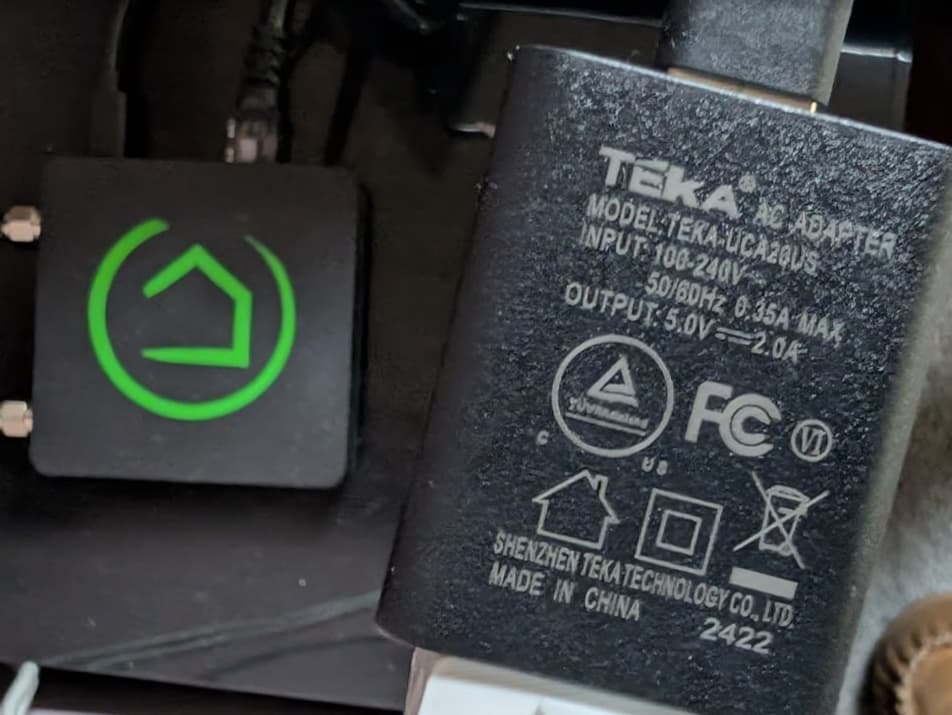
Unfortunately it in't branded by Hubitat.

The one from my C8 Pro.

1 Like

Ok, thanks. I can't find that brand in my pile. I see that it's 5V 2A so I'll see if I can find one with similar output specs. I have the regular C-8 not the pro, so it may not require as much current.

1 Like

Well, it stayed up 4 days. This morning, sometime between 4:30am and 6am it became non-responsive - no web page updates, nothing on port 8081, no response to pings, and doing a Network Reset did nothing.

So now I've:

  • Taken it off of Wifi (removed if from the Network Settings page) and put it back on Ethernet at the router
  • Put it on a Sony-branded USB adapter with a 5.0V 1.5A output
  • The USB adapter is on the same UPS as my networking stuff and NAS, which has been very reliable
  • Rebooted with the advanced option to rebuild the database

I have Hubinfo installed so I'll keep an eye on CPU and Memory.

If it happens again should I do a soft reset and reload the database from a saved copy?

