I have 5 3-rd reality contact sensors.
I use the Generic Zigbee Contact Sensor (no temp) hubitat driver.
All five devices show an "Update Firmware" button on their respective screens.
I have successfully updated 2 from build "30" to build "34".
The other three simply will not start the update process.
I've tried moving them around; opening/closing the contact just before and after I click the update firmware button; nothing. The device does communicate it's status immediately back to the hub, so I think it's communicating correctly.
Any other tricks to get the OTA firmware jumpstarted?
EDIT:
Nothing is logged for these three devices.
The other two showed "Update status.... 10%.... 20%... etc".
And I know if an update is unavailable, a log will be made.
But nothing is being logged here.
My first suggestion would be re-add them to Hubitat and do the device reset on the contact sensor. They will just repair as an already attached device, so no work to do on the hub side. That may put the sensor in a good state to accept the update.
I agree with Steve - reset and re-pair them. They will be found as an existing device, and that's fine. I found a couple of my Third Reality sensors needed a few firmware update attempts before I saw them start the update, but once the update started it ran through normally (I kept the log open in another window). Also, for some odd reason, many of them fell off the network after updating (I believe it was the next day when I noticed some of the contact sensors were not responding to doors being opened) and I had to go around and re-pair them. They have been fine since then.
Thank you, both.
Yes, that makes sense. I will give that a try and report back.
I live in Louisville, Kentucky, and we just had the Derby yesterday... I'm still recuperating a bit but will try a little later this afternoon.
Side note. I also have a bunch of the Thirdreality 3RSP019BZ plug-ins. I updated them all last week and a couple of them errored out during the update process. One at 20% and one at 70%.
When I tried a second time to update their fw, they actually resumed from where they errored out.
Sorry for the delay.
I did get it to work, finally.
I figured since the device was already reporting open/close immediately and correctly, that communication between the device and the hub was good. This was not the case, as updates were not ever registering.
I re-paired the device to hubitat, and the hub correctly re-found the device and re-added. It was at this point I lost the open/close status. It was no longer reporting status changes to hubitat. I tried re-pairing again, found it again, added it again, but still no status changes.
I clicked the "Configure" button on the driver. I got back the open/close status changes. I then tried the firmware update again, and it was successful.
I'm not sure of the correct order of steps. But a few repairs and a configure, and it then accepted the firmware update correctly.
Thank you for the suggestions!
I’m glad the update was successful.
Interesting that you lost the open/close update after re-pairing. I am pretty sure that the configure is supposed to run automatically as part of the pairing/initialization. Possibly a bug in the driver for the device.
You just reminded me about another thing. After a FW update I always hit the configure again so the driver resends the setup to the device.
Edit: I ticked off my post as the solution. I hope that’s ok. Just so if other find this they can try it as the first approach.
Hi @mike.maxwell
Quick question. @joshlobe has the thirdreality contact sensor and he is using the Generic Zigbee Contact Sensor (no temp) hubitat driver.
Details are in the first post.
He had trouble updating the FW on a couple so he re-paired them. He had to hit the configure button in the driver to get the open/close status to update again.
The configure should have be auto-run as part of the re-pair process, correct?
If yes, could you check the driver code to see if there is an omission?
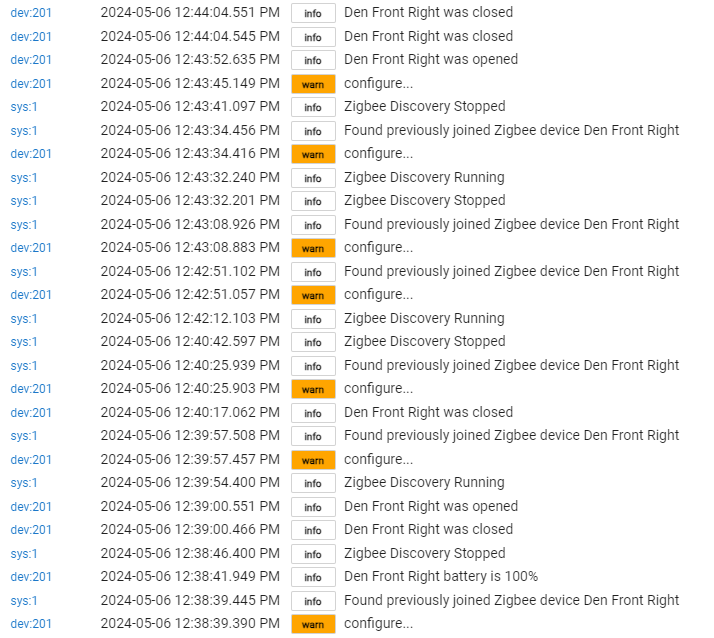
Just as an aside, here are the logs from re-pairing the device:
dev 201 is the contact sensor.
I repaired (12:38:39), tested once and it logged, tested again and nothing. Tested a third time and nothing.
Again, I repaired (12:39:57), and it only logged one time. Additional pairing attempts yielded logs from status changes. Finally at 12:42:43, all logging worked correctly.
Now, I'm sure part of this is me rushing things, or not fully understanding the flow. In the end, I have updated firmware, and the device is communicating correctly.
Good advice about using the configure again after a firmware update. I'll go back and do that now.
Yeah who knows. Maybe the device was quite not ready to accept the “configure” command during re-pairing and missed it.
The good part is you got it sorted 
Im just in the process of swapping out all the old sonoff contact sensors with the 3Real door sensors.
Far superior to sonoff, uses hall effect instead of antique reed switch for detection.
I found that in a pack of four I has some at Firmware MT 1233-D3A2-0000003F and some at Firmware MT 1233-D3A2-00000030.
I hadnt realised that OTA was possible until read this post
I had been getting errors in the log for 000030 even though the open/close was being registered:
error org.codehaus.groovy.runtime.metaclass.MissingMethodExceptionNoStack: No signature of method: genericZigbeeContactNoTemp.checkEventInterval() is applicable for argument types: () values: (method checkEventInterval)
I re-paired , then ran the OTA update which went smoothly.
It now seems to be corrected, so i dont know if it was the update or the re-pair that fixed it.
many thanks Steve for excellent information
How do I know when the Third Reality update has finished? I just updated my vibration sensor from 00000035 to 00000037. The Live Log only has an update at 90% complete, nothing after that. I do see in the Device Info tab that the version has changed, but it seems like there should be a log message that says the update is complete. I don't want to brick it.
There normally is a completion message, no idea why it didn't log. You can try updating again, and if it reports no update available then it completed and the hub just didn't get the completion message.
Out of curiosity, how did you even get the update process to acknowledge?
I'm using the native "Third Reality Vibration Sensor" driver, and I get no response at all (in the logs) when I click the Update Firmware button...
I've tried the update right after waking the sensor up by shaking it too. I've done plenty of zigbee device updates over the years, so I'm pretty confident it's not operator error.
Mine's working great on 1.00.40, so I don't have any burning need to update, but I'm just more curious to figure out why I'm not getting any response.
It appears that 1.00.55 is latest from 3R, though I don't know if Mike actually has that file available for us or not.
Mike, I just assumed it finished since the version number changed. I didn't power-cycle it (by removing the batteries) like I normally would because it's working fine. It took about 25 minutes to do the whole update and it was within 6 feet of the hub the entire time.
I'm also using the native Third Reality Vibration Sensor driver, but my version numbers are very different than yours:
Maybe TR has changed how they do version numbers.
To update I didn't do anything unusual other than what you did, which was to shake the sensor immediately before clicking the Update Firmware button. It seems like you already have a newer version than I do, maybe firmware updates behave differently now.
They show up on live logs for me.
I have 6 of the 3R 3RTHS24BZ units (Temp/Humidity with a display). The driver that slips into place by itself is the Generic Zigbee Temperature/Humidity Sensor. While that driver offers a button that says ‘Update Firmware’, it actually doesn’t trigger anything (or at least seems benign).
Since its a HE provided generic, I didn’t expect it to work so once in a great while I do a quick ‘magic trick’. I create a virtual temp device and ‘replace’ my sensor - this saves the ‘In Use By’.
Then I ‘remove’ the device which excludes it from the Zigbee network.
I open my HomeAssistant, fire it into Pairing mode and add the unit. It automatically updates it’s firmware there.
then I remove it from HA, and re-add it to HE, using the Replace function again.
It’s work, but it does get me past the HE limitations.