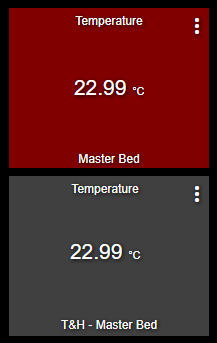
Here is the reason for me fiddling with the Thermostat tile:
div.bottom-0:after {
    visibility: visible;
    position: absolute;
    text-align: center;
    left: 0;
    right: 0;
    bottom: 0;
    white-space: pre-wrap;
}
#tile-13 div div div.heating {
    display: none;
}
#tile-13 div.self-start div {
    display: none;
}
#tile-13 div.self-start::before {
    content: 'Temperature';
    padding: .25rem;
    display: block;
}
#tile-13 div.my-1 {
    display: none !important;
}
#tile-13 div.cooling div.inline-block {
    height: 31.5px;
    overflow: hidden;
    font-size: 21px !important;
}
#tile-13 div.cooling div.inline-block small {
    font-size: 50% !important;
}
#tile-13 div.cooling div.inline-block small:before {
    font-size: 21px !important;
    content: ' ';
}
#tile-13 div.cooling i.he-circle-down, #tile-13 div.cooling i.he-circle-up {
    display: none;
}
#tile-13 div.bottom-0 {
      visibility: hidden;
      white-space: nowrap;
      overflow: unset;
}
#tile-13 div.bottom-0:after {
      content: 'Master Bed';
}
This combined with a virtual thermostat device and a little rule in RM4 and I now have a Temperature tile changing color based on temperature... Not very practical, but fun! If I would use this more, I'd extend my Temperature device driver with the correct capabilities 

