This is the same as entering the hub IP address:8081
It is where you can often access the hub to restart or shutdown if you can't get to it by normal means, since pulling the plug often seems to cause database corruption. It is also where you have to go to do a soft reset.
All of what you have described sounds like weak zigbee mesh. You could try connecting the hub to a long ethernet cable (or wifi adapter I suppose) and placing it in different parts of the house to see if it improves, or you could add a couple of the outlets within 10 feet of the hub and see. I doubt the hub is bad, it's just that ever time you set up the mesh, you will get a different result. It also takes days for things to settle down with devices that work properly. When I had those bulbs the mesh never settled down. It was constantly changing.
So best bet is to add some outlets close to the hub and throughout the house? are the ST ones the best?
Yes
Yes.
Now you know you can get the Ledvance BR30 rgbws $36 for 4 on Amazon, or if you can find the recessed ones cheap even better. They have a much better zigbee chip.
Thanks.... my only issue is replacing 56 lights lol... like 3 or 4 are LEDVANCE and the rest are OSRAM. If I am going to replace them I would prob just go sengled if I am paying to replace all these lights lol. Or just get a zigbee switch and put normal bulbs in would probably be a better option at this point.
whats the best way to look at the mesh to troubleshoot?
http://HubIPAddress/hub/zigbee/getChildAndRouteInfo A superficial look at routing can be seen. There is a way to see the entire mesh, but it is more involved. If you search the forum you will find it.
Thanks... so if the route table is missing entries that means it can't talk to that light right?
Parent child parameters
EzspGetParentChildParametersResponse [childCount=0, parentEui64=0000000000000000, parentNodeId=65535]
Child Data
Neighbor Table Entry
[Den Light 5, 2378], LQI:213, age:3, inCost:5, outCost:7
[Den Light 6, 4188], LQI:249, age:4, inCost:3, outCost:7
[Den Light 1, 692E], LQI:149, age:3, inCost:7, outCost:7
[Den Light 3, 7EEB], LQI:56, age:7, inCost:7, outCost:0
[Den Light 2, 91BE], LQI:220, age:4, inCost:5, outCost:7
[Media Room Light 2, 946C], LQI:241, age:5, inCost:5, outCost:7
[Media Room Light 4, BAFB], LQI:254, age:4, inCost:1, outCost:3
[Media Room Light 1, CAD3], LQI:242, age:4, inCost:5, outCost:7
[Den Light 7, E104], LQI:248, age:4, inCost:3, outCost:7
[Media Room Light 3, EE4C], LQI:223, age:4, inCost:5, outCost:7
[Den Light 4, F64B], LQI:247, age:4, inCost:3, outCost:7
Route Table Entry
status:Active, age:64, routeRecordState:0, concentratorType:None, [Media Room Light 1, CAD3] via [Media Room Light 1, CAD3]
status:Active, age:64, routeRecordState:0, concentratorType:None, [Media Room Light 3, EE4C] via [Media Room Light 4, BAFB]
status:Active, age:64, routeRecordState:0, concentratorType:None, [Media Room Light 4, BAFB] via [Media Room Light 4, BAFB]
status:Active, age:64, routeRecordState:0, concentratorType:None, [Den Light 2, 91BE] via [Den Light 4, F64B]
status:Active, age:64, routeRecordState:0, concentratorType:None, [Den Light 1, 692E] via [Den Light 2, 91BE]
status:Active, age:64, routeRecordState:0, concentratorType:None, [Den Light 3, 7EEB] via [Den Light 2, 91BE]
status:Active, age:64, routeRecordState:0, concentratorType:None, [Den Light 4, F64B] via [Den Light 4, F64B]
status:Active, age:64, routeRecordState:0, concentratorType:None, [Den Light 5, 2378] via [Media Room Light 4, BAFB]
status:Active, age:64, routeRecordState:0, concentratorType:None, [Den Light 6, 4188] via [Den Light 6, 4188]
status:Active, age:64, routeRecordState:0, concentratorType:None, [Den Light 7, E104] via [Media Room Light 4, BAFB]
status:Unused
status:Unused
status:Unused
status:Unused
status:Unused
status:Unused
No. This only shows the devices directly communicating with the hub. I can’t remember exactly what the incost/outcost means, but I do remember that 0 and 7 are numbers you don’t want to see. 0 is unknown link quality or a stale link, 1-7 are link quality ratings with 1 being the best and 7 indicating a bad link. I believe this is what devices use for choosing a route. Also, LQI is link quality indicator and 255 is the best, but I don’t think it’s a metric used by devices from what I’ve read.
Here is mine from my lights hub:
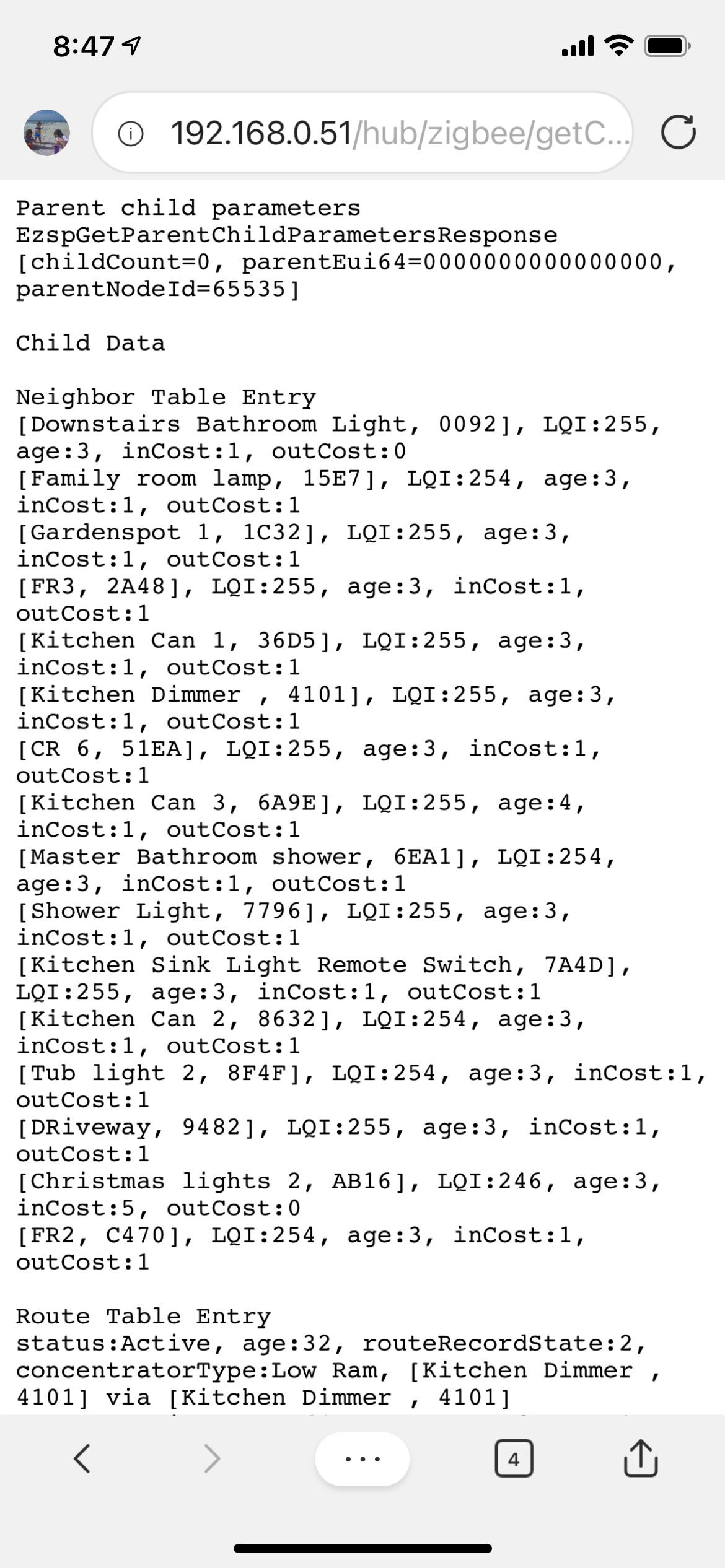
ok thanks... so i have a bunch of "bad" connections to lights which is interesting because the media room lights are literally right by the hub. through 1 wall but like 2-3 feet from the hub. do you think it would help if I buy a good number of ST outlets and put the first by the hub and spread them out on each floor of the house? maybe 3-5 per floor spread out?
Yes, or in wall dimmers. My lights hub has a number of Zigbee dimmers. Maybe see what it looks like with the hub on the other side of the wall.
Bought a bunch of Ikea Repeaters for the new hub and sylvania lights. Seems to be happy so far with all the basement lights I have moved. Fingers crossed this will work.
That being said there is a strange behavior with the LEDVANCE Lights and the Advanced Zigbee RGBW driver. It cannot do blue correctly. The OSRAM bulbs are fine and they work with the driver and blue. However the LEDVANCE ones do at first when you configure them. Then they start blue and transition up to purple purple blue once you turn the off and back on. On the initial configure they work fine. Where is the best place to report this behavior? Figure the dev working on that driver should probably take a look at it?
I ended up changing back to the Generic Zigbee RGBW driver for mine. The group device kept getting out of sync with what the driver reported, which wasn't correct when the group device set the bulbs. The Advanced driver is @mike.maxwell 's creation AFAIK.
Thanks... Hopefully he can fix the advanced driver. I am using it because I hate the bulbs coming on and staying off if there is a power outage.
When you say out of sync... what was it doing/causing? I have noticed a few weird issues like the color and a few lights fading slower when turning on a group (slight popcorn) but nothing major yet. But I would rather switch lights back no if I need to before I get too many moved.
Fix in what respect?, reading the last few posts in this thread, it's not clear what the issue is.
Hopefully Ken can clarify the sync issue but I have noticed weird color behavior with the LEDVANCE lights. They won't stay blue after on off is one of them. The turn on blue transition into purple even tho they should be blue. They are blue right after config button and are the correct color but after power cycle they wont go back to it. I will test more colors and see if there are any other odd things.
What I was seeing, since most of my remaining Ledvance lights are recessed rgbws that are in groups, was that the group device would change an attribute like color temp, but the device driver would not update and vise versa. It really struck me because I've never seen the device driver not update when a device change happened. It's not something I've ever seen with the Generic Zigbee RGBW driver, or any other driver for that matter.
The bulb is in charge of restoring it's previous color state after being command on, this isn't anything a driver does.
In order for the advanced drivers to work in groups, zigbee group messaging must be enabled.
If these bulbs still don't work properly with the advanced, just switch back to the generic. These drivers are not going to work with all bulbs in all situations.
That’s what I did. The Generic driver works perfect. I just thought it was odd.
I will probably switch it back but it just sucks because generic drivers don't remember last power state unless I am missing something? If the power goes out and comes back on while I am sleeping I don't want the 12 lights in my bedroom to come on lol... Any way to avoid this with the generic driver?
Also, with the generic driver does the group messaging still work to avoid the popcorn effect? Or is the advanced driver required for group messaging?
Thanks!