parse: {"kind":"websocket#api","request":{"host":"api.brillion.geappliances.com","method":"POST","path":"/v1/appliance/D828C931C78B/control/home-water-filter-set-mode"},"success":true,"code":400,"body":{"kind":"error","resource":"/v1/appliance/D828C931C78B/control/home-water-filter-set-mode","code":400,"message":"The request could not be understood by the server due to malformed syntax","reason":"Invalid JSON."}}
Can anybody confirm which range hoods are supported by this driver? I would assume the 30" and 36" both around $800 that clearly have WiFi, but probably not the 20" ($380) that only has Chef Connect via bluetooth to a range?
Thanks for that. I tried it and got this error.
parse: {"kind":"websocket#api","id":"D828C931C78B-setErd-0x115F","request":{"host":"api.brillion.geappliances.com","method":"POST","path":"/v1/appliance/D828C931C78B/erd/0x115F"},"success":true,"code":400,"body":{"kind":"error","resource":"/v1/appliance/D828C931C78B/erd/0x115F","code":400,"message":"The request could not be understood by the server due to malformed syntax","reason":"erd is not writable"}}
This driver for Home Assistant does work if that helps
For anyone still following this thread: I forked tomw's SmartHQ integration and have been actively maintaining it. The fork is at GitHub - craigde/hubitat-SmartHQ · GitHub and is installable via HPM (search for "SmartHQ").
Huge thanks to tomw for the original work — the fork inherits all of tomw's appliance support and API reverse-engineering. I'm standing entirely on that foundation.
What's working now that wasn't:
Architecture The integration is now an app + a small child SmartHQ Connector driver + per-appliance child drivers. The app handles credentials, OAuth, and dispatching messages to appliances; the Connector child owns the WebSocket (required because Hubitat only exposes interfaces.webSocket to drivers, not apps); each appliance is a child driver that surfaces capabilities to dashboards and rules.
WebSocket connection no longer fails with NullPointerException: Cannot get property 'webSocket' on null object. The integration now has a tiny SmartHQ Connector child driver that owns the WebSocket; the app spawns it automatically.
Reconnect works after transient failures Previously a generic exception during init would kill the connection permanently.
Login cookie bug fixed A Groovy map literal was silently dropping the region cookie, which caused intermittent login failures.
Dozens of smaller fixes Bounds-checked setpoints, proper timer/schedule cleanup, token-refresh timing, wrapped parse methods so one malformed ERD can't take out a whole device, etc.
What's better for dashboards and automations:
Every appliance driver got a capability cleanup so the common Hubitat use cases work natively without custom rules on string attributes:
"Is X running?" — Oven, Dishwasher, Laundry, Microwave now expose a proper Switch capability derived from their cycle/cook state. "Notify me when the dryer finishes" is a one-liner.
Filter alerts — Refrigerator, Portable AC, Ice Maker, Water Filter, and Dehumidifier all use the standard FilterStatus capability with normal/replace values.
Temperature tiles — Refrigerator and Oven expose TemperatureMeasurement with proper units.
Thermostat mode picker — Portable AC added ThermostatMode alongside the existing thermostat capabilities.
Supported appliances:
Refrigerator · Oven · Dishwasher · Laundry (Washer/Dryer) · Microwave · Portable AC · Home Water Filter · Ice Maker (Opal Nugget) · Range Hood · Dehumidifier (new in 1.0.4, contributed by @Alan_F — thanks Alan!)
Installing / upgrading:
New install: HPM → search for SmartHQ → install. Pick whichever appliance drivers apply to you during the install flow.
Upgrading from tomw's original: install the new package fresh; the old SmartHQ System driver is gone (the architecture changed — see below).
Everything else: open a GitHub issue at craigde/hubitat-SmartHQ — happy to fix things.
Roadmap (planned for future versions) is tracked in ROADMAP.md in the repo. Next big piece is Phase 2: per-door ContactSensor child devices on the fridge, child Light devices for hood and ice maker lights, per-cavity Switches on dual ovens.
If interested I have added the rinse agent status to the dishwasher driver. Not sure if it is the same for all dishwashers. In my initial research I read that the value retuned would be 1 through 4. 1 being empty, 2, 3, and 4 Lo Medium Hi respectively.
On my dishwasher it returns 4 when rinse agent is good at the end of a cycle before you open the door. Once you open the door it goes to 0 and stays.
Once the rinse agent is low, it changes to 6 before the door is opened at the end of a cycle, and goes to 2 after the door is opened and stays at 2. The SmartHQ IPhone app only says good or add, it never indicates any level changes. So I assume that is a property of the dishwasher. I have a GE profile dishwasher model PDT775SYNFS from 2022 or 2023
I have only just made the modification and it only gone through one cycle of filling and running out the agent. I am also still using the original dishwasher driver from tomw. Only saw there was this update recently. I will try to switch to the new app sometime soon.
Don't know anything about forks and what kind of stuff you can do in github. If you want the code I can send it or post it here.
@craigde Heads up - GE/Brillion has made a change to the login process that is going to break everyone’s connection the next time the app tries to reauthenticate. I found this because I connect both via HE and HA, and my HA connection broke first.
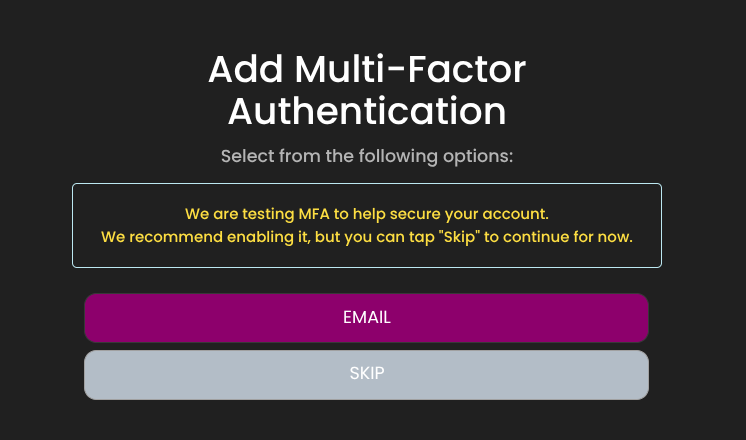
The issue seems to be that they added a step to the login process. If you login via the website you get this after entering your username and password:
Skipping is not persistent, so even if you skip, you get prompted again on the next login. I’ve already emailed support to ask them to rethink this process and asked if they would consider making the skip set a flag on the account so subsequent logins would not hit this prompt.
I don’t want to activate MFA right now since my HE integration is still working, so I don’t know what they logon process will look like with MFA enabled. From looking at my account settings, it looks like it would send me an email with the code. Going forward, if they don’t implement a token system for integrations or allow users to opt out of MFA, this is going to be a pain as it will require manual intervention every time the app needs to reauth.
Looks like they reverted the change. You can now log in via the web and not get the MFA prompt, and the HA integration is working again. Hopefully when they want to encourage people to adopt MFA in the future they won’t do it in a way that breaks the login process again.
Thanks for the detailed report — that error was enough to pin it down.
What was happening: the crash (ArrayIndexOutOfBoundsException: Index 1 out of bounds for length 1) was in the part of the login code that parses GE's OAuth redirect after a successful username/password submit. GE changed that redirect to include an empty-valued parameter (something like scope=), and the old parser didn't handle a parameter with no value.
This code runs: only on a full re-authentication. As long as the integration can refresh its existing token, it never touches this path. Anyone else whose token is still refreshing cleanly won't have noticed yet, but they'd hit the same issue on their next full login.
The fix (v1.0.5):
The redirect parser now tolerates empty/valueless parameters, so login completes normally.
As a bonus, if login ever doesn't return a valid code (an MFA prompt like the one we saw a couple weeks ago, bad credentials, or another flow change), the app now logs a clear reason and shows it on the app's config page instead of just silently retrying forever. So if GE breaks something again, you'll get an actionable message rather than a mystery.
To get updated: once 1.0.5 is live on main, Hubitat Package Manager will show it under Package Manager → Update. Updating the SmartHQ app is all that's needed — no library/bundle reinstall. After updating, the integration will re-auth cleanly on its next cycle and devices should start updating again.
Still no luck for me. It looks like they turned on the ‘we are testing MFA’ step again.
I worked with Claude to make it work with the MFA nag screen. I forked your code and did a pull request with the modified smartHQ_app
I also sent support another email asking them to consider third-party integrations when making changes to their logon process. Maybe they’ll remove the nag screen again.
The auto-generated name for the PR is “Refactor get_authorization_code with MFA support#12” but it really doesn’t add MFA support, it just adds support for bypassing the MFA testing prompt.
@craigde Finally got around to updating to your version and all seems to be working.
One question, however, with the original I had setup a rule to send an initialize to the SmartHQ device if I detected no activity on any of my appliances in a 12 hour period. Occasionally the driver seemed to lose it's connection and sending the initialize would get it going again. I can't seem to do that with this version. The SmartHQ connector has a initialize attribute but it has not set capability so you can't select it in a rule to run the initialize with a custom action. Perhaps your driver takes care of that better than the old?
I also added my rinse agent code to your dishwasher driver and that seems to work for me as well. FYI