I am unable to get the snzb-06p to work as a presence sensor. it only shows it at a motion sensor. The reason I bought it was to be able to detect presence instead of motion.
Any advise?
thank you
I am unable to get the snzb-06p to work as a presence sensor. it only shows it at a motion sensor. The reason I bought it was to be able to detect presence instead of motion.
Any advise?
thank you
I am assuming you are referring to the Sonoff “presence” sensor. If so like all other marketed “presence “ sensors other than Aqara FP300 the state you will get shown is motion. For two reasons….
(1) The sensor is truly reading motion. Presence is just a marketing term for someone being in the room for an extended period of time as you know but the sensor is really reading motion. It can only sense someone there by them moving even if it is micro movements like breathing. Since this is the actual case the sensor state is called motion. Motion will always be active if someone is in the room or area so you should build your rooms with that mindset and use the state of motion for your triggers or action. It will work exactly the same.
(2). “Presence” in hub language (same for Home Assistant “ as well) is reserved for if someone is inside a geofence area or has left that geofence area. Such as did you arrive home and now at home or did you leave home. So are you “present “ at home or not “present “. This is the premise behind presence in writing rules.
I know with the sensor names that makes it a little counterintuitive but if you will remember it that way and build your rules in accordance it will work fine.
As for the sensor I had one of those when they first came out but at the time they were too powerful and were not tunable enough so I returned it. I hope that things have progressed since then as the one I had was picking people up through walls and there was nothing I could do about it.
If you are dead set on not using motion state then the Apara FP300 has the PIR and mmWave sensor built in the same unit. Yours just has mmWave if it is the sensor I am suspecting. The community drivers in HPM has both a PIR Detection and Room Occupancy state however both those states are used to populate the motion state and again most people only use the motion state in their rules.
I agree this is all semantics in the marketing. The idea of room human presence is a thing, but that is just deduced by motion. Motion in the room that is detected by mmWave does not necessarily indicate any human presence, it could just be a houseplant moving from a fan, or a pet. That is strictly motion detection, the device itself is not determining the presence of anyone, only reporting motion in the room.
For Geofence, the underlying cause of being present in the house is your phone physically being present in the fence boundary. That is very specific to a person's device being reported as present in an area, not some unknown thing that is being sensed by motion detection.
Occupancy, which is really what we are looking for, is the count of humans in a space. While not a Hubitat capability attribute, some mmWave sensors tell you the number of unique moving objects in a space as an occupancy count, which we interpret as the number of humans present, but it is still just motion detection.
Sonoff calls it presence, but Hubitat already had a definition for presence that means something else.
These mmWave sensors still serve mostly the same purpose as older PIR “motion” sensors, and that’s how Hubitat treats them.
Since it essentially detects both room occupancy and motion, Hubitat calls it a motion sensor.
As @LearningHubitat mentioned, driver development can get trickier for devices that have both a mmWave and a PIR sensor. Those devices can distinguish between occupancy and motion, so the hub has to handle that differently for these devices to work optimally for automations.
For those devices that report separately for the two sensors. I tested a battery powered Tuya mmWave/PIR sensor under zigbee2mqtt about a year ago. As best I can remember, it did not distinguish between mmWave and PIR. They both reported as occupancy under z2m.
Thank you for the reply.
I was using a smartthings motion sensor. I was having the following issue:
1- when you enter the room, the motion sensor detected motion, and It turned the light on.
2-the light was supposed to stay on, until no motion was detected, then after waiting 2 min, I will turn off.
If I stayed still, the light will turned off, so I had to move in order to turn it on.
Sometimes after several on/off triggers, the light will just stay off (very annoying).
I am using webcore and logic was ;
If kitchen motion sensor detect motion
Then turn light on
Else If motion sensor changes to no motion
Wait 5 minutes
Then turn off
The purspose I got the sonoff presence/motion sensor, was hoping it would help with the above issue, but since hubitat doesn't recognize it as a presence sensor, then there is no point to have it. They make a cheaper version, with just motion sensor, but I am assuming it would be the same issue as just having the smartthings motion sensor.
Advise?
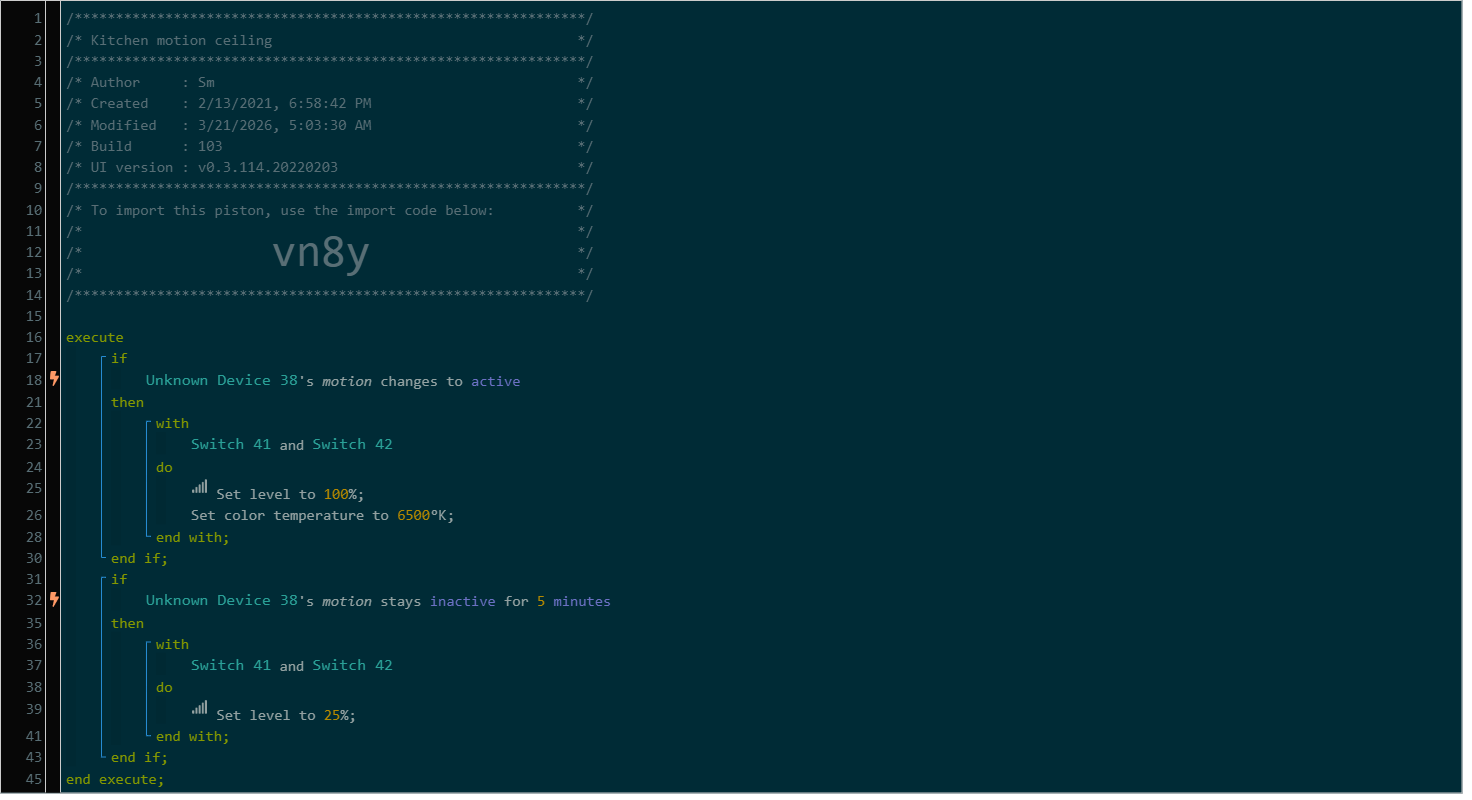
Is the 5-minute waiting timer cancelabe? Maybe if you publish your webCore pistol it will become more clear whether the problem is there.
The 5 minutes timer must be cancelled every time the sensor reports ‘motion active’
You can also try the HE inbuilt ‘Room Lighting’ app, it has the right logic incorporated.
No, you can use the Sonoff in the same logic as you are doing now. I have rules written the same way. Here is a rough sketch of how I wrote my rules using a PIR and an mmWave sensor. I still like the PIR for the initial turning on of the lights as they are usually a little quicker for the initial motion detection.
I don’t know your naming logic so I will use the manufacturer name to identify the sensor.
Trigger:
If Smart Things Motion Sensor OR Sonoff SNZB-06P detects motion.
Action:
Even though you are using the motion state with the Sonoff sensor it will work exactly as you want. Just a note I put both sensor in as possible triggers so that if I leave the room and the light goes off, if for some reason the PIR sensor is still active or is in the cool down period the light will still turn back on if I have to turn around and almost immediately go back in the room.
The sensor is designed as long as you are in the room and making micro movements then the sensor will send a report back to the hub saying something is in here so the hub will report it as motion and the lights will always stay on. Then when you leave and there is no more micro movement the sensor will say to the hub ok there is nothing moving anymore so nothing is here. Then the hub will report motion as inactive. Not exactly that way, but a good visual.
Please keep in mind to not point the sensor at fans, curtains that can blow around, or anything that may move. This goes for almost all “presence” sensors as they all detect micro movement.
The only reason you would need to return the sensor is if it is too sensitive for what you need and giving false detections due for one reason or another.
Also, you are correct the 03P that is just motion (PIR) will do the same thing as your current sensor. I use these exact sensor all through the house as my PIR sensor as shown above. I really like them for that purpose.
I'm using this device for that exact purpose and it has been working, almost too well. I live in a condo and it was picking up a neighbor through the wall. I thought I was getting false positives before I figured it out. I had to move it about 5 feet away from the wall. It was picking them up from the "back" of the device.
I'm using this driver [BETA] Tuya Zigbee mmWave Sensors with the "Sonoff SNZB-06P Radar" profile. I had to turn the sensitivity to it's lowest. Our distance from the device ranges from 2 to 6 feet. I'm using Rule machine and similar logic to what's above.
I had the same issue. I was picking people up through walls in neighboring rooms and the hallway which was behind the sensor. I just couldn’t tune it down enough to work.
I had originally put foil on the back of the device but I actually use the fact that it reaches out a little bit in all directions. Mine is mounted underneath a kitchen counter that separates it from the dining area. I have a light that is tripped if you approach the counter from the dining area. It's reaching out sideways and backwards through a sheet rock wall out to about 3 or 4 feet on it's lowest setting.
Ok so I wasn't crazy when I tried using a toilet paper roll lined with aluminum. I had to keep the backside clear or it would have zigbee dropouts.
thank you.
1- when you enter the room, the motion sensor detected motion, and It turned the light on.
2-the light was supposed to stay on, until no motion was detected, then after waiting 2 min, I will turn off.
If I stayed still, the light will turned off, so I had to move in order to turn it on.
Sometimes after several on/off triggers, the light will just stay off (very annoying).
I am using webcore and logic was ;
If kitchen motion sensor detect motion
Then turn light on
Else If motion sensor changes to no motion
Wait 5 minutes
Then turn off
The purspose I got the sonoff presence/motion sensor, was hoping it would help with the above issue, but since hubitat doesn't recognize it as a presence sensor, then there is no point to have it. They make a cheaper version, with just motion sensor, but I am assuming it would be the same issue as just having the smartthings motion sensor.
Motion and presence on the Sonoff sensor is the same thing. Presence is just a marketing term. If you are in the room the Sonoff will read motion active even if you are sitting still. It will literally see your chest move from breathing and register it as motion.
The term Presence is reserved in Hubitat as a term for being inside a specific geolocation. Home assistant uses presence in the same way as Hubitat.
Don’t get hung up on the term of presence and write your rule for the light to turn off if the Sonoff shows motion inactive and you will get what you want.
The Sonoff motion will not go inactive with you sitting still like your PIR sensor does.
Download the Hubitat app