Sleep/awake should be untethered from Modes

I've been struggling with some code changes I'm making as I try to improve my Mode Manager Advanced application. It revolves around the distinction of something I recognized 3 yrs ago - that Modes are confused. Under the old model (which still exists today) I inherently recognized that there were Periods, there was a home/away state for presence and there was an awake / sleep. (at least in my world). Since I don't go to sleep at a specific point in time, it is an override in my case to Periods. But HE does not show a distinction. After a very long back in forth with 2 AI's. This was the clearest explanation I could get. I recognize that I'm doing me, but I do believe that this affects anyone. It begins with HE calling it location.mode and then down the rabbit hole I go.

"You hit the nail on the head. The ambiguity you are sensing comes directly from a terminology and architectural collision between standard Hubitat terminology and how custom state managers model home automation.

Here is a breakdown of the definitions, why the naming creates friction, and how to conceptually structure them cleanly.

1. Hubitat Naming vs. What They Actually Mean

  • "Location Mode" (Hubitat Core Term):

    • In Hubitat’s platform design, there is a global system variable literally called location.mode. Hubitat uses the word "Location" here simply to mean "the state of this hub location," not geographical GPS location.

    • Hubitat allows location.mode to be set to arbitrary strings like Day, Night, Away, or Sleeping. This global value is what standard Hubitat rules use to drive light levels, motion sensitivity, and security profiles.

  • "Presence" (Geographic Location):

    • This is whether you are physically Home or Away at your house's geographic location.
  • "Sleep State" (Physiological/Behavioral State):

    • This is whether you are Awake or Sleeping.

2. The Model Conflict in Custom Apps

In a traditional setup, Location Mode acts as a single, multi-purpose status bucket that mixes three separate dimensions:

Dimension Real-World Concept Possible Values
Geographic Presence

Home, Away

Temporal Daily Time Period Schedule

Early Morning, Morning, Day, Evening, Late Evening, Wee Hours

Behavioral Sleep State

Awake, Sleeping

Because Hubitat only provides one global location.mode variable, Mode Manager Advanced has to collapse all three dimensions into that single variable.

That is why Sleeping gets treated as a "Location Mode" value in Hubitat—it overrides the temporal schedule (e.g., Morning) while you are Home."

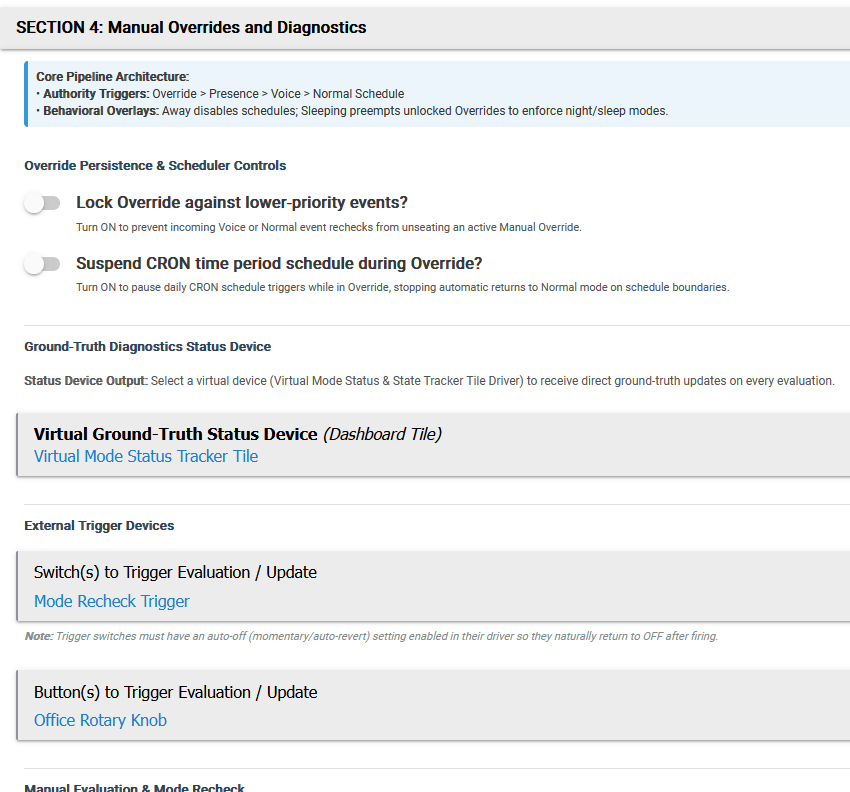
What is happening is I want to track reasons. I have 4 reasons for a mode change. Voice, Presense, Override, Normal (Period Scheduled). Transitioning between voice and normal causes logic problems with my state management. I feel Hubitat should review and expand on how this is handled fundamentally.
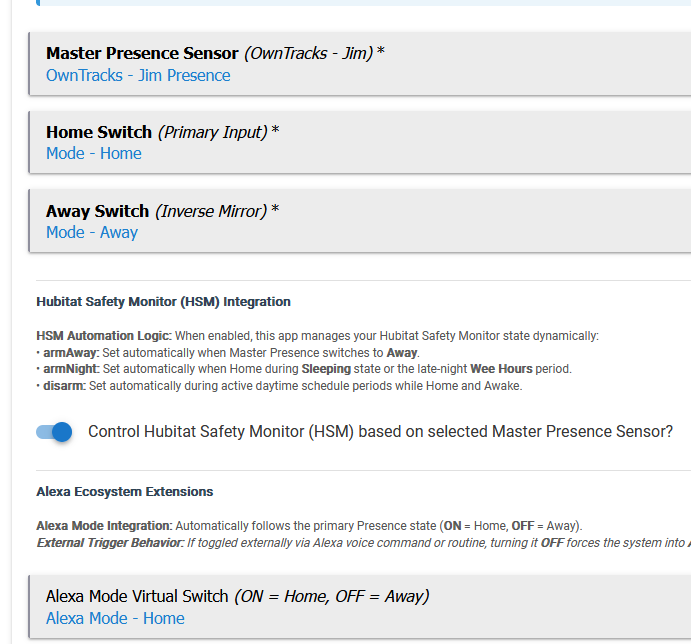
I functionally have another one where automations are different: Guests Present.

Because of all this, I only use built-in modes for time-of-day, and other controls (virtual switches) for Guests Present, Away, etc.

That is so Huge! I forget how much pain I dealt with when my GF lived with me. Years back I used brians FollowMe app. I could get it working pretty well for tracking myself, but as soon as I introduced a different body into the equation, it was untenable! (And lets not also forget, Dogs. Cats.)
This really adds to a discussion of PIR sensors - being able to detect WHICH human is in a room. I just don't think we're there on that one! But point made, Modes have yet another factor - Entity (sounds like star trek). So Jim could be Sleeping but Uhura could be Away, while Bones is working in the lab ... shakes head what a rabbit hole thats going to be. RFID chips under skin any one?

Because significant changes like that would likely be a "breaking" change, it seems like some other way to address it than changing the existing modes would be the only safe way to go about it.

In the mean time, look at setting up a Hub Variable(s) (or virtual switches) with the values you want split apart and use those instead of the modes.

This 100% depends on how you define sleeping, how you set it up in your hub, and what you want to accomplish with it.

I actually had a sleep number bed that could detect presence (on each side individually). When Both my wife and I were "present," I could have had it change a mode. I actually just used it for conditionals in rules. I just used a conditional that prevented speaker announcements and automatic lights if either of us were detected as present. However, I could have just as easily set up a switch to change the mode based on our (individual or combined) "presence" in the bed.

It is super easy to set up modes that overide times, I do this with several modes already. Some of them are treated as away, others are not. Some of them automatically resume the time based schedule, some require me to flip a switch (this is where using a virtual switch on our bed sensors would have come in handy).

Not sure what you are trying to do, but I am pretty sure you could do it with the existing mode manager and a little bit of logic/thought.

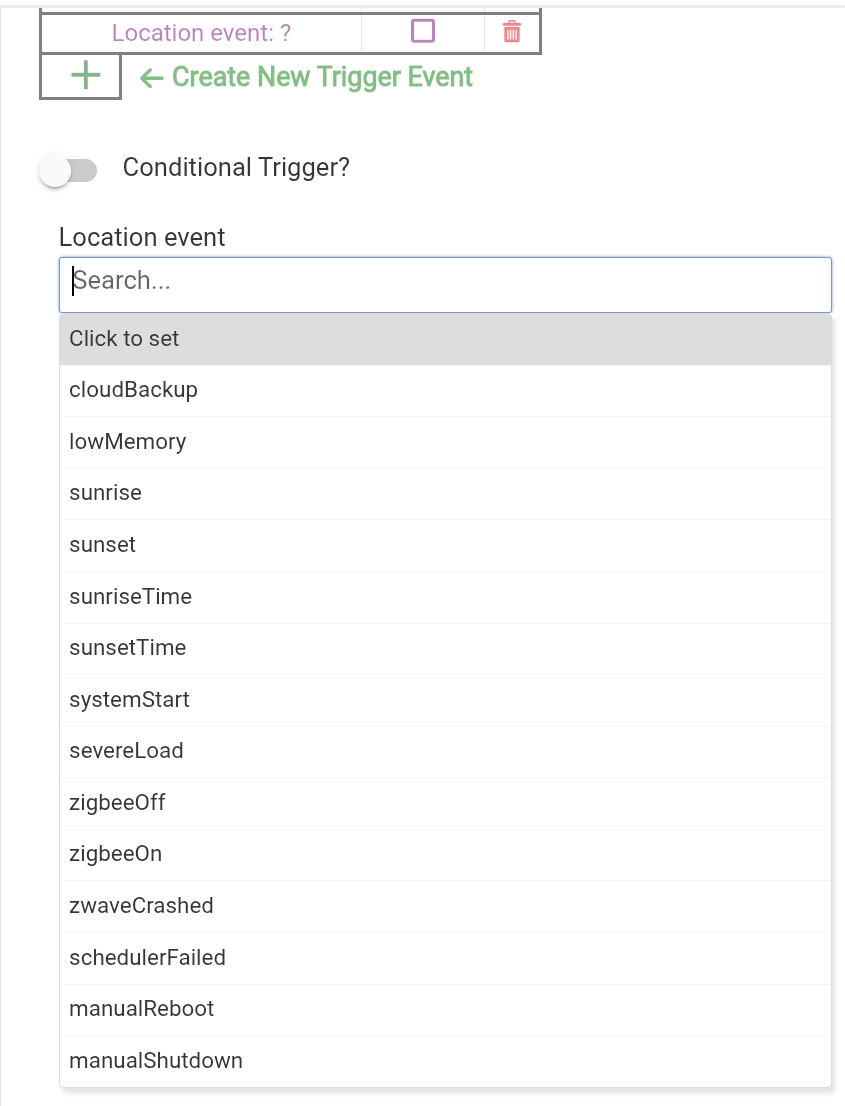
I would not get too hung up on "location" as the part of the naming convention. It just means "this hub". Notice the other events that are tied to "location". Not all are even closely related to a geographic location - rather a specific hub device, which many (if not most) name based on their location.

System Start
CloudBackup
Manual Reboot

List of Location Events available to RM

@rob9 - breaking change. Thats what troubles me the most. My gut says its just kicking the can instead of addressing. But I'm a user not a dev so this point is moot. I do feel this is bug creep - a design flaw thats being worked around and will forever be there - but as I see in the discussions, there are options to handling it - hub variables, rules upon rules.

Separately - I can see how important smart beds can get - knowing who has gone to bed is going to be a critical item for me at some point. I've never considered a bed sensor but that has it's own problems! My kids would flop on a bed for a phone call etc... causing a sleep state if it's just a glorified contact sensor. hmm. how does one really know its sleep time vs. snacking and tv watching from the bed? Contact sensors on the eyelids?!?! HAHAHAHahahaha

Yeah, it gets tricky accounting for all the circumstances.

I live by myself, so it's a bit easier. Still, I have a button by my need that I tap when it's time to go to sleep. It's tied into my Ring Alarm, so it arms the system then when I disarm it, the system knows I'm awake.

@rob9 Do you use HSM? how does it tie into modes for you? does it integrate to the Ring Alarm?
I implemented a generic subscription - I don't have any ring devices - but I do have a substantial camera implementation and a smart doorbell - not that it has much to do with my modes.
Here's a snippet:

I also implemented a tile to show 'truth' at the atomic level

How do you 'see' your status? a Tile or notification to a device? Are you implementing both text and voice?

I tie HSM to my Ring through Rule Manager "rules".

They don't line up directly to Ring, so I use a bit of logic to map between HSM's "night" and "home" <> Ring's "armed stay".

I use those and not the built-in modes.

I don't use hub mode for anything. I would use it for home/away, but I really have no use for that status.

I don't like hub modes because I use room modes for every room, not a house "mode". I consider modes "scenes", and not every room has the same lighting scenes through the day, nor do they change at the same time or for the same reasons. Bedroom has a sleep mode, the front only has a night mode.

A hub variable can work for this with rules to change it, but I just use a scene controller app I wrote for each house area, and a virtual child device, to control all the scenes and motion statuses for individual rooms of that area. (Front, Back, and Basement are my house Areas).

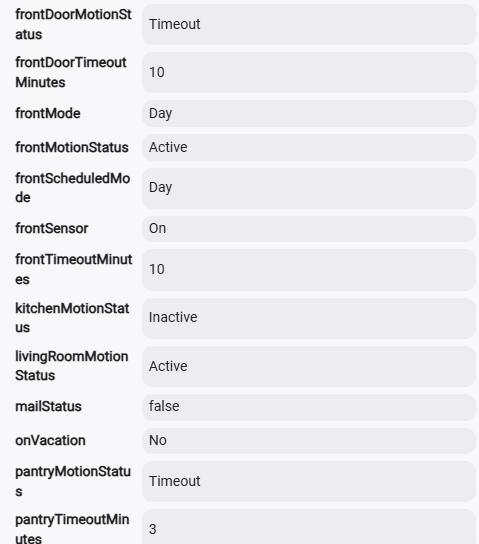
My front area is an open-concept living room, dining, kitchen, entryway, along with a pantry. These rooms all share a "front mode", but lights are controlled by multiple area sensors to determine if they turn on to that scene or not based on motion presence. So living room can be dark while kitchen lights are on, if people are only in the kitchen, even though they share the mode and it is all one big room.

I also use Active, Inactive, and Timeout. I don't have the sensors control when the lights turn off directly based on inactive. The sensors set an "Inactive" state when they go inactive, and the lights go off based on the timeout minutes set for that room for how long the sensor stays Inactive before it times out and turns off the lights.

I do have a Front Motion Status, that represents if any of the areas are active or if all areas are inactive.

In the Front area app, I have sensors for Front Door Outside (camera detected motion), Entry/Stairs PIR, Pantry PIR, Kitchen Sink PIR, Kitchen mmWave, Dining Room mmWave, and Living Room mmWave. Kitchen Sink turns on directly from the PIR sensor, but level is still defined for whatever Front scene is active.

Example: